

Get default colour scheme on border
-
Hi,
I have managed to figure out how to add a border to an image on my about page but I don’t know the colour code for this theme so it doesn’t match. Any help would be appreciated :)The blog I need help with is: (visible only to logged in users)
-
Hi there,
Would you please make your site public? We are volunteer can’t help you if your site is private.
Thank you.
-
The teal accent colour is
#1c7c7c.If you’d like to add borders to some images without having to repeat the code each time, you can give the image a class like “myimg” by adding it to the image’s other classes, like this, for example:
<img class="myimg aligncenter wp-image-160" src="https://thesightinthestorm.files.wordpress.com/2017/02/16002844_10154403805748282_1585577382284267316_n1.jpg" alt="16002844_10154403805748282_1585577382284267316_n" width="370" height="370" />…and then add this to your custom CSS panel in the Customizer:
.myimg {
   border: 20px solid #1c7c7c;
}
Doing it this way means that if you’d like to change the width or colour on all your images at once later, you can do it easily in the CSS without having to edit each image one at at time.
-
Hi Kathryn, sorry I wasn’t clear enough. I was after the grey, the green is too harsh. I know I could choose a different colour but it makes the cursor hovering brighter and easier to see. Could you pls tell me how to add an image class? I’ve never done that before. Thanks for your help so far!
-
There are two ways to add an image class.
1. Flip to the HTML editor and add it manually, or
2. Use the image editor in the WP Admin dashboard. Click “Advanced Options” and add the class name in the “Image CSS Class” field. You’ll want to remove any other border styles at the same time.
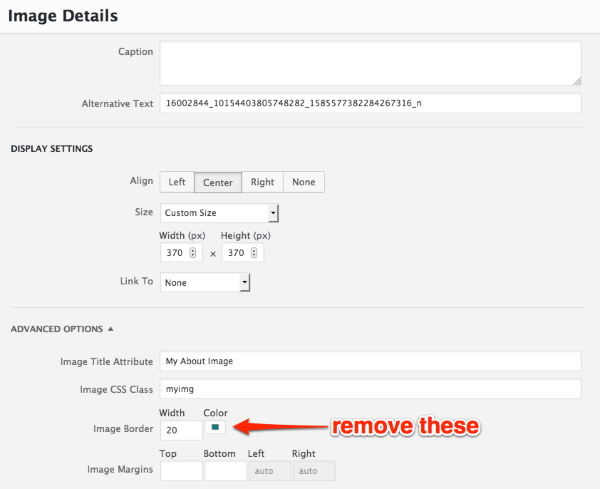
Let me know know it goes.
-
Hi Kathryn, for some reason the image class didn’t work but thats ok. I deleted the teal and found the code for the grey. Thank you for your help :)
-
Hey there,
The reason the class isn’t currently working is that you have this entire image tag in the “class” field:
<img class="myimg src="https://thesightinthestorm.files.wordpress.com/2017/02/16002844_10154403805748282_1585577382284267316_n1.jpg" alt="16002844_10154403805748282_1585577382284267316_n" width="370" height="370" />Instead of just
myimgor whatever you choose as your class name.Glad you’re set in any case, but if you’d ever like to fix the issue, this is the culprit.


- The topic ‘Get default colour scheme on border’ is closed to new replies.
 WordPress.com Forums