get images to work when publicized to Facebook page
-
Pubicize is working great to auto post my blog to my facebook fan page but the images do not show up. All I get is a thin line down the side of my post.
The blog I need help with is: (visible only to logged in users)
-
-
We have several authors that I do not want to connect to facebook through publicize until we make sure it is working properly. I have posted a test blog under my admin account to
http://www.facebook.com/HowManyDrinks called “I’m a lttle drunk”. You can see how it shows up with the line to the left. The link to the blog no longer works because I had to set back to the original author and repost.
Blog address:
http://www.howmanydrinks.org -
And can you give us a specific example of a post where the picture does not show?
(Please, not the entire website, just a specific post).
-
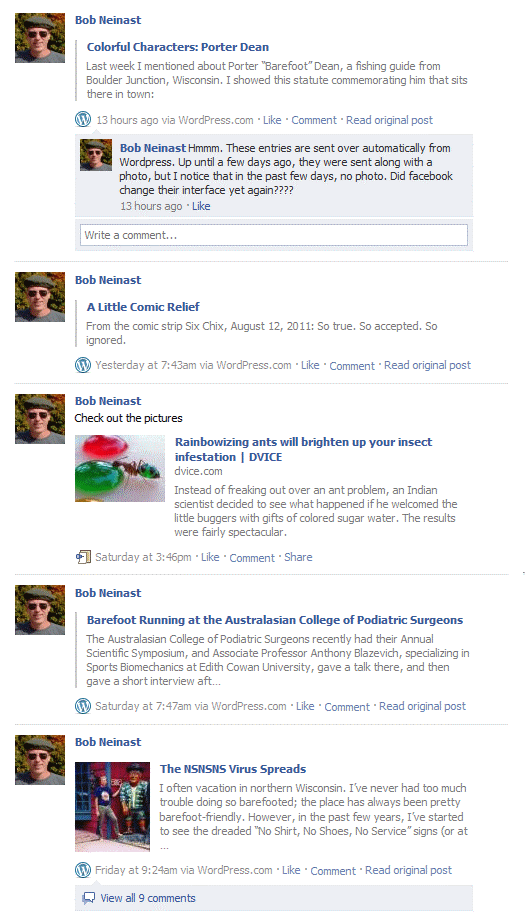
I thought I’d done so by pointing you to my facebook wall. Ok, let me be more explicit. My blog is Ahcuah. I have placed a screen capture of my facebook wall here. As you can see, no pictures appear on the facebook page with “Colorful Characters: Porter Dean” or “A Little Comic Relief”. (“Barefoot Running at the Australasian College of Podiatric Surgeons” does not have a picture in it, so it is ok that the facebook page has no picture.) The last time I had a picture appear on the facebook page is last Friday, with “The NSNSNS Virus Spreads” (which is the last one on the screen capture).
Hope this helps.
-
I just want to let you know that a picture did appear on facebook this morning when my blog post of this morning got forwarded there. So if you fixed something, it worked!


- The topic ‘get images to work when publicized to Facebook page’ is closed to new replies.
 WordPress.com Forums