

Getting featured images to show on homepage
-
Hello,
I am using the Goran theme, I have my featured pages on my home page and all the posts have featured images that I have set for them but they are not showing up on the home page.
The support page for featured images said that some themes only allow a certain size image to be used and to look at the themes info about it, but I can’t find anything about featured images on the Goran themes description other than the fact that featured images for pages will automatically show up on the home page.
Any help would be appriciated.
Thanks
MelzieThe blog I need help with is: (visible only to logged in users)
-
Hi Melzie, I think the problem is that you’ve selected “Blog” for your featured page in the Customizer, instead of an actual static page, as you can see here:
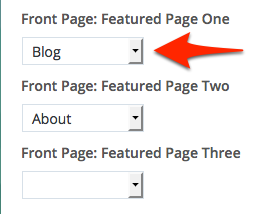
If you select a static page (i.e. any other page besides the “Blog” placeholder page) its featured image should be displayed.
Let me know if that does the trick.
-
Ok so for the blog posts an image wont be featured on the home page ever?
I managed to get my featured image up for my about page by changing the photo and publishing it. So even if I publish new blog posts the featured pic still wont show?
Thanks
Melzie -
“Blog” isn’t a real page, so no, it won’t display featured images on your front page if you keep your settings as they are currently.
“Blog” is just a placeholder page, not a real static page with its own content. The theme’s “featured page” areas are designed to pull in the featured image on a static page only, not posts.
-
If you’d like to display recent posts on the homepage, you could try the Display WordPress Posts widget in one of the front-page widget areas, with the featured-image option selected:
Let me know how it goes.
-
-


- The topic ‘Getting featured images to show on homepage’ is closed to new replies.
 WordPress.com Forums