

Glichy HARMONIC theme
-
Hi there — page mapping with this theme is not clear. The scrolling feature works only from the landing page, otherwise pages aren’t matching up with nav bar items, (IE. posts appear over the NEWS page only when scrolling down; not when you click NEWS from the header). Anyone with this experience? Thanks
The blog I need help with is: (visible only to logged in users)
-
Hi there, you’ll need to select a Posts page for your posts to appear on.
In the WP Admin dashboard Head under Settings > Reading and select “News” as your Posts page under the dropdown list.
Or in the Customizer, head to the Static Front page section and do the same there.
Let me know how it goes.
-
Thank you!
I’ve done that, but items in nav bar items are still taking me away from the scrolling/static pages.
Where is the hook-up for nav bar buttons in the header, and footer?
-
but items in nav bar items are still taking me away from the scrolling/static pages.
The top menu links to the three pages you’ve set up in your custom menu, namely your About page, News page (your blog posts), and the Homepage.
The footer menu automatically links to the sections you’ve opted to appear on your frontpage, as you can see on the demo:
https://harmonicdemo.wordpress.com/
It’s not possible to add a custom menu to the footer in Harmonic, the menu is generated automatically.
Harmonic comes with a third menu for Social Links, which are displayed at the top left, just after your site title, as you can see on the demo. You can learn how to set it up here.
-
No — the News page in the top menu isn’t linking to my blog posts (the News page).
And the Contact item in the footer menu does not link to the Contact page in that page in my dashboard.
There may be glitches with Widgets in this theme also — I’ve added them to the Contact page but they’re showing up with all pages.
Hope you can help!! maybe there’s something with synching Classic and new dashboard styles?
Thanks
-
No — the News page in the top menu isn’t linking to my blog posts (the News page).
While you’ve set up the News link to go here:
https://subtlertelevision.wordpress.com/news/
– that page doesn’t actually exist, so WordPress chooses the page with the closest URL, which is your posts page here:
https://subtlertelevision.wordpress.com/news-2/
What page do you expect it to be going to instead?
If you want “news” as your page slug instead of “news-2” you can do that:
1. Empty your trash, where the original News page exists
2. Rename the slug from “news-2” to “news” -
And the Contact item in the footer menu does not link to the Contact page in that page in my dashboard.
Although you opted in the Customizer to use the word “Contact” for the wording in your footer menu that links to your Page section, there is nothing actually connecting your real Contact page to this menu item – that’s where the confusion comes from. The wording you may add in the Customizer is arbitrary – it doesn’t link up any particular page to that menu item.
The “Page” section in the Customizer will always display the page content of the page you’ve selected as your front page, which in your case is the page called “Home.” That’s why you’re seeing the Home page’s content in the front page.
There isn’t a way to bring your separate Contact page to the Page panel in Harmonic. One workaround would be to move the content on your current Contact page and move it to your Home page instead.
You can learn more about Harmonic’s front-page setup here – it might help clarify things:
-
There may be glitches with Widgets in this theme also — I’ve added them to the Contact page but they’re showing up with all pages.
By default, widgets are displayed on every page and/or post that includes that widget area. This is the same with any theme, and it’s the same on both WordPress.com or self-hosted sites.
If you’d like to restrict widgets to appear only on a particular page, you can use the Widget Visibility feature:
If you need further help with widgets, just let me know.
-
Ah, now I see that you’ve already figured out how to use Widget Visibility to restrict the contact info widget to only the Contact page.
If you’re seeing that widget displayed on other pages or posts, could you provide a link so I can take a look? I spot-checked but am not seeing it anywhere else so far. Thanks!
-
omg! yes ok of course, i can see that now.
i’m trying to set up a top nav bar with About, News, and Practice (the portfolio) pages; the footer with just Journal, Social, and Contact.
The demo is really beautiful — I love the horizontal layout of the Contact page, and that top and bottom nav items circle back: About=Contact, News=Journal — Can a page linking to the Portfolio appear between the News and Contact pages right from the front?
Thank You
-
i’m trying to set up a top nav bar with About, News, and Practice (the portfolio) pages; the footer with just Journal, Social, and Contact.
The bottom footer isn’t designed to be a footer that goes to specific pages on your site, as I mentioned – it can only take you to the sections that the Harmonic front page supports, as I mentioned above.
Can a page linking to the Portfolio appear between the News and Contact pages right from the front?
The front page does support a Portfolio section, if you’ve added portfolio projects to your site and have not opted to hide that section via the Customizer. The Portfolio section will appear last on the front page, it’s not possible to change that order.
-
okay awesome that makes total sense —
i’m reading up on the Portfolio section now… here’s the link to the Contact page, https://subtlertelevision.wordpress.com/contact/
the widgets are checked in the customizer but the page isn’t showing location data -
I’m seeing the contact info widget in the left sidebar, but Google Maps doesn’t know how to parse the address you’ve entered so it’s displaying the default location:
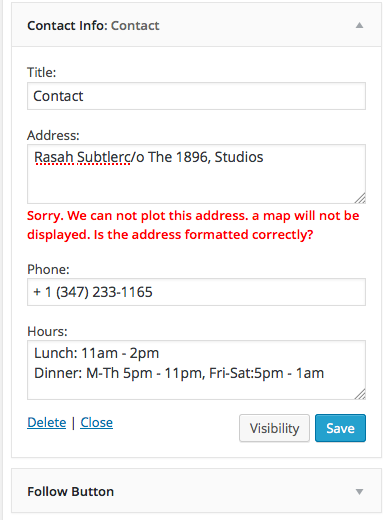
You’ll need to enter an address that Google Maps understands. Try finding it first at http://maps.google.com/ and then copying over the exact address into the map widget.
-
no… i’m not seeing that.
are you looking at the contact page here:
https://subtlertelevision.wordpress.com/contact/
or on the front page, here:
-
I went to this page and scrolled down:
https://subtlertelevision.wordpress.com/contact/
Screenshot:
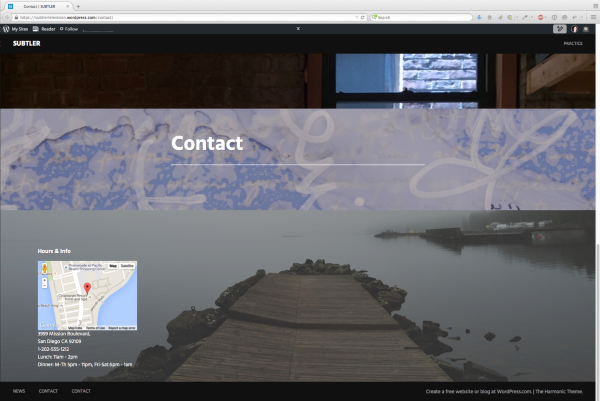
It looks like you’ve set the Contact page to use the Front Page template and that’s confusing things. I’d suggest you choose the Default template instead, to see the expected results.
-
done and nope!, triple-checked.
anything more i can try for that glitchy page ??
the Contact item in the footer menu is still somehow connecting to a page titled “Home”, but i’ve cleared that in the WPAdmin; Customizer, and trash. so far i’d have to say this theme is inflexible, not friendly, and not as advertised demos.
keeping the portfolio off the front page is rad, doable — exclusive top nav bar visibility for practice pages works great for me!
excited.
thanks so much -
The contact form is still set to use the Front Page template. You can go there directly by clicking this link:
https://subtlertelevision.wordpress.com/wp-admin/post.php?post=35&action=edit
Here’s where it needs to be changed to Default:

There’s a similar place to change it in the new editor.
the Contact item in the footer menu is still somehow connecting to a page titled “Home”, but i’ve cleared that in the WPAdmin; Customizer, and trash.
You’ve added the word “Contact” to the Widget section for the front page, in the Customizer. You can remove that in the Customizer under Theme > Widgets, so the word “Contact” no longer appears in your footer menu:
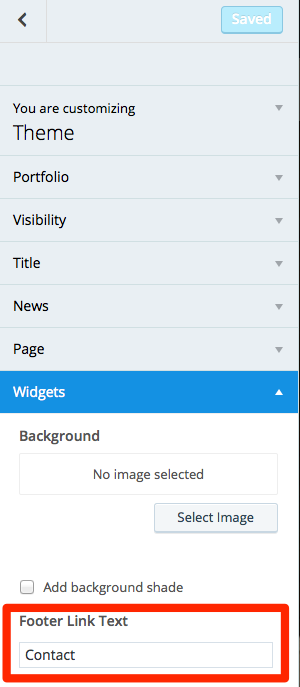
I’d also suggest that you check the box to hide the Widgets section on the front page, since you have no widgets in the Front Page widget area. You can remove the contact widget you’ve set up since you’re restricting it to the contact page only.

I think there’s still some important confusion happening here. It is not possible to display your existing contact page on the homepage of your site. In terms of regular page content, the front page can only display the content of the page you’ve assigned as your front page, which is the one called Home.
-
hmmm. nope.
i’ve been with wordpress for a long time; never had an issue.
are you guys going exclusively premium, pay-per-use community?
bummer. the demo is very attractive.thanks again for your time Kathryn.
-
Hi Butler, when you say “nope” I’m not sure quite what you mean. Are you having trouble with the tweaks I mentioned above? I’d be glad to help if you are – we could take it step by step.
-


- The topic ‘Glichy HARMONIC theme’ is closed to new replies.
 WordPress.com Forums