

Glichy HARMONIC theme
-
Yes, could you head to this link?
https://subtlertelevision.wordpress.com/wp-admin/post.php?post=35&action=edit
Do you see the Page Attributes box like you see in this screenshot?

-
yes, I’m getting:
“You attempted to edit an item that doesn’t exist. Perhaps it was deleted?”
-
OK, looks like you deleted that old contact page since I posted a reply earlier and have also rejigged a few things. For example, I see you’ve assigned your new Contact page to use the Front Page template, so that should sort out a few things.
Let’s see which issues are still causing trouble.
Let’s look at your front-page widget area next. I see that you’ve added some widgets to it, but that area is still not showing on the front page.
I think that’s because you haven’t added any content to your Contact page yet. Could you try please adding some content to your contact page and let’s see how it looks?
-
-
-
-
-
-
ok so i’d like my Contact page to look like the Explore page here
https://harmonicdemo.wordpress.com/#slide-4 -
The Explore section on the demo isn’t actually a page, it’s just a collection of widgets added to the Front Page widget area.
Here’s the breakdown of widget widgets you’re seeing there:
Front end: https://cloudup.com/cLpC8fpvu2b
Back end: https://cloudup.com/cOlGabIqonj
-
oh i see — so once I add these widgets they’ll turn up below what is now called the Contact page, with a new toggle in the footer
-
Well, you have already added three widgets to the Front Page widget area:
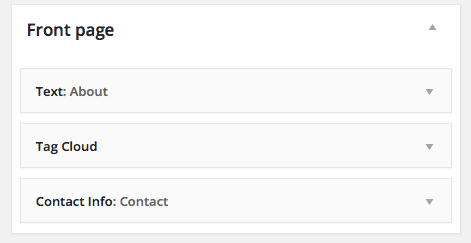
… but they are not appearing right now. I had a theory this was because your Contact page is currently empty, and I wanted you to add some content to that page in order to test that theory. Would you go ahead and add some content to that page so we can see if that gets your front-page widgets showing up?
-
right — I’ll update the existing Contact page –> About, and add more precise address info to widgets as you suggest. Am I getting that right?
-
For now, could you please try adding some content to the Contact page?
It looks like you already tweaked the address in the contact widget, so if that address was found in Google Maps you should be good to go on that front.
-
-
How did it go with adding content to your Contact page? I’m still not seeing anything there.
is there an area where i select solid black background or do i workaround that?
Harmonic requires images in each front-page section for it to function; it’s not possible to have a solid colour. You could create a small image that’s just black as a workaround – it’ll repeat to fill the entire area. Here’s a tiny black square you can use, for example:

-
-
-
thanks so much!
now where do i upload/ repeat the black background? i’d like to update the footer text for the About page without confusing options in the Widgets and Customizer
-


- The topic ‘Glichy HARMONIC theme’ is closed to new replies.
 WordPress.com Forums