

godaddy email not working, changed mx settings with WP suggestion still not work
-
please help, I am new to this…
I have a wordpress blog / site but registered domain with go daddy and email with go daddy,
the site is working ok after I sorted the mapping direction pointersI have used the WP page to add to my DNS for godaddy email setup using WP instructions, but it is still not working and I cannot work out what I have done wrong. it has been 3 days since I made the change so if it was going to work I should be working by now.
please help!
thankyouThe blog I need help with is: (visible only to logged in users)
-
I’ve tagged this for staff to look at.
I can’t see how your dns are setup but it I don’t believe the MX records are setup properly.Can you provide what GoDaddy says your MX records should be set to?
You can find out how to get this info by following the instructions on their site at http://support.godaddy.com/help/article/2570/using-our-email-with-domains-hosted-elsewhere#popimap
Under the
“Finding your MX Records for POP, IMAP, or Workspace Webmail”
section. -
thankyou I have used your information and changed the DNS settings I had entered with the advise from wordpress re godaddy. and have instead entered what godaddy says to enter for DNS in the wordpress settings.
fingers crossed it works this time, if it does it was way off what wordpress suggested I enter which is disappointing ( that their information was wring I mean)
im still confused and not sure if it is correct, and I have to wait up to 48 hours to know if it is correct or not…
would really appreciate It if someone could tell me if what I have entered is correct or not and if not if they could change it for me to what it should be.
really appreciate your feedback sandymcfadden, and thankyou for tagging staff.
-
What settings did you think you used? If you post what you did maybe someone can help – but with no info by you – nobody can much guess
When I looked at https://www.whatsmydns.net/#MX/rechargeelectrical.com
they are not showing any MX records at all
-
previously with advise from wordpress help page I had entered
MX (email visible only to moderators and staff) 10 mailstore1.secureserver.net.
MX (email visible only to moderators and staff) 10 smtp.secureserver.net.
CNAME email email.secureserver.net.
CNAME mail pop.secureserver.net.but after 48 hours that did not work…
hoping the info I have posted is helpful to someone wanting to help me,
thankyou! -
Good point Thankyou for bringing that to my attention, silly me.
The current DNS settings I have entered into my wordpress settings from recommendations of godaddy are :
0 smtp.asia.secureserver.net
10 mailstore1.asia.secureserver.netpop.asia.secureserver.net
-
currently they are
MX (email visible only to moderators and staff) 10 mailstore1.asia.secureserver.net.
MX (email visible only to moderators and staff) 0 smtp.asia.secureserver.net.
CNAME email smtpout.asia.secureserver.net.
CNAME mail pop.asia.secureserver.net.thankyou !
-
I have not worked with godaddy email in a while – and the support documents could use a bit of fine tuning –
but I don’t think that putting a full email address in the MX records is correct – otherwise the MX records would need to be updated for each email address – my email is not at Godaddy but I have one MX record and I think 5 email accounts –
also the MX records should have a priority code – such as
MX 10
MX 5 -
does this help, I have copied and pasted it straight from by DNS settings
Existing DNS Records
A rechargeelectrical.com handled by WordPress.com
NS rechargeelectrical.com handled by WordPress.com
CNAME *.rechargeelectrical.com handled by WordPress.com
MX (email visible only to moderators and staff) mail
handled by mailstore1.asia.secureserver.net. with priority 10MX (email visible only to moderators and staff) mail handled by smtp.asia.secureserver.net. with priority 0
CNAME email.rechargeelectrical.com alias of smtpout.asia.secureserver.net.
CNAME mail.rechargeelectrical.com alias of pop.asia.secureserver.net.
-
I am not on Godaddy – but the two records below are what the records looked like to get me email working – part of your issue is the format of the MX records – note – My mail server is on a fixed IP address (not a lot of servers are today)
MX 10 mail.my-site.com.
A mail 255.255.255.255
NOTE TO STAFF: there used to be a generic page on changing DNS records that had some sample DNS (CNAME, A, MX etc.) records in the proper format – it was always a bit tough to work with – but would have been helpful in this case – maybe bring the old sample back – thanks
-
Hi rechargeelectrical.
Here is a screenshot of what my dns settings look like in WordPress.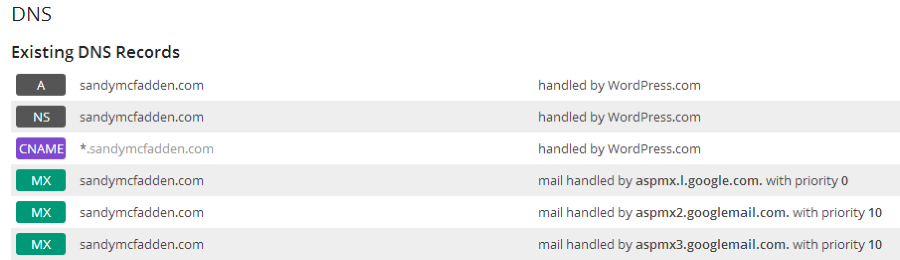
Yours should look similar except with your domain and the secureserver settings instead of the Google ones in mine.
I think you may have put your full email in the mx record instead of just the domain name.
-
Hi there,
I just took a look at your MX records and everything appears to be mostly correct. You may want to double check with GoDaddy however as our records indicate that your two CNAMES should be:
email.rechargeelectrical.com >> email.secureserver.net
mail.rechargeelectrical.com >> pop.secureserver.netInstead of what you have, which is:
email.rechargeelectrical.com >> smtpout.asia.secureserver.net.
mail.rechargeelectrical.com >> pop.asia.secureserver.net.If you are trying to use those CNAMES and they are incorrect that could be what is causing you issues. Also, the GoDaddy rep should be able to do a lookup using one of their tools to see if your records are testing OK within their system, and if not which ones need to be corrected.
-
@amightywp is right I can see your mx records now when I couldn’t before.
If it’s not working yet I’d say it should be fairly soon for you.
-
Thankyou Thankyou Thankyou everyone, just so grateful for your help, this had been doing my head in.
I have just made your suggested changes to the CNAME so fingers crossed it is working soon.
Thanks again! -
Not a problem at all, but hold off on any thank yous until we know for sure that they work! Let me know how it comes out!
-
Thankyou very much everyone, it is working! Yipee, really happy and so grateful for everyone’s help!
-


- The topic ‘godaddy email not working, changed mx settings with WP suggestion still not work’ is closed to new replies.
 WordPress.com Forums