

Google search has "Blog" out the front Facebook photo cut off Twitter photo?
-
3 Questions please…
1) When I do a google search for my new web site (searching – explore yoga travel) The result comes up with my site however it has the word “Blog” at the start of the heading then the rest of the title stuff. I really don’t want blog at the start as I am about to launch my travel business and this looks a bit amateurish. Is there a way of removing the word “Blog” from the start?
2) When I use my photos as the main post and then publish it to Facebook the photo gets cropped down, cutting off my text from the photo. Is there a way of ensuring that what I have on my WP post doesn’t get chopped down on FB? Or what height should I make my photos for FB?
3) I notice that when my post gets published to twitter it doesn’t show the photo on the front screen like some other tweets – is there a way of including the photo display on the front of the tweet?
Thanks
The blog I need help with is: (visible only to logged in users)
-
Hi Mariska,
1) When I do a google search for my new web site (searching – explore yoga travel) The result comes up with my site however it has the word “Blog” at the start of the heading then the rest of the title stuff. I really don’t want blog at the start as I am about to launch my travel business and this looks a bit amateurish. Is there a way of removing the word “Blog” from the start?
I’m not currently see your Blog page as first in the Google Index when searching your site:
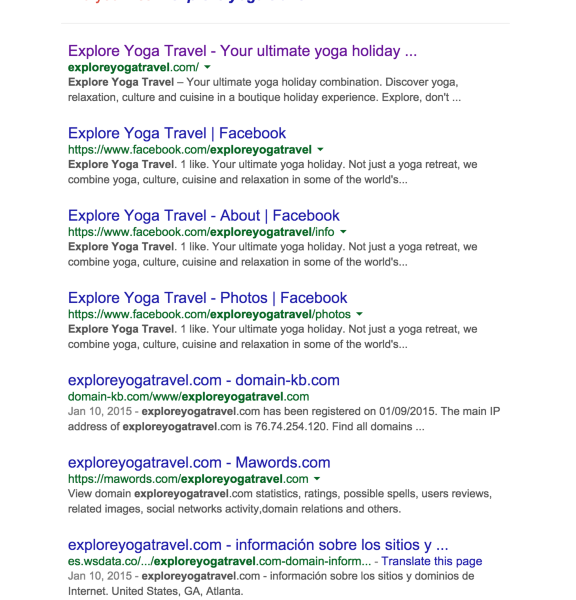
Please note that we have no control over where Google places your site in their index. If you’re interested in SEO, take a look at this:
2) When I use my photos as the main post and then publish it to Facebook the photo gets cropped down, cutting off my text from the photo. Is there a way of ensuring that what I have on my WP post doesn’t get chopped down on FB? Or what height should I make my photos for FB?
Facebook would be doing this on their end, so we would have no control over how Facebook decides to display your image. All we do is provide all information to Facebook. They would then display it using their guidelines. All I know is that they require images that are at least 200 px wide.
3) I notice that when my post gets published to twitter it doesn’t show the photo on the front screen like some other tweets – is there a way of including the photo display on the front of the tweet?
You may need to enable Twitter Cards. Take a look at this:
https://dev.twitter.com/cards/overview
Please contact Twitter support if you have any issues with this!
Feel free to reach out if you have any questions!
-
Hi again,
Thanks for the info. I have just done another search for explore yoga travel in google and it is still coming up with Blog – in front of the website.
not sure if this link works
- https://www.google.com.au/?gws_rd=ssl#q=explore+yoga+travel
I have pasted the result here – but a bit hard to see what I mean – but it still seems to have blog at the front.
Google
WebImagesShoppingMapsVideosMoreSearch tools
About 74,800,000 results (0.38 seconds)
Search Results
Blog | Your ultimate travel combination – exploring yoga …
exploreyogatravel.com/blog/
Feb 10, 2015 – Your ultimate travel combination – exploring yoga, relaxation, culture and cuisine in one holiday. Explore, don’t retreat!
You visited this page on 13/02/15.
SNOW GODDESS RETREATS – Yoga, Ski & Snowboarding …
http://www.snowgoddessretreats.com/
A boutique yoga retreat for women to enjoy a wellness ski & snowboard holiday in the stunning alpine destination of Hakuba, Japan. … Explore with Us … a group trip before, but I really needed to get away and I didn’t feel like traveling alone.Is there any way of removing “Blog” from the front?
Thanks
Mariska
-
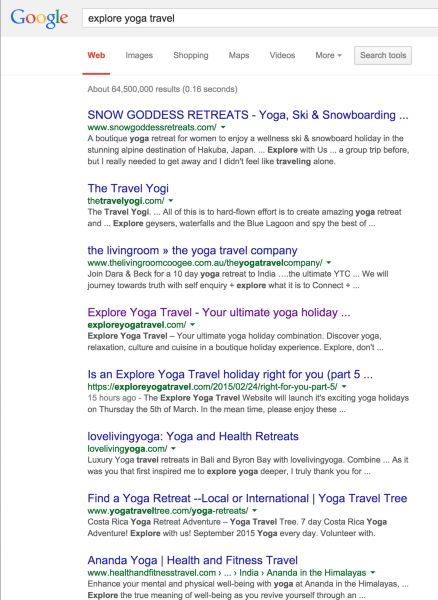
I’m not seeing Blog. Can you show me where in this screenshot your are seeing those words?
-
Hi Grace,
Yours is different to mine. I have done a screen dump to a Jpeg but I need a way to attach it. Is there an email address I can send the jpeg to you?
Regards
Mariska
-
-
-
I took a look at your screenshot, and at that time it seems like Google set your Blog page higher in the index than your Home page. Unfortunately, there is nothing we can do about this as it is up to Google. You can try contacting their support team to see what you can do.
-
Re: Question 3 – Twitter photos.
I have had a look at the twitter site about cards. I came across the following information:
“WordPress Site, Hosted on WordPress.com
Automattic/Wordpress supports hosting of WordPress sites on their WordPress.com domain, with over 72M sites and counting.
By default, WordPress-hosted blogs are enabled for Twitter Cards. WordPress automatically scans the contents of your post and determines the best Card type. Additionally, WordPress allows for easy-posting of your blog entries directly to Twitter via the “New Post” interface.
Configuration
Before you’re ready to start posting, follow these quick instructions to connect your blog to your Twitter account:Login to your WordPress Admin Dashboard
In the left sidebar, navigate to “Settings→Sharing”
Next to the Twitter section, click on the “Connect” button and continue to allow your blog to Authorize to your Twitter account.
A few things to note before you’re on your way:Make sure your site is accessible by Twitter’s web crawler by going to the Dashboard and configuring “Settings→Reading→Site Visibility” to allow search indexing.
Be sure to submit one of your example posts via the Twitter Card Validator. Once you have the confirmation e-mail, a tweet with your site URL will have a Card attached.”Thia seems to suggest that the twitter card is automatic at the wordpress end. I have followed the steps above, copied the url from the page that has my blog on it (http://exploreyogatravel.com/ey-travelog/) and put it into the validator as suggested – However I get an error:
Log
INFO: Page fetched successfully
INFO: 21 metatags were found
ERROR: No card found (Card error)This seems to suggest there is no aotomatic card on my wordpress account?
Can you please help?
Thanks
Mariska
-
Hi there,
Please note that you have to insert an example post. The link you put in was the entire posts page, not the actual post. Try this one:
http://exploreyogatravel.com/2015/03/12/georgina-anic-confirmed-for-october/
-
Ah ha.
Thanks for your help – everyday is to learn something new. Have a great weekend.
Mariska
-


- The topic ‘Google search has "Blog" out the front Facebook photo cut off Twitter photo?’ is closed to new replies.
 WordPress.com Forums