

Google sharing problem
-
I am not sure what’s going on with my WordPress account but this is the second issue I’m having with my posts not sharing properly to social media outlets. I’m still working with WordPress to figure out the first issue and now I’m seeing issues with Google+.
Previously when my posts auto shared to Google+ the media (picture) associated with the post would share over. Now with all my posts, it’s picking up the Inspiring Blogger photo from my home page and adding it to all posts shared.
I am becoming so frustrated that I want to remove all of my sharing apps from WordPress and not share at all because it’s also doing it when I share from the icon buttons on my home page.
Can someone please help me resolve this issue? Thank you.
The blog I need help with is: (visible only to logged in users)
-
I apologize for the previous rant above. Just a bit tired of running into problems when trying to share my posts.
I uploaded a screenshot in my media profile to view of what I’m seeing when sharing from the icon as well as what it looks like when shared from Publicize. I had deleted the original posts on Google+ and did a manual share in order to create the screenshot.
Thank you.
joaynn
-
-
Hi Joaynn,
Please note that Google+ is choosing that image and they have been making some changes on their end. While we provide all the information we can’t control what image Google+ essentially chooses. Unfortunately, there is not much we can do about that at this point.
When a post is shared it should either contain a Featured Image so that Google can fetch this. Try adding a featured image to see if that helps. If not, try adding an image that is greater that 512 px. I have seen some users saying that helps.
However, Google+ applies certain image criteria which we don’t control. Sometimes this results in showing the wrong image or no image at all.
We’ll keep an eye on the development and make improvements from our end if possible.
Just a note, when you manually share, you can change the images and get the one in the post as seen here:
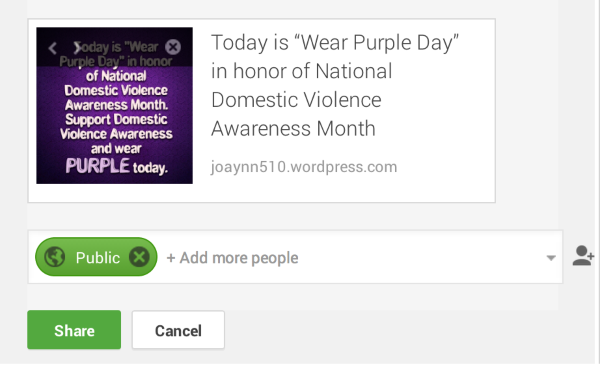
I’m sorry I couldn’t be of more help.
-
Thank you for the information. While I understand Google+ is making changes and you guys have no control over their process, I am a bit confused as to why this just started happening given I did not see a problem from my previous posts on or before 10/8. Yet from 10/10 to present it is now a problem.
By any chance, would there be something wrong with WordPress since it just started happening specifically when I was working with WordPress on another issue with my site. I ask because it may have been something done in error that may have triggered this action. Just curious and would love to hear back.
In the meantime, to make things easier for me as I do not wish to go in for every post shared from this point forward and manually change the photo even though there is a photo already attached to the post, I will look at removing the Google+ sharing option from the Publicize page.
Thank you.
-
You’re very welcome. It may be best to contact Google+ and see what they have to say about it. I do not think it would be a change with us, because I checked your posts and I do not see any errors since the 8th. There would be an issue with us if the post did not share at all. Since the issue lies in pulling of the images, this would be handled on Google+’s end from my understanding.


- The topic ‘Google sharing problem’ is closed to new replies.
 WordPress.com Forums