

Google Website Verification
-
I have followed the steps for Google Website Verification and it will not verify the site. With a wordpress.com site, where would I put the HTML tags Google sent? It asks you to put it in the header, but how would I access that? As you can see on my site, I have the code they gave me entered, yet it still will not verify. I would appreciate help.
Thank you-
ElainaThe blog I need help with is: (visible only to logged in users)
-
Hi Elaina,
I’ve looked at the Google Webmaster Tools settings in your site here, and it appears you have the incorrect information saved.
The information you used came from the “HTML file upload” method. While in Google Webmaster tools, instead select Alternate methods:
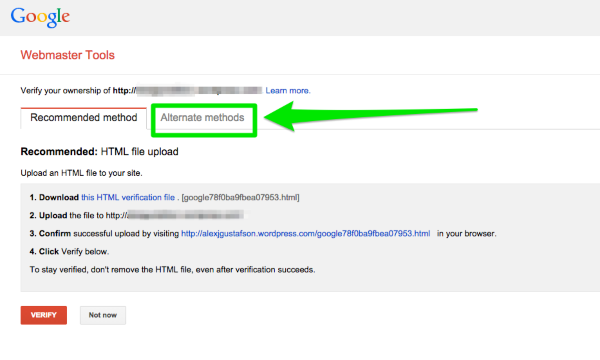
Then use the “HTML tag” option:
https://cloudup.com/coONB_F8–k
Copy and paste that content into your site’s verification tools, then we place the content in the site’s header automatically. Make sure to save changes too.
-Alex G.


- The topic ‘Google Website Verification’ is closed to new replies.


 WordPress.com Forums