Goran – my website's front doesn't look the same if I hold IPAD vertically
-
Hello!
I’m a complete newbie and I’ve just designed a small webpage at http://www.walthamstowbunny.org. using the Goran theme.
When I hold my Ipad in landscape view the webpage looks fine. If I turn the Ipad to portrait everything changes, the logo is in the middle and a blue band replaces the logo background. Is there a way to keep the website looking the same or is it a feature of Goran?
Thank you!The blog I need help with is: (visible only to logged in users)
-
I forgot to say, if I have to accept that the above is just a feature of Goran, can I change the colour of the band from bright blue to another colour without resorting to Premium. I vaguely remember choosing the blue palette in Customise. Thanks again for any help you can give me.
X
-
Goran is a responsive theme, so it adapts to different screen sizes automatically. For example, the logo is centered on some mobile devices for better visual balance at smaller sizes.
I vaguely remember choosing the blue palette in Customise.
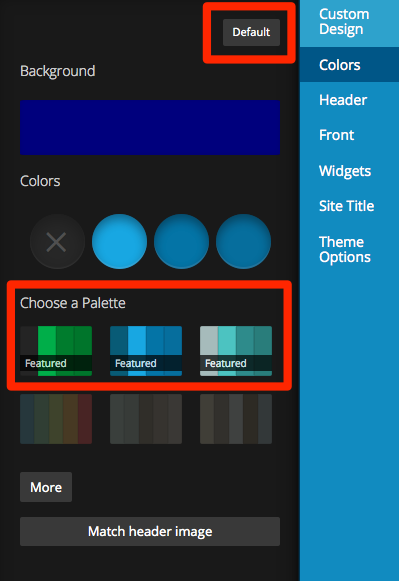
You can try reverting back to the theme’s default colours by clicking Default in the Customizer > Colors. You can also choose one of the other free featured colour palettes.
-
The theme behaves that way as designed for narrower screens. It is switching to a mobile friendly layout including a mobile menu system to make it easier for smaller devices. The color of that area comes from the custom color set as “Accent Two”.
-
Hi Clundmark!
Thank you very much for the advice, I suppose there’s no way of disabling the mobile friendly layout so the look of my website stays the same? If I can disable this, what would my website look like on smaller devices, would just a section of it be visible on the screen?
Please can you remind me how to set the Accent two colour as I must have done it unknowingly and I’d like to go back and try a different colour. I’m a complete newbie! Thanks again,Walthamstow Bunny
-
You can’t disable the responsive feature of the theme. It really is a good thing. Optimizing for mobile devices makes your site/blog a better experience on those devices, thereby increasing readership.
To change accent two: Appearance -> Customize -> Colors. It is the second color dot after the one that has a X through it.
-
-
-
Hi Ryancowles,
I have been very busy with work and haven’t had the chance to put your suggestions into practice, which I’ll try to do next week. Thank you very much for your message.
-
-
I just create a new blog and I choose the Goran theme. I activated it but when I view the view site, It doesn’t show the theme, all there is just a simple theme without any background picture. Can anyone tell me why? Thanks.
-
nadav2000 – looks like you’re now running Sela.
Both Sela and Goran need to be set up with a static front page assigned to the Front Page template in order to start looking more like the demo site. Please see the setup guides for each theme for step-by-step instructions:
Sela – https://theme.wordpress.com/themes/sela/
Goran – https://theme.wordpress.com/themes/goran/If you need further help, could please start a new thread? Thanks!
-
kathrynwp – thanks for your reply. But it still doesn’t work for my blog. I did as the instructions from https://theme.wordpress.com/themes/sela/
I love the background picture( laptop, phone, books…) and I really want to make it as front page whenever I go to my main page
-
nadav2000 – your homepage is currently set to display your latest posts. To make your site look more like the demo, you’ll need to follow the instructions to set up a static front page. If you want your homepage to display your blog, it will look different than the demo.
Could you please start your own thread so I can help you more easily to figure out where you’re getting stuck? This thread is about Goran. Thanks!
Start the thread here:
https://en.forums.wordpress.com/forum/themes#postform -
kathrynwp – thanks for your answer. I have a little question. If I registered 2 admins of my blog. Do both of us have the same role, same power to manage the blog? Do we get the same notifications when someone follows or comments? ( sometimes I get the notifications but my friend doesn’t)
Thanks -
Comment notifications go to the author of the post, while other notifications like new follows go to the site owner’s email. Hope this clarifies!
-
kathrynwp – Yes, it does. Thank you.
I still have one more question. I want to post a post. The moment when I click Publish, it automatically turns into schedule mode even though I didn’t set up any schedule post. I try to get rid of it by setting the schedule time to the present time, but it still doesn’t show up. Now it is a scheduled post that I never know when it is gonna appear. This happens every time I try to publish the post immediately.Thanks a lot and I do appreciate that you answer my questions.
-
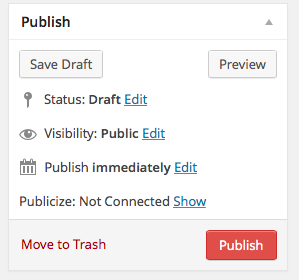
@nadav2000, when you get ready to publish a post, in the Publish module does it say, Publish Immediately, like in this screenshot or does it say Scheduled?
-
@thesacredpath- thanks. Yes, It does say Publish immediately. I always check the status to make sure it is set publish immediately. when I click Publish, it tells me something like: you successfully scheduled a post…
-
Log out of WordPress, clear your browser cache and cookies and then try again. I did a test post on your site and then set it back to draft immediately after I verified that the post had “Published”.
Let us know if that works.


- The topic ‘Goran – my website's front doesn't look the same if I hold IPAD vertically’ is closed to new replies.
 WordPress.com Forums