

Goran Theme Problems And Other Problems
-
Hi,
I am in the process of constructing my business website with the Goran theme, and I would like to have the front page buttons saying “Read more” written in my own language (Norwegian). How do I go about?
Thank you for your help!
Best,
Hilde
hildehagelin.com -
Hi Hilde,
Thanks for the report! I’ve reported this to our theme developers to add into the theme. I’ll let you know as soon as I have any updates!
-
Hi Hilde,
Currently, it looks like Goran is only 47% translated for Norwegian. We’ll deploy translations for that theme once it’s over 85% complete for a given language.
We would love your help translating the theme to Norwegian if you have time. Here is a support document that explains how to get setup with GlotPress, our translation tool:
http://en.support.wordpress.com/glotpress/
Once you are logged into Glotpress, you can view the translations for Goran here:
http://translate.wordpress.com/projects/wpcom/themes/goran
Norwegian translations can be found here:
http://translate.wordpress.com/projects/wpcom/themes/goran/no/default
From there, you can suggest new translations to help bring the Norwegian translation above 85% (additional instructions at the link above). Once it gets above 85%, we’ll have the translations validated and then deployed for the theme.
Please let me know if you have any additional questions! We really do appreciate your help here.
-
Hi Jeremy,
Thanks for your help! I have done my best to help with the translation. Now there are only a few words missing.
I am a bit confused about the “Noto Sans character subset specific to your language” – should I plot in the Norwegian characters æ,ø,å here?
Further, while waiting for the translation to be deployed, would it be possible for me to solve the problem with the text on the buttons using CSS? Is there a CSS code that I could use for editing the text on the “Read more”-buttons?
Thank you very much for your help!
Best,
Hilde -
Problem with posts
I’m using the Goran theme and I try to work with posts as well but it always shows only the post title and not the content. What I’m doing wrong?
http://www.virtual-cilicia.org/?p=374 -
Thank you so much for the help Hilde!
I am a bit confused about the “Noto Sans character subset specific to your language” – should I plot in the Norwegian characters æ,ø,å here?
That particular bit can be ignored.
I did want to point out one thing here:
That shouldn’t be translated. It’s basically asking if Norwegian-specific characters are included in the specific font (Noto Sans). I apologize that this isn’t more clear.
If Norwegian characters are included within the font, you would want to enter “on”. If not, you would enter “off”. You can normally tell whether language-specific characters are supported within the font through normal use (do your blog posts appear correctly?). Alternatively, you can check here:
For example, the Noto Sans font can be found here:
http://www.google.com/fonts/specimen/Noto+Sans
Regarding using CSS to change the button immediately, you can use the following:
div.entry-summary p a.more-link:before {
	content: "Read More";
	color: #fff;
	font-size: 20px;
}

div.entry-summary p a.more-link {
	color: #e74f4e;
	font-size: 0px;
}
The first part inserts the new translation, so you’ll want to change “Read More” to the correct translation in Norwegian. The second part shrinks the current text down so it’s not visible.
Please let me know if you have any additional questions!
-
@zastrugis – Your site is self-hosted running WordPress.org software. You’ve reached support for the free sites hosted at WordPress.com. Since your site is self-hosted, I don’t have access to your site files to provide support for this issue. I would recommend reaching out to the WordPress.org support forums here:
-
-
-
Thank you for the CSS code, Jeremy! It worked perfectly.
As to the translations, I have rejected the parts that should not be translated. Hope I´ve done it right…….?
Thanks, Hilde
-
Thanks Hilde! I’m glad the CSS code worked. I’ll be passing along the translations to one of our validators. I’ll let you know as soon as I know more!
-
Hi I’m tryin to do the same for Brazilia Portuguese, unfortunately i have not found “read more” anywhere, either on Goran, or Edin for that matter.
Cheers
-
For Brazilian Portuguese, I found the following string in Edin:
Goran is actually a child theme of Edin so that’s why the string isn’t present in Goran as well.
Before Edin or Goran get deployed, we’ll need to get the translation percentage up to 85% in both spots:
http://translate.wordpress.com/projects/wpcom/themes/edin/pt-br/default
http://translate.wordpress.com/projects/wpcom/themes/goran/pt-br/default
We would love for you to help if possible! Could you take a look and help correct any strings that are incorrect or untranslated?
-
I believe i already did.
btw just noticed
‘on PT Mono font: on or off’ was translated to “Ligado”
I re translated it to ‘on’, not sure if it should be ‘on’ or simply empty.
Please check.‘on PT Sans font: on or off’ same issue
All the others seem ok.
I suggested most of the missing ones, they both should be about 100% now.Cheers
-
Wonderful! Thank you so much for the help. I believe PT Sans should be “on” as well as that font looks like it supports the specific characters in Brazilian Portuguese. I’ll pass this along to a validator to take a look!
-
@hildehagelin – If you have time, we would greatly appreciate any additional translation help you could offer for Edin here:
It’s the parent theme of Goran so before we deploy Goran translations, we’ll need to get Edin up to par as well.
Thanks so much for your help!
-
Is it possible to hide page titles on goran and to reduce feature image height or remove completely?
-
-
Hi,
I found a lot of solutions to the problems i met with the goran theme in this conversation so i guess it’s the right place to ask…
I would like to add a business logo to my website, but when i navigate to Customize → Site Title, there is nothing to upload a logo.
How do i do that ?
Thanks, Emmanuelle -
Hi Emmanuelle,
Can you make sure you’re checking the correct site? Here’s what I see when I visit the Customize -> Site Title section of your site:
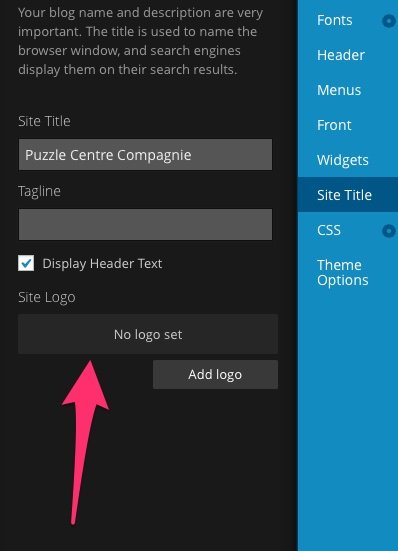
Just a note, I’ll be closing this thread to additional comments. If you’re still running into issues getting the logo set, can you open a new thread?
@hildehagelin & @aikinozen – I’m still working on the translations!


- The topic ‘Goran Theme Problems And Other Problems’ is closed to new replies.
 WordPress.com Forums