

Goran Theme – 'top content'
-
The demo page for the Goran theme has a grey line across the top of the front page with a telephone number: Phone: 1-202-555-1212
I can’t figure out how to enter text into the space. It doesn’t seem to turn up on the customise theme page. Where is it?
The blog I need help with is: (visible only to logged in users)
-
Hello Billbennettnz,
When you are on the Customize Theme page look under Theme Options, it is called Top Area Content and there is a grayish colored box under it where you type your Text, an example of this is shown on the Goran Theme Page:
https://wordpress.com/themes/goran/
Good luck ;) ,
-John Jr -
-
Hello Billbennettnz,
You are welcome, I forgot about this feature and I remembered it again thanks to you making this topic, and so thank you for creating this topic. :D
Now I am using this space/area for my Tagline because the Goran theme does not have a Tagline option, and so now I have a way to show my Tagline. ;)
Have a good day,
-John Jr -
Hello,
I’m not sure if this is the correct location to ask this question…but here it goes! lol Under Appearance–>Customize–> Site Title & Tagline there’s suppose to be an option to upload a logo and for some reason my version of the Goran theme does not have that option. Does anyone know why that may be?
Thanks,
Dom -
Hello Dom,
The Logo option is showing up for me.
When you go there do you see the Site Logo option under the Tagline option?
Screenshot: https://mediacru.sh/GRUYsFIAsitI
If not, what is the URL of the blog that you are having this problem on, and which internet browser and what version of that internet browser are you using?
If you are using an older version of your internet browser I recommend updating it to the latest version.
-John Jr
-
Hey John,
Thank you for replying! I’m using Mozilla Firefox for a browser and the URL is http://www.fwspros.com/. I’ll try updating the brower, but i’m pretty sure its the most current. Also the link you sent me to the screen shot of your Goran Wrodpress dashboard looks nothing like mine. Here’s what mine looks like:
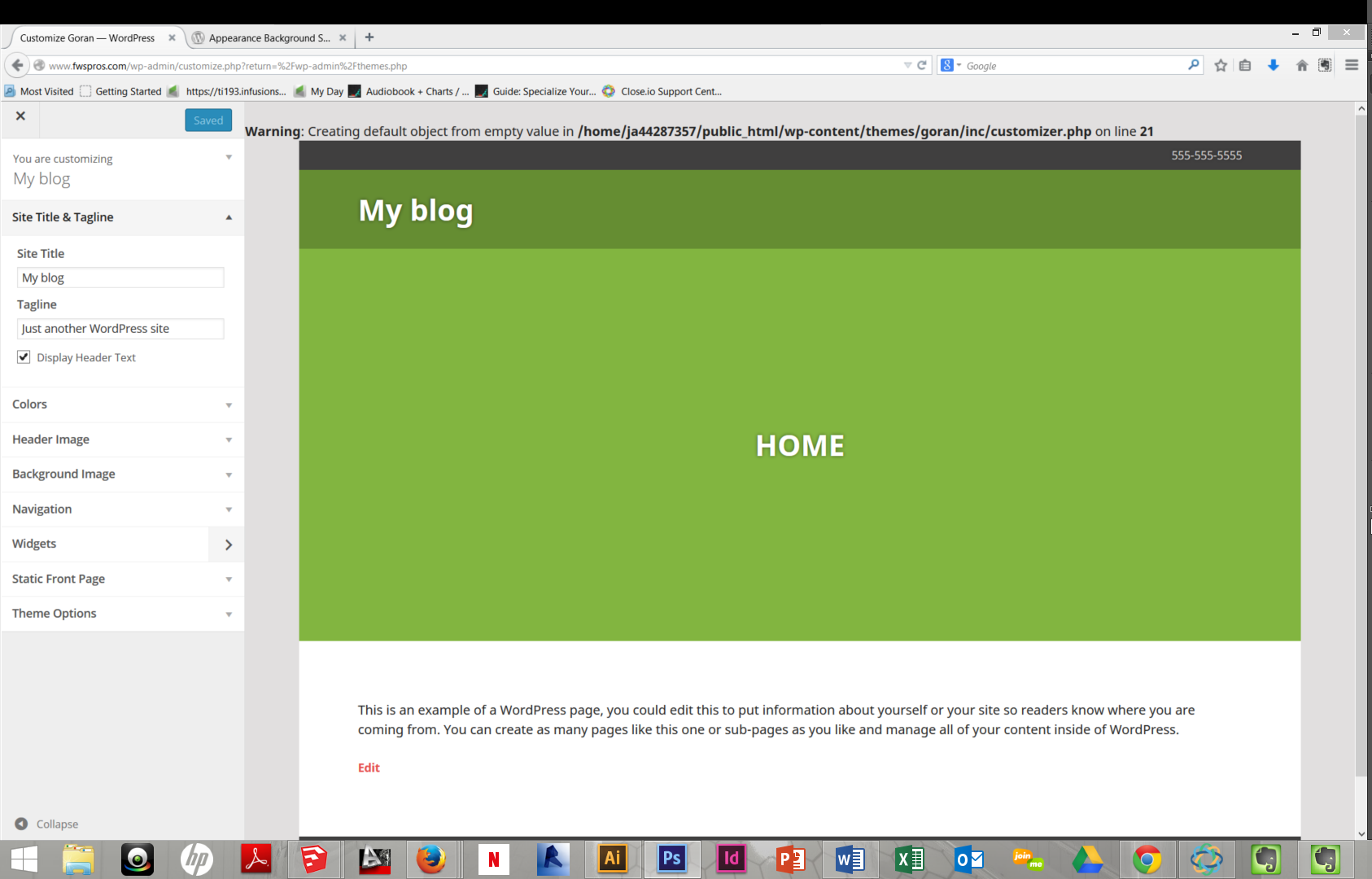
Any suggestions?
Thanks,
Dom -
Hello Dom,
If you do not know how to update Firefox or find the version that you are using use this link:
https://support.mozilla.org/en-US/kb/update-firefox-latest-version
Thank you for the screenshot, based on that and based on the link to your blog I am assuming that blog is not hosted on WordPress.com, correct?
If so, you will probably have to get help at the WordPress.org Forums (https://wordpress.org/support/forum/themes-and-templates), because this Forum is for WordPress.com only.
It seems that either that option is currently missing on the WordPress.org version or it is located in a different area/location or that option is only available on a newer version of the WordPress software (here on WordPress.com a beta/newer version of the WordPress software than the stable version is probably used, but I could be wrong) or something like that, but those are just wild guesses; and a staff member and/or someone familiar with the WordPress software and/or the WordPress.org version of this theme would have to answer that question for you.
Good luck,
-John Jr -
Hi dominickarodriguez – it looks like http://www.fwspros.com/ is running the self-hosted version of WordPress. John Jr.’s hunch is correct – the Site Logo feature is specific to the WordPress.com version of Goran right now, although we hope to include Site Logos in a future version of the Jetpack plugin for self-hosted sites.
If you’d like help with alternative ways to display a logo in the self-hosted version of Goran, please feel free to post in the Goran forum on WordPress.org and I’ll be glad to help you over there:
https://wordpress.org/support/theme/goran
You’ll need a free WordPress.org account to post – if you don’t already have one, you can register here:
-
Hello Kathrynwp,
I had forgotten about this topic, thank you for helping us. :)
-John Jr


- The topic ‘Goran Theme – 'top content'’ is closed to new replies.
 WordPress.com Forums