

Gravatar Photo
-
My gravatar picture won’t display. The image uploads fine. It just won’t display.
The blog I need help with is: (visible only to logged in users)
-
Hi there!
Can you make sure that the email address associated with your WordPress.com account has the correct picture selected here:
http://en.gravatar.com/emails/
If not, can you send me a screenshot of what you see there? You can simply upload the screenshot to your Media Library, like any other image, and I’ll be able to access it from there. Here are some tips for taking screenshots:
Let me know if I can help with anything else!
-
the email address has the picture I want. I have confirmed it. It still won’t display. Can you please address this problem. I have been waiting for some time now.
-
Hi there!
It looks like you set the rating on your Gravatar image to PG.
http://en.gravatar.com/site/check/(email visible only to moderators and staff)
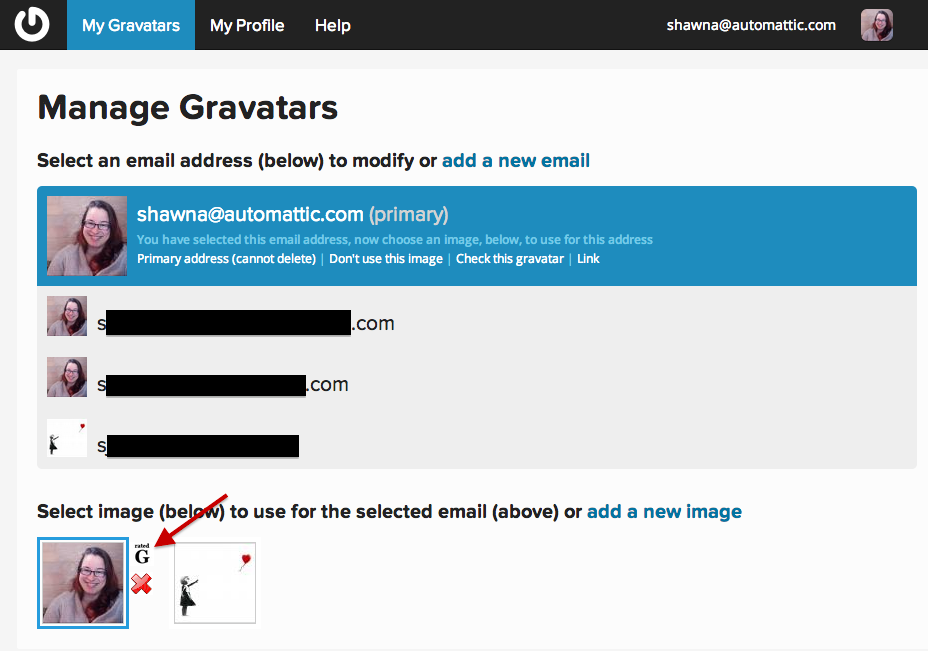
Can you set your image to G and let me know if you still don’t see your image on your WordPress.com account! You can do this by going to ‘My Gravatars‘ and clicking on the Rating that appears next to your image when you mouse over it:
-
-
-
Great! Sorry, I should have mentioned that it can take a couple minutes to propagate over to WordPress.com.
Let me know if I can help with anything else!


- The topic ‘Gravatar Photo’ is closed to new replies.
 WordPress.com Forums