

Grid-Page #quaternary alphabetical page order
-
Hi,
I’m currently working on a website but i’m having trouble with child-page order on a parent page.
IT IS NOT the ul or ol (html tag) order of a menu or widget. It is really linked to the display order of child-pages on a parent grid-page of the Edin theme.I tried to use the page attributes to fix the order. However I don’t have a fixed set of pages (some may be added later). I don’t want to change the order of all the pages every time I add a page, so I gave it a number related to their alphabetical value (1=A; 2=B; 3=C etc.)
The problem is that, for now the pages are displayed by page-id. This means that within my A (page order 1), they are still not alphabetically ordered.
Does anyone know how to change the page order from page-id to alphabetical on a grid-page?
If it’s not possible can it be ordered by chronological order (latest pubication displayed first)?
here’s a link to the concerned page: https://culturelabblog.wordpress.com/archive/
Here’s a second question: If you take a look at my CSS, i have changed a lot of things, on many pages, I have hidden images. However, I want them completely gone on those pages (since right now they are still charging even though we don’t see them). Does anyone know if it is possible to access personal .php files? Or, if not, if it is possible to erase them on those particular pages?
Cheers
The blog I need help with is: (visible only to logged in users)
-
Does anyone know how to change the page order from page-id to alphabetical on a grid-page?
Are you all set with this? Looks like you discovered the Order field already:
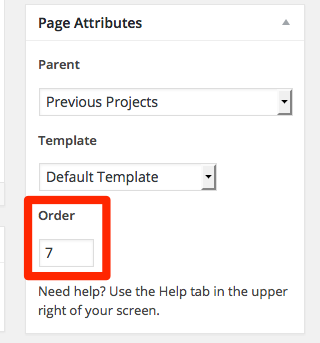
Here’s a second question: If you take a look at my CSS, i have changed a lot of things, on many pages, I have hidden images. However, I want them completely gone on those pages (since right now they are still charging even though we don’t see them). Does anyone know if it is possible to access personal .php files? Or, if not, if it is possible to erase them on those particular pages?
Could you please show me a specific example of what you’re talking about so I can have a look?
It’s not possible to edit the PHP but if you provide a link and explain what you’re trying to remove I’ll have a look.
-
I have the same question as the above… I understand that i can input a number to put my pages in order, but it also says ‘Tip: Keep at 0 to maintain alphabetical order.’ though it does not list in alphabetical order. Plus, every time I add something new, I don’t want to have to change the numerical order every time.
thank you.
-
@thesacredpath, thank you for getting back to my question. Here is the link:
I want the grid view (child pages) to be in alphabetical order under the Food page (parent). Hope that makes sense. Thank you!
-
Page Attribute Order will not affect the child pages shown on a parent page. That is aimed at Menus. Generally I would expect them to show up chronologically with newest first, but I’m not seeing that on the page you reference. I did a bit of testing and the pages show up on the parent page in the order that you set the parent page in the child pages.
If you set them all back to no parent pages and then set the parent for each in the order you wish them to appear, they will then show up in that order. After that, any additional pages you may add as children will appear at the bottom of the grid. Given the way things work in Edin, I might suggest oldest first order. That way when and if you add additional pages that are newer they should appear in the correct order.
-
it says under ‘Edit Page’
– PAGE ORDER
(space to input number)
Tip: Keep at 0 to maintain alphabetical order.I have kept it at zero and I would love for my ‘Food’ page to show the Child pages in alphabetical order when in grid view. Bummer.
-
@hoi0178, The page order is for navigation menus, like at the top of your site (about, my rating scale) and for Menu widgets put into sidebars or footer widget areas. It does not control the order of child pages on a parent page. No matter how you set the Page Order in the Attributes module, it will not change the order of the child pages in the parent page.
-
@thesacredpath, please see my page now: https://hoisadventures.wordpress.com/home/food/
I have changed the page order and it has indeed changed the order of the child grid views on my ‘Food’ parent page. I know I can organize this by changing the numerical page order, but I want it to be automatically alphabetized when the Page Order value is 0. Thank you for your help.
-
Hmmm, that’s interesting. I had tried that, but didn’t see a change – or didn’t think I had. Let me chat with one of the developers and see if this is something they would be willing to change. I’ll chat with them on Tuesday and hopefully get back to you around midday.
-
-
@hoi0178, I have filed a bug report on this, and it may be that the statement about alphabetical order when page order is left at 0 may perhaps be incorrect. I won’t know for sure what is going on until the developers have a chance to look into it more thoroughly. I’ll report back as soon as I get any word.
There is a chance that the order when left at 0 is actually working as designed when it comes to displaying child pages on the parent page in themes like Edin and Sela.
-
I hope this is a bug and that they can fix it. I am no programmer or coder, but it seems like an easy fix. Either, I don’t understand why the newest posts are automatically placed at the bottom of the page; shouldn’t it be the other way around?
Anyways, standing by. Hope we can get it to alphabetical order. *fingers crossed*
Thank you!
-
-
-
I just checked the bug report and it is slated to be fixed, I’m just not sure when. I wish I could be more definitive, but things are triaged and prioritized by order of importance and severity with security and major bugs getting the highest priority.


- The topic ‘Grid-Page #quaternary alphabetical page order’ is closed to new replies.
 WordPress.com Forums