

Grid page template
-
I have just changed the theme of my site to Sequential and would like to have the grid page template but I can’t work out how to do this. Below is a link to the details of this theme.
https://sequentialdemo.wordpress.com/
Many thanks
AnnThe blog I need help with is: (visible only to logged in users)
-
Hi Ann,
Have you taken a look at the Sequential theme support guide?
https://wordpress.com/themes/sequential/
Take a look under Grid Page Template and it will teach you how to create this.
Let me know if you have any questions with this!
-
Hi there
Thanks for your reply – yes, I’ve had a look under Grid Page Template in the guide, but it just seems to illustrate what it will look like rather than telling me how to create it.
Thanks
Ann -
So in that support guide it says this:
The Grid Page Template displays all child pages of the parent page, in a grid format. This template is perfect for highlighting case studies or services. You can add a manual excerpt to each child page, which will be used as the blurb on the Grid Page Template page. If you don’t add a manual excerpt, your site will pull in the first piece of text from each child page.
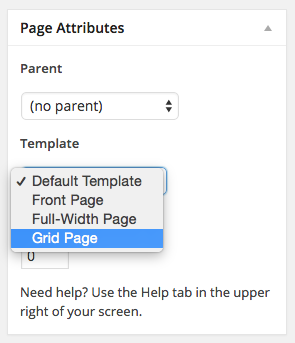
I’m not seeing any of your parent pages with the Grid Page Template. You can change it by going to Page Attributes when you edit you parent page as seen here:
-
Got it J
Thanks for your help
Ann
From: WordPress.com Support Forums [mailto:(email visible only to moderators and staff)] Sent: 18 February 2015 19:59To: (email visible only to moderators and staff): [WordPress.com Forums] Grid page template
gracejiyoung replied to a forum topic that you subscribe to
in response to the topic “Grid page template”:
So in that support guide it says this:
The Grid Page Template displays all child pages of the parent page, in a grid format. This template is perfect for highlighting case studies or services. You can add a manual excerpt to each child page, which will be used as the blurb on the Grid Page Template page. If you don’t add a manual excerpt, your site will pull in the first piece of text from each child page.
I’m not seeing any of your parent pages with the Grid Page Template. You can change it by going to Page Attributes when you edit you parent page as seen here:
Reply View forum topic
Want less email? Unsubscribe from this topic
Thanks for flying with WordPress.com
-


- The topic ‘Grid page template’ is closed to new replies.


 WordPress.com Forums