

Harmonic Theme Bugs
-
Hello, im excited to use my website in the Harmonic lay out.
However, it will be in another language. Is it possible to remove or change the “read more” button on the full widht page? -
If you have the CSS upgrade, you can add the code below to remove the “read more” button.
.button.scroll { display: none; } -
However, it will be in another language.
It looks like you’ve already set erikduin.wordpress.com to Dutch under Settings > General.
It looks like there’s an issue with the Harmonic theme translations at the moment – we’re getting them fixed up and I’ll keep you posted here.
If anyone else has Harmonic questions, could you please start a new thread? Add the word modlook to the Tags area if you need staff attention. Thanks!
-
We’ve fixed the issue with Harmonic theme translations and you can now see the available translations here in GlotPress:
http://translate.wordpress.com/projects/wpcom/themes/harmonic
Languages that are at least 85% complete will automatically go live within 24 hours. As you can see, Dutch is currently at 70% – would you be willing to add some of the missing translations so we can make that language available to everyone? You could do that here while logged into your WordPress.com account:
http://translate.wordpress.com/projects/wpcom/themes/harmonic/nl/default
Just let us know once you’ve added some translations and we’ll get them validated and launched. Thanks!
-
I was wondering, if anyone can help me with the below mentioned issues –
How to add social media icons at the top of the site using in Harmonic theme? How to make the default background image for the portfolio go away?(The one which comes handy with harmonic theme). -
How to add social media icons at the top of the site using in Harmonic theme?
Harmonic supports a social links menu and you’ll find a full setup guide here:
http://en.support.wordpress.com/menus/social-links-menu/How to make the default background image for the portfolio go away?(The one which comes handy with harmonic theme).
Harmonic requires a background image for each front-page section in order for the JavaScript code in the theme to function correctly. You can add your own image under Appearance > Customize > Theme > Portfolio Front.
Check out the full setup guide for Harmonic: https://wordpress.com/themes/harmonic/
-
-
I’ve just started using Harmonic. I selected a featured image for my posts, and everything looks good in the preview. When the posts publish, however, instead of being a featured image behind the post title and date, the image is simply a box image above the post title, like a regularly inserted image.
How do I get the featured images to work as they appear on the demos and previews? countdowndays.wordpress.com
Thanks.
-
Hello @kathrynwp,
Thanks for you information in this post! It already helped me with some of the questions I got. I just finished all the open Dutch translation strings. Is there a option to get these translations updates in my hosted WordPress at http://www.thanq.eu/ ?
I’m left with 2 questions:
– I can’t seem to locate the custom logo feature within the theme editor, is this unique to WordPress.com?
– When viewing a single portfolio item, no featured image is displayed, but I like the featured image option so much on other posts!! Is there a way to also show this on the portfolio-post-type?Thanks in advance!
-
pieterbezuijen –
I just finished all the open Dutch translation strings.
That’s great, thanks!
Is there a option to get these translations updates in my hosted WordPress at http://www.thanq.eu/ ?
You can download the .mo file from GlotPress and connect it to a self-hosted child theme.
– I can’t seem to locate the custom logo feature within the theme editor, is this unique to WordPress.com?
The Site Logo feature will be in version 3.2 of Jetpack. The beta version can be downloaded here for use on development sites:
https://wordpress.org/plugins/jetpack/developers/– When viewing a single portfolio item, no featured image is displayed, but I like the featured image option so much on other posts!! Is there a way to also show this on the portfolio-post-type?
You could create a custom single portfolio template in a child theme to accomplish this.
If you have other questions about the self-hosted version of Harmonic or want to follow up on the translation question, please do post in the WordPress.org theme forums, since these forums are for folks on WordPress.com.
http://wordpress.org/support/theme/
Important: add the tag wpcom-theme in the tags area when you post there so I’ll get an alert when you post and can find your thread.
You’ll need a free WordPress.org account to post – if you don’t already have one, you can register here:
-
sharonjanelle –
I’ve just started using Harmonic. I selected a featured image for my posts, and everything looks good in the preview. When the posts publish, however, instead of being a featured image behind the post title and date, the image is simply a box image above the post title, like a regularly inserted image.
How do I get the featured images to work as they appear on the demos and previews? countdowndays.wordpress.com
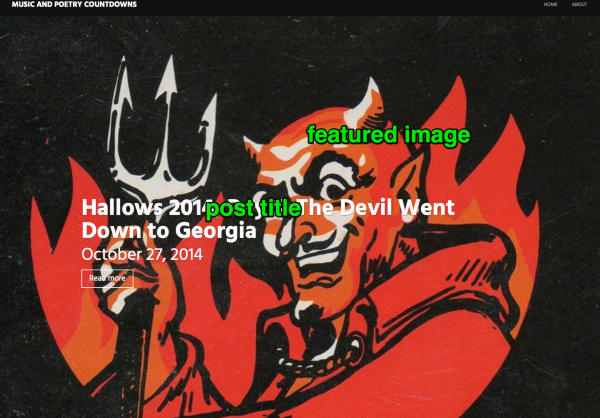
Featured images for Standard posts in Harmonic are displayed on the blog index, above the title. For example:
https://cloudup.com/cHZl1ZLqaixOn the single post, the featured image is displayed as a large background image, behind the post title, for example:
-
If anyone needs further help with Harmonic, please feel free to start your own thread in the Themes forum, where we’ll be able to help you more easily:
https://en.forums.wordpress.com/forum/themes#postform
I’m closing this thread now that the OP’s issues are fully resolved.


- The topic ‘Harmonic Theme Bugs’ is closed to new replies.
 WordPress.com Forums