

Harmonic theme remove featured image
-
Hi there,
I’m using the Harmonic theme and would like to hide the featured image on pages. The reason I’d like to include featured images in the first place is to provide a thumbnail for Facebook sharing, but I don’t want that image to display on the page.
Thanks!
The blog I need help with is: (visible only to logged in users)
-
Hi there, give this a try in your custom CSS and let me know if it does what you’re after:
.page #preload, .page #slide-feature { display: none; } -
Thanks! That code successfully hides the featured image (I’m now talking about the About page), but I am still not seeing that image as the thumbnail when I share the page on Facebook. Instead, the thumbnail is an old header that I actually deleted from my media files a while ago. Try sharing http://www.inthemakingproject.com/about on Facebook and you can see what I mean.
-
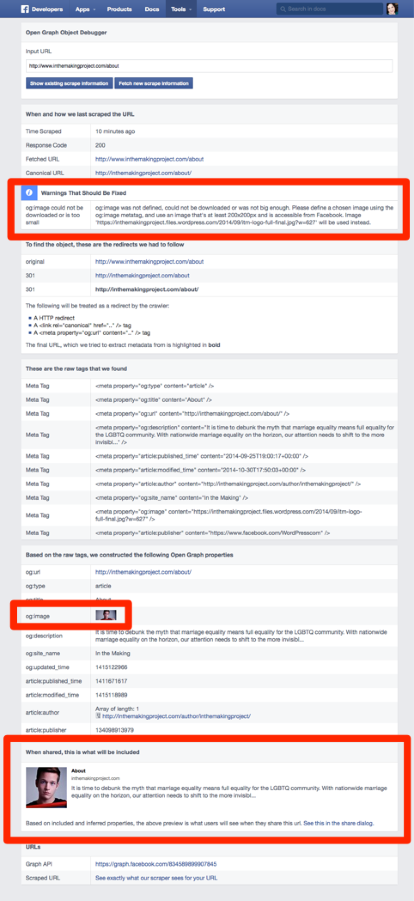
I ran your About page through Facebook’s debugging tool.
This is the error your og:image gives:
og:image was not defined, could not be downloaded or was not big enough. Please define a chosen image using the og:image metatag, and use an image that’s at least 200x200px and is accessible from Facebook. Image ‘https://inthemakingproject.files.wordpress.com/2014/09/itm-logo-full-final.jpg?w=627’ will be used instead.
og:image is the special tag Facebook looks for, from which it pulls the sharing thumbnail.
When you look at the browser source you can see that your site is actually serving up the correct featured image to Facebook:
<meta property="og:image" content="http://inthemakingproject.files.wordpress.com/2014/09/in-the-making.jpg?w=1200" />For some reason, Facebook doesn’t like the image and has chosen to override it with your site logo as the sharing thumbnail.
Unfortunately sometimes Facebook does this for no clear reason. Your featured image is larger than 200 x 200px, and it’s correctly tagged.
One thing you can try doing is uploading a smaller version of your featured image and see if that helps at all. I know it sounds counterintuitive since FB is saying your image is too small, but we know that’s not the case since the original is well over 2000px wide:

Could you try shrinking it down to about 800px wide, reuploading it, and seeing how that goes?
-
Thanks again. I just reuploaded it with an image that has the dimensions of the thumbnail. Still not working.
What’s odd is that Facebook is choosing my OLD site header, a file that I deleted a while ago from my media. So, it’s not even defaulting to an image that’s actually on the page. Is there a way to permanently delete that image on your end so that at least it defaults to something else?
-
Is there a way to permanently delete that image on your end so that at least it defaults to something else?
I used a special tool we have to completely wipe this image from our server caches:

Let’s give it a couple of hours before trying again with Facebook sharing.
Right now the Facebook debugger is still giving the same error on the image:
(you need to be logged into Facebook to use the tool)
You can see how Facebook is picking up the right sharing thumbnail, even though the debugger says there’s a problem with it:
-
Thank you! It’s working now!!!!!
I do have one more question. For some reason, when I google “In the making project harvard,” which are very clear key words for the website, I’m not seeing any results for my webpage at all. Any reason why this is happening, or ways I could address this issue?
Thanks,
Curtis -
Thank you! It’s working now!!!!!
Excellent!
I do have one more question. For some reason, when I google “In the making project harvard,” which are very clear key words for the website, I’m not seeing any results for my webpage at all. Any reason why this is happening, or ways I could address this issue?
Getting your site to come up for the particular keywords you desire is an art and a science, and not something you can ever completely control. :-)
That said, if those are your target keywords, I’d definitely recommend using “In the Making Project Harvard” as your site title, as it’s much more specific than just “In the Making,” which is what you have now. Search engines place a lot of importance on the title tag, which will pull in your site title automatically.
I’d also suggest checking out these guides to learn more about SEO and WordPress.com:
http://en.support.wordpress.com/search-engines/
http://en.blog.wordpress.com/2013/03/22/seo-on-wordpress-com/
http://en.blog.wordpress.com/2014/05/02/seo-quick-tips/
http://en.blog.wordpress.com/2013/10/29/stats-wrangling-v/ (the whole series on stats is good)Good luck!
-
Thanks for this. I will look into this.
Another question: On my homepage (the gallery page), when your cursor goes over any of the images, it displays the html that I put in the title field. Is there a way to change what shows up here without changing what’s in the title field?
-
Another question: On my homepage (the gallery page), when your cursor goes over any of the images, it displays the html that I put in the title field. Is there a way to change what shows up here without changing what’s in the title field?
No, there isn’t. Title attributes are meant to be displayed that way. :-)


- The topic ‘Harmonic theme remove featured image’ is closed to new replies.
 WordPress.com Forums