

Harmonic Theme Title and Project Issues
-
Hi! I’m unable to get the title of my blog to appear. I’m using the theme Harmonic and I really like the way the title is displayed in the demo. I can not find any way to get it to appear. Also, I am having trouble with the Projects section of my site. I tried to add a photo gallery to it but it is not appearing on the front page like it should.
I would be extremely grateful for any help or advice.
Thanks!
LizzyThe blog I need help with is: (visible only to logged in users)
-
Your detailed theme description page is here https://wordpress.com/themes/harmonic/ and you can use it to set up your site.
Provided you are logged in as Admin http://en.support.wordpress.com/user-roles/#administrator under the exact same username account that registered the blog then you can to access the blog’s dashboard and navigate to > Settings > General.
The Site title (blog name) and/or the optional Tagline can be changed on the top of this page at any time. > Settings > General … “save changes”. That is exactly where search engine spiders look for the site title and removing it from there can cause issues with getting your content indexed. Note that the site title (blog name) and blog address URL do not have to be the same but it’s better for SEO (search engine optimization) if they are the same.
I’m also tagging this thread for a Themes Staff follow-up as yours is a private blog and we Volunteers cannot view it.
-
Hello! I just changed the settings so you can see the site now. I have a “title” for the site. It shows up on the top of the page but not on the first picture like in the demo. The subtitle is showing up though.
On the bottom of the page, you’ll see the glitch where the projects section is just a white bar. -
I have a “title” for the site. It shows up on the top of the page but not on the first picture like in the demo.
Looks like your title is showing where it should, at the upper left of your homepage.
In the demo, the word “Harmonic” within a rectangle that sits on top of the large image is a Site Logo graphic, and unconnected to the site title. If you’d like to upload your own graphic, you can do that in the Customizer, through the uploader in the Site Title section.
I made a couple of screenshots to show you how things fit together:
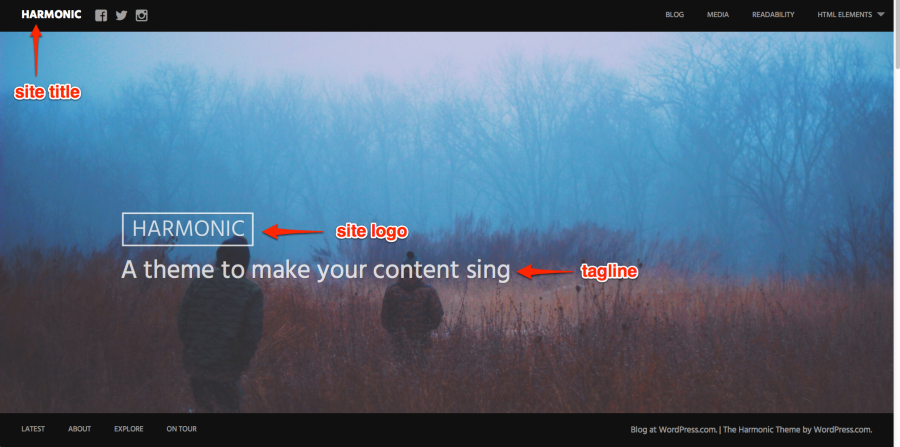
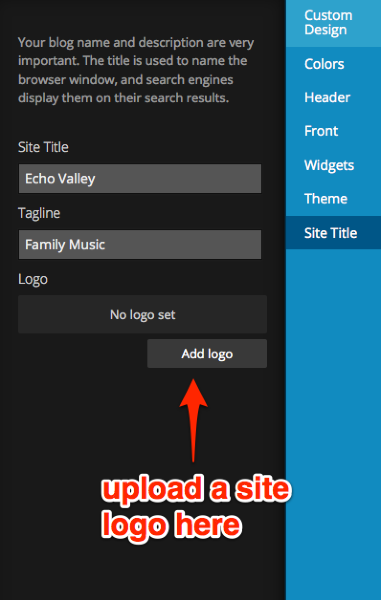
I’ll look at your projects next.
-
The portfolio section on the front page is designed to showcase one image per project. So instead of adding a multi-image gallery to a single portfolio project as you have now, you could try adding one image per project instead. Insert the image both within the post and as featured image to display the same image on the front page and on the individual project page.
Alternatively, add a featured image to your current gallery and it should be displayed on the front page. When you click on the featured image you should then see the full gallery on the individual project page.
Let me know how it goes or if you need further help.


- The topic ‘Harmonic Theme Title and Project Issues’ is closed to new replies.
 WordPress.com Forums