

Harmonic: title page no longer exists therefore the theme is shit?
-
I’m using your template on WordPress.com. I can’t change anything in title page because it no longer exists in theme options, customiser. Therefore, a random picture under the theme appears and I cannot use your main feature.
It cannot be changed as there is no title page. The link to making your front page, as the main theme feature, involves section 1 as title page. Yet it doesn’t exist. Hence, the instructions are now void. Providing such links will be both irritating and pointless, as the .org admin have done just that, while handballing the problem to the .com site. I don’t understand why it’s so difficult to create a basic, free site with this template and to then ask for help from WordPress. I don’t care about the reasons between .org and .com support that really doesn’t make sense to the end user.
There seems to be an issue with the theme itself.The blog I need help with is: (visible only to logged in users)
-
Hi,
With the Harmonic theme applied, and the Front Page template assigned to the front page, the site title now appears above the Title section background in the black navigation bar that contains menus assigned to the primary menu area. I agree that this is a bit odd. As a workaround you may use the tagline field at Customize > Site Identity for your site title. If you do so, then make sure that the “Hide Tagline” box at Customize > Theme Options > Title is unchecked.
The link to making your front page, as the main theme feature, involves section 1 as title page. Yet it doesn’t exist. Hence, the instructions are now void.
Please quote the instructions that you are referring to, cite the source (which WP.com support page, for example) and then add a “modlook” tag to the sidebar at right here to call for staff attention.
I can’t change anything in title page because it no longer exists in theme options, customiser.
Items in, around, or overlaying the title page on the Front Page template may be modified at the following locations:
- Customize > Site Identity — Here are fields for the site title (see above), tagline, and logo.
- Customize > Theme Options > Title — Here you may add a background image, background shade and hide the tagline if one is set.
-
-
Hi Alex, were you able to sort this out or is there still an issue somewhere? I want to make sure you’re all set.
Right now I can see the Title section in the Customizer’s Theme Options area, and the image that’s uploaded there is being displayed on your site:
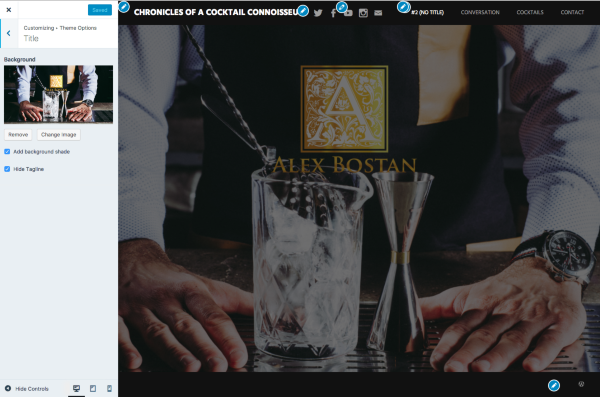
Please let me know if you’re set with this or if you need a hand with something else, just let us know.
musicdoc1 – thanks for pitching in, as always.
-
Hello
I cannot see if my title page is working, as I am on an apple tablet and when I preview the site, the background image selected for title screen is oversized.
Can this be fixed?
-
Hi Alex, I had a look at your site on my iPad mini and things look as expected on this end, so it would be helpful to know what you’re seeing, and how it differs from what you’re expecting to see.
Harmonic has several optional panels that you can scroll down on the homepage. On your site, you’ve opted to display the Title, News, Page, and Portfolio panels. I see all these panels OK when scrolling down your site, on both desktop and the iPad.
Would it be possible to upload a screenshot from your iPad so I can better understand what you’re seeing on your end? Here’s a guide on how to make a screenshot:
http://en.support.wordpress.com/make-a-screenshot/You can upload the screenshot – in a graphic format like JPG, PNG, or GIF – in your Media Library so I can see it. Thanks.


- The topic ‘Harmonic: title page no longer exists therefore the theme is shit?’ is closed to new replies.
 WordPress.com Forums