

Has image editing changed?
-
As of last night, my editing environment has suddenly changed preventing me obtaining the desired appearance for my images.
Previously, when I clicked on an image, two coloured icons appeared in the top left corner for edit or delete. Edit allowed me to change the size of the image displayed on the screen to 90%, 80% etc while the size of the underlying image was unchanged if the user clicked on it. I could also specify a larger image as the underlying image.
What I get now are two black and white icons on the top right that only allow the [Add Media] options – images on the screen can be full-sized, large, medium or thumbnail only.
I hope this is not a change in the interface because if so it is a catastrophic one for me.
How do I get back the editing options I am so familiar with?
The blog I need help with is: (visible only to logged in users)
-
Hi there!
There have been recent changes to the image editor. We no longer have an Advanced Settings pane for image settings. We have also disabled the image border feature. You can read more about the on going conversation about these recent changes here:
If you’re interested in sharing your thoughts on these changes, you can post a response in this thread:
https://en.forums.wordpress.com/topic/image-resize-1
You can now edit your image size by dragging the boxes that appear around the outer edge of your image when you click on it:
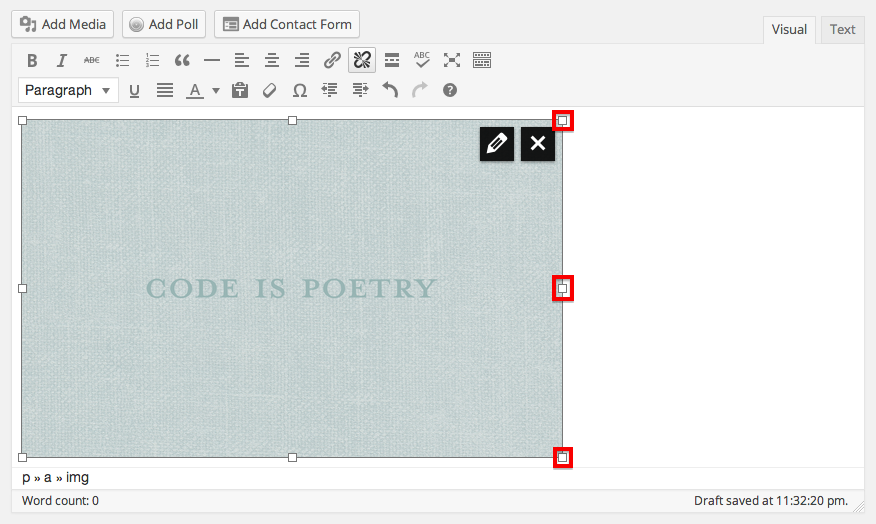
Let me know if I can answer any other questions for you!
-
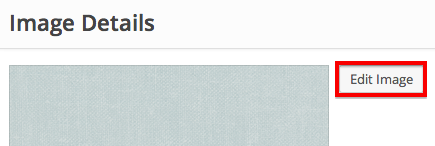
I’m sorry, I forgot to include another way you can change the size of your image. Once your in the image editing menu through the pencil in the upper right hand corner of the image, click on Edit Image:
Then you can crop or scale the image:
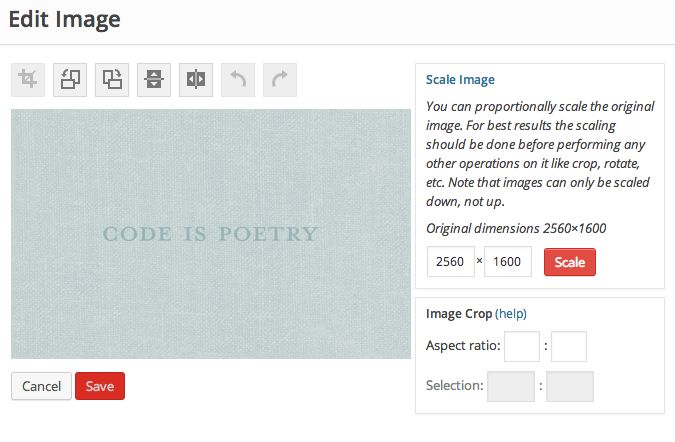
Let me know if I can help with anything else!
-
I found the other thread and have participated in it. The main problem I have remains that I am unable to systematically resize my images, as the old percentage resizing interface allowed.
I repeatedly tried resizing images through the new [Edit Image] and could never get it to work, either immediately on the screen on in preview.
-
I should add that the new [Edit Image] resizing capability is not a substitute for the old percentage resizing capability, even if it did work, because it requires far more keystrokes per image and a manual calculation of what you should resize to.
-
I have also put a request for automated scaling in the other thread with an explanation of how to do this: https://en.forums.wordpress.com/topic/image-resize-1/page/6?replies=169#post-1715382
-
Great! We have several staff members monitoring that thread and passing on feedback to our developers. Its really helpful to have all of our users commentary in the same place so we can tell what’s most important to you!


- The topic ‘Has image editing changed?’ is closed to new replies.
 WordPress.com Forums