

Have I got a domain mapping problem?
-
Hello:
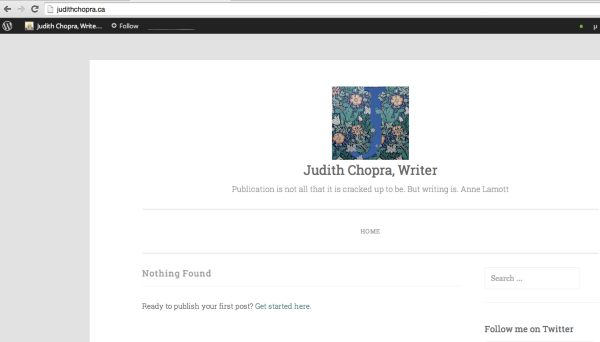
My domain is judithchopra.ca. I recently mapped it to WordPress.com. On my dashboard, I have created and can view two new pages, but on the domain, all I see is a jumble I created through WordPress.org. Is there a mapping issue, because my dashboard still shows (email visible only to moderators and staff) as my primary blog–I don’t want it to be and I don’t need it. Please advise.The blog I need help with is: (visible only to logged in users)
-
Although judithchopra.ca has been registered, it is not using WordPress.com nameservers.
WordPress.com does not accept domain transfers but mapping an existing domain is possible.
Domain mapping of an existing domain URL that you already own and purchased elsewhere is not done free of charge. You will have to renew the domain name purchase where you made it and the domain mapping purchase here every year.
Important Notes Before Upgrading http://en.support.wordpress.com/domains/#important-notes-before-upgrading
Mapping an existing domain costs $13. annually. In order to map to a domain one must have an underlying .wordpress.com subdomain blog to map from and it does not matter what that underlying .wordpress.com URL is. It does not have to match the domain URL. If you have registered a .wordpress.com blog you log in as Admin under the exact same username account that registered the blog and purchase a domain name by purchasing an annually renewable domain mapping upgrade for the blog.
See here for mapping an existing domain that you already own http://en.support.wordpress.com/domains/map-existing-domain/
Dashboard > Store > My Upgrades is where you do the primary blog set up knowing it can take between 24 – 72 hours for domain name propagation to take place throughout the internet. You can view the DNS changes here > http://www.whatsmydns.net/ What’s important during that stage is to be patient.
-
Thank you. Just to clarify:
I paid to map the existing domain. Now I know that I need the subdomain, but it still appears as a primary domain in at least one place. I’m well past the 72-hour point now. -
TimeThief’s response doesn’t address my issue. I am stuck, having purchased the domain mapping upgrade, but still seeing the old wp.org rubbish instead of my new pages. Please help.
-
I’ll tag this thread for Staff assistance because I do not know how to help you. Another Volunteer may answer prior to Staff but I tagged the thread so it will not fall through the cracks and escape attention. Please subscribe to the thread so you are notified when they respond and please be patient while waiting.
-
Hi there,
I’m a bit confused as to your situation. The reason why you are seeing your old WordPress.org site when you visit: judithchopra.ca is your nameservers are set to GoDaddy as @timethief mentioned. It is not pointing to us:
- NS1.WORDPRESS.COM
- NS2.WORDPRESS.COM
- NS3.WORDPRESS.COM
If you want that domain (not the subdomain) to point to your new WordPress.com site: tumnuswriter.wordpress.com, please contact your registrar and have them change the nameservers to us.
If you want to map a subdomain, your registrar would need to add a CNAME record (not change the nameservers). Please take a look at the link below for more information:
Let me know if you have any questions with this!
-
Thank you. I’ve made that change and I’m waiting for it to take effect. I did make it earlier, but perhaps not in the correct place.
-
I just checked and they are currently still set to GoDaddy. Once it’s changed, clear out your cache and cookies using the guide below:
Then you should be set!
-
Hello: I have made the change on Hosting.com (I’m not using GoDaddy) and it shows–
JUDITHCHOPRA.CA View Domain List
All domains list (1)
Status: Active|Created: 7/6/2014|Expires: 7/6/2015|Folder: None|Profile: None
Renew
Manage Auto-renew Settings
Renew Domain
Upgrade
Buy & Sell
Get Domain Appraisal
Account ChangeDelete
Settings
DNS Zone File
Contacts
Domain Settings
Auto-Renew Standard: On
Extended: Off
ManageLock On
ManageNameservers NS1.WORDPRESS.COM
NS2.WORDPRESS.COM
NS3.WORDPRESS.COM
Updated 11/5/2014
ManageForwarding Domain: Off
ManageI’ve also cleared my cache. But there’s no change…. Have I missed something else?
-
-
-


- The topic ‘Have I got a domain mapping problem?’ is closed to new replies.
 WordPress.com Forums