

Having difficulty reordering blocks in the new block editor
-
Hi,
I am trying out the new block editor on WordPress.com and am having some difficultly reordering the blocks that I have added.
This article –https://en.support.wordpress.com/wordpress-editor/#adding-a-block –
says that I can move them around by “clicking and holding the six-dot-grid near the top-left corner of each block, or use the up and down arrows to bump a block one spot in the direction you want”.
However I can’t seem to bring up those options, I get the + icon for adding blocks when I move the cursor around the page, but clicking on any blocks or hovering over them does not produce the move buttons.
Does anyone have any ideas?Many thanks,
ConorThe blog I need help with is: (visible only to logged in users)
-
Hi Conor,
Are you accessing the editor via My Site ->Blog Posts, or via WP-Admin? Can you point me to a specific post where this is happening? Just the title of the post is necessary – we can access it on our end even if it’s only a draft.
This is what you should be seeing:
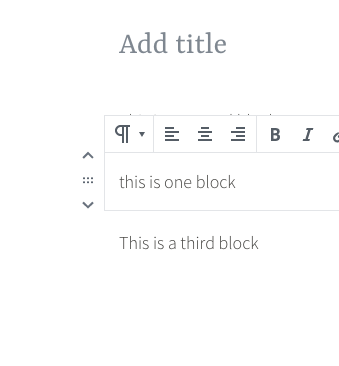
That will only appear if you have more than one block in the post already.
Can you check if switching to a different browser makes any difference?
-
Hi,
Thanks for your help.
Here is the page I am trying to edit
https://tryingwordpress999.wordpress.com/wp-admin/post.php?post=49&action=edit
The picture you showed there, with the up/down arrows, is exactly what I was missing – but I have just figured out what was happening – I had “Spotlight Mode” turned on (accessed from the 3-dot toolbar on the top right).
Turning “Spotlight Mode” off made the up/down arrows and move buttons appear again.
Apologies for that, it is my first time playing around with the new block editor so I’m still getting used to it. And there might be a case for having those buttons available even in spotlight mode – even if someone is just focusing on one block they may still want to move it around!
Thanks for your help!
-
Thanks for letting me know you figured it out.
Apologies for that, it is my first time playing around with the new block editor so I’m still getting used to it.
No need to apologise. We’re all still getting used to it, and at this point it’s changing every few days as updates and bug fixes are being merged, so it’s a learning process. I didn’t even think to consider spotlight mode, so you ended up teaching me something :)


- The topic ‘Having difficulty reordering blocks in the new block editor’ is closed to new replies.
 WordPress.com Forums