

HD video
-
Hello,
I tried to upload video to my blog (I activated videopress) but the video looks very poor.
It’s movie form iphone 5S (1280×720 H.264 codec AAC) On the computer video looks ok but after uploading on blog, quality is very bad.
I also put link to the same video on vimeo. On vimeo You could watch it in HD but in blog not.Please help :)
The blog I need help with is: (visible only to logged in users)
-
Howdy!
Can you point me to the post on your blog where you’ve posted these two video comparisons? I can’t seem to find them in your recent posts.
-
Hello there!
I didn’t posted the video because of the quality.
I’m sending You link to vimeo and video via wetransfer.
Maybe You’ll know what to do. I will appreciate it.vimeo: https://vimeo.com/96481509
wetransfer: http://we.tl/sukUAdwfJtall the best
łukasz -
Hi łukasz,
Can you upload the video to your Media Library instead?
Let me know once you’ve done that!
-
-
Hi!
When I view your video after enabling HD in the top right-hand corner of the player as shown here:
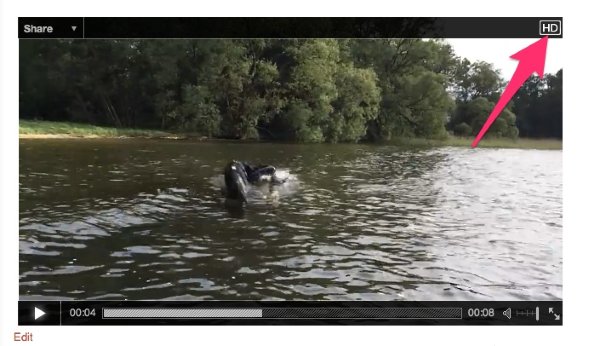
The Vimeo and the VideoPress upgrade look to be comparable in quality. Can you give this a try and let me know if you see a difference?
-
Hello Jereme
Could You please show me the video with movement. How can I upload video in HD?
best
łukasz -
Hi,
You don’t need to do anything specific when you upload the video. Instead, when you’re playing it within the VideoPress player, you can just click the HD icon. I’ve uploaded an example video of how to operate in HD in the VideoPress player to your Media Library. Here’s the direct link:
https://intuilik.wordpress.com/wp-admin/post.php?post=306&action=edit
Check out that video and let me know your thoughts!


- The topic ‘HD video’ is closed to new replies.
 WordPress.com Forums