

Header displays improperly in Bosco theme.
-
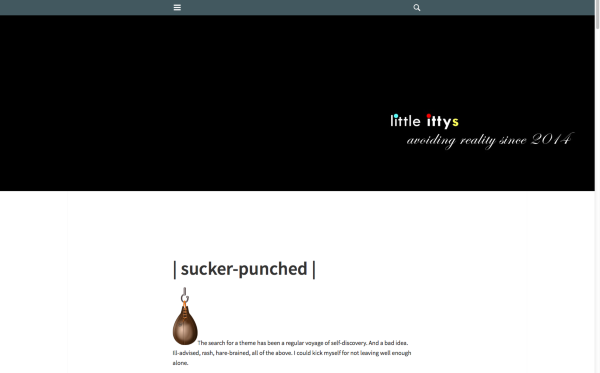
littleittys – I’ve reported the issue with the Bosco header to our developers. It looks like it displays correctly when “Display Header Text” is checked, but it’s cropped when that box is unchecked.
publikworks – could you please provide a link to your site running Bosco and ideally start a separate thread? I haven’t been able to replicate the issue you’ve reported so I’ll need more information to troubleshoot further. (The only site I see on your account is running Suits at the moment.) Thanks.
-
-
Hi! Thanks for sticking with it. And yes, it does display correctly when the site title and tag box is checked, but looks like a really dumb mistake. Then, when the box is unchecked, the box collapses to half its horizontal size. Gah!
The site running Suits is the one I wanted to try Isola on. But since the header image was so wonky, I elected not to publish it that way. Would you like me to switch temporarily so you can take a look at the issue?
-
Hi,
we deployed a fix, so that image in the header displays in its entirety.
Enjoy the theme.
Cheers,
Fränk -
littleittys – your Bosco header should now look a lot better! If you’re happy with it, no need to switch themes. I’d like to troubleshoot any Isola issues separately with publikworks in a new thread, since it’s a different theme and a different issue.
-
-
-
Sorry, I had to bail on Bosco. Adding images to posts, particularly when using the Unaligned option, went wonky and the background repeatedly defaulted to a dark gray.
So I switched to Isola and, as expected, the header image expanded wildly. Everything else went smoothly, though, and looks every bit as terrific. Can I fix the header?
-
Sorry to hear about the issues in Bosco – if you’d ever like to return to Bosco and troubleshoot those things, let me know and I’d be glad to help.
Your header looks good to me at the moment, so I’d like to get a better understanding of what the problem is.
This is what I see in Firefox 39 at a browser width of 1538px wide:
Would it be possible to upload a screenshot to help in troubleshooting?
Here’s a guide on how to make a screenshot:
http://en.support.wordpress.com/make-a-screenshot/You can upload the screenshot – in a graphic format like JPG, PNG, or PDF – in your Media Library so I can see it. Thanks.
Let me know what browser, version, and browser window size you’re using – you can get all those details here: http://supportdetails.com/
-
-
Ready. The screen grabs, both Firefox and Google, are in my media library. But I think you’ve already solved it. How do I reset the browser width? In the View tab of both browser Actual Size is selected, but clearly something is amiss. Could that be the issue?
-
-
Thanks for the screenshots, very helpful!
I see the same effect on my end when I make my browser window smaller.
Since Isola is designed for a large custom header, which is used as a background image, edges of the image may indeed get cropped on smaller screen sizes. Custom headers that work best in this type of theme are more flexible, decorative or abstract, so they can handle this sort of cropping.
Two options:
– you could try moving the logo portion of your image further to the left within the image.
– you could try using a theme that supports the site logo feature, so your image will never be cropped or stretched. The site logo feature is meant for images like yours, that include important text or can’t tolerate cropping.
-
Thank you. I’ll play around with it and see if I can make Isola work. If not, the search continues. I appreciate your appreciate your patience.
-
-
Okay, shoot me if I ever change themes again. I’ve returned to Bosco and all it looks like a million, except for the dark gray background. I’ve selected white and it appears to be white until it’s saved and published. It’s me, isn’t it?
-
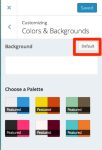
Clicking “Default” in the Customizer’s Colors & Backgrounds panel worked to return the background to Bosco’s default white:
If you have any further trouble with it, just let me know!
-
-
-
There’s one tiny, insignificant detail that doesn’t really need to be fixed. I’m just bringing it to your attention. When I’m on the homepage, and hover on the gravatar at top right, the sign out is misaligned. It works perfectly, though. I’ve had no more problems and I like the look. It’s a keeper. Thanks, kathryn!


- The topic ‘Header displays improperly in Bosco theme.’ is closed to new replies.
 WordPress.com Forums