

Header image in Twenty Ten theme
-
I’m using Twenty Ten theme. For the “Header” image, it gives me an option to “randomise suggested headers”, but what i really want to do is randomise the header images I’ve uploaded. Can you help?
The blog I need help with is: (visible only to logged in users)
-
Hi there,
You should be able to accomplish this by selecting the option to randomize the header images you’ve uploaded as shown here:

This should only shuffle through the images you have uploaded (not through the stock images). Does that make sense?
Let me know if you have any additional trouble!
-
Thanks for your reply.
I can’t find where this is within the dashboard.
If I go to “Customise”, then select “Header”, it shows me “Current header”, then “Previously uploaded” (my images), and “Suggested” (the stock images) – but only gives me an option to “Ramdomise suggested images” (the stock images).
Perhaps I’m looking in the wrong place?
-
You’re in the right place! When you hover over your uploaded headers and scroll to the bottom of the “Previously uploaded” section, you should see the following button:
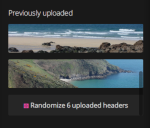
If you check that, it should randomize your uploaded images. Can you give that a try and let me know if it works for you?


- The topic ‘Header image in Twenty Ten theme’ is closed to new replies.


 WordPress.com Forums