

Header images please help
-
Hi,
I added a header image which I want to remove from my site to add a new one. I have deleted it from media library and under the “customize” section there is no image selected, yet the image still appears. Can anyone help me get rid of the bloody thing?
Running the Twenty twelve theme.
Thanks
The blog I need help with is: (visible only to logged in users)
-
-
-
-
You might also try going to Appearance>header on your Dashboard. If it’s still showing up there, click remove header image.
If it’s not showing up there either, you might try loading a different header image and then removing it (assuming you prefer to have no header image at all.)
Good luck!
-
@doug11214
Don’t use the customize at all. Use this direct link > Appearance > Header like lizthfair suggested above.In your case here is that link
http://becomingaperson.com/wp-admin/themes.php?page=custom-headerIf you still see it after that then that means you have not cleared your browser cache http://en.support.wordpress.com/browser-issues/#clearing-your-browser-cache
-
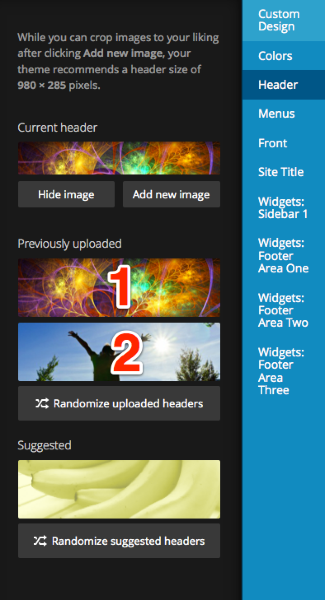
Hi Doug – is removing the header image still an issue? If if is, I’d like to try removing the image in your Customizer myself, so could you let me know if the image you want to remove is either of these two? Thanks.


- The topic ‘Header images please help’ is closed to new replies.
 WordPress.com Forums