

Header shows mysterious image not in my media library, doesn't show my selection
-
Theme: Harmonic. Beautiful theme, but will not display my uploaded and selected and saved-as-header image (jpg; size, dpi, correct). Displays a mysterious image that is not in my media library; I don’t even see it in the theme previews. I have reloaded it several times. Heeelp!
The blog I need help with is: (visible only to logged in users)
-
Volunteers cannot view private blogs and I don’t comprehend what you are on about here. That’s why I tagged this thread for Staff assistance. Please subscribe to it so you are notified when they respond. To subscribe:
1. Look in the sidebar of this thread and find the subscribe to topics link.
2. Look below the comment box:
_ Notify me of followup posts via e-mail -
Hi there – the reason why your blog header isn’t being displayed correctly is that you haven’t yet selected a Posts page, as you can see here under Settings > Reading:
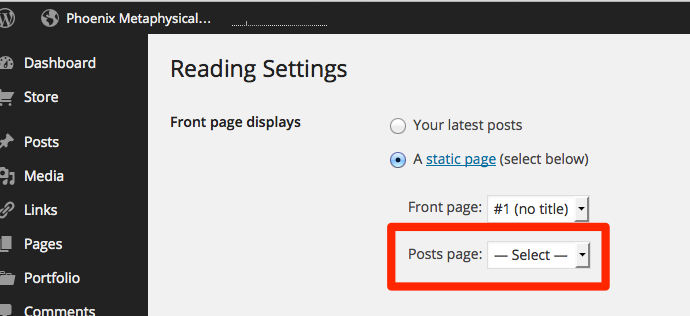
You’ll need to create a blank placeholder page for the News/Blog section and then select it from the dropdown menu.
There’s a full guide here if you’re not sure how:
http://en.support.wordpress.com/pages/front-page/Once you do that, your header will be displayed at the top of the blog index, as well as category, date, and tag archive pages.
Let me know if you need further help.


- The topic ‘Header shows mysterious image not in my media library, doesn't show my selection’ is closed to new replies.
 WordPress.com Forums