

Header, widget problems on Expound theme
-
I’ve got the Expound theme set up on my private test blog (https://windwhistle.wordpress.com) and have a couple of problems.
My header image does not link back to the home page. Yet it seems to do so on other blogs using Expound. Don’t understand why mine doesn’t.
The widgets I’ve set up via the Dashboard offer no Visibility setting. But if I look at them from the Customizer bar that slides in from the right, they do show a Visibility tab.
I’ve long thought I might switch to this theme, but won’t do it if these problems can’t be resolved.
The blog I need help with is: (visible only to logged in users)
-
I use this theme on my blogging tips blog.
1. It’s not the header image that links back to the Home page. It’s the site title that links to the Home page and this is not just on the Expound theme.
2. Yes and … ? lol :D
-
I’ve encountered that with other themes and passed over them because of it. So your header is, in effect, a background image with the default type over it? It’s odd that there’s an option to turn off the header text if it’s the only link to the home page.
I suppose it’s something I could fix with CSS but I was hoping that wouldn’t be necessary.
Oh well, thanks for the input.
-
-
Hi windwhistle,
I have Expound, too (http://loopbraider.com/). I really like the way the homepage displays the posts.
Aside from the title being a link to the homepage, I also made the first tab in my upper menu a “homepage” tab to make it easy for readers to get there. -
@ windwhistle,
The widgets I’ve set up via the Dashboard offer no Visibility setting. But if I look at them from the Customizer bar that slides in from the right, they do show a Visibility tab.
I’ve yet to find a widget at the Appearance > Widgets page without Visibility settings. Which widgets are lacking Visibility options on your widgets page?
-
The widgets I’ve set up via the Dashboard offer no Visibility setting.
Let me know if you’re not seeing the Visibility button:
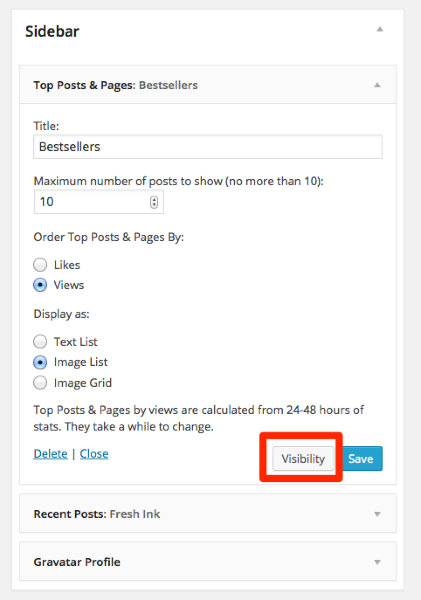
-
@kathrynwp
I figured it out. The Visibility button does not show if the page is in “accessibility mode” (per Screen Options). It does show in normal mode, with accessibility mode disabled. WP might want to look into that. Seems to me it should show in both modes. -
@kathrynwp
I meant to add that I’m on a Mac and it works that way in both Chrome and Firefox. -
I’m glad you found the Visibility option. Our developers are aware that it’s not currently available in accessibility mode and we have a request in for that to be amended, but I don’t have an ETA on when it might change. If it does, we’ll keep you posted here.
-


- The topic ‘Header, widget problems on Expound theme’ is closed to new replies.
 WordPress.com Forums