

Help! Blog using wrong Twitter handle on Share button
-
Hi,
I’m having the same issue with my posts on amillionchinchillas.wordpress.comPages show the new twitter handle, but old posts show my old twitter handle. The correct twitter name should be @chinchillatech
Thanks.
-
-
-
-
Greetings. I would love to get the exact same issue fixed. When I share from jaysondbradley.com it’s sharing @jaysongbird instead of @jaysondbradley.
If you could remedy this, I’d be forever grateful.
-
-
Hi – Im facing an issue similar to the ones above.
When I share my wordpress blog post to twitter, it picks up the wrong twitter handle @unlikedesign instead of this correct one @unlikedesignco / Could you please help me out on this – I tried deleting and re-establishing the share settings between wordpress and twitter but the problem remains. -
-
Hi @gracejiyoung! Thanks but this only seems to have corrected the “via @unlikedesignco” problem. When the post appears on twitter – it again credits the author as @unlikedesign instead of @unlikedesignco / here is the link for you to see: https://twitter.com/unlikedesignco/status/460876440330706944 / I’m sorry to bother in case this is a twitter issue and not a wordpress one but I could really do with some help. Thanks so much!
-
@unliked-
Currently I am seeing @unlikedesignco as seen here:
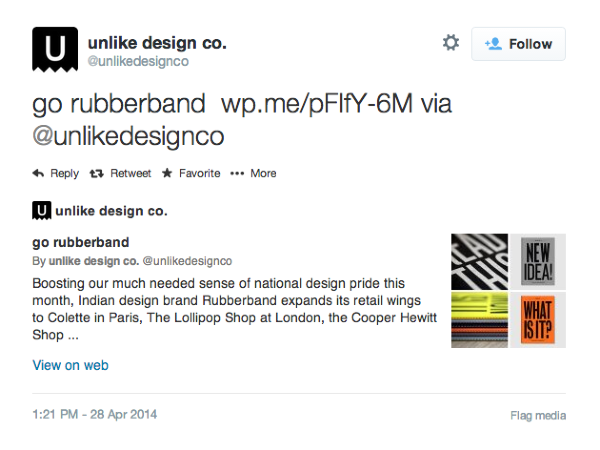
If you are still seeing @unlikedesign can you please try clearing out your cache and cookies using the guide below?
Cheers!
-
@gracejiyoung – Yes, the problem has gone away from the previous share. I don’t see the wrong attribution anymore – however, the problem is repeating for a new share from the blog. For example, I just shared this from my wordpress blog: https://twitter.com/unlikedesignco/status/460883565140385792 and in this case the author is wrong again (@unlikedesign)
Thanks for giving this your time. -
Hi there,
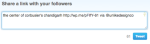
That’s strange! Can you please try one more time? I just tried to share that same post via Twitter and was able to see your new Twitter handle as seen here:
-
@gracejiyoung – of course that bit is now corrected and I see it exactly as the screenshot you sent – so that part is okay (just before pressing the tweet button)
The problem is after the share – once the tweet appears on twitter. In the case of recent similar tweets (shares from wordpress), I ran the urls through this link: https://dev.twitter.com/docs/cards/validation/validator
And the issue was resolved for those particular urls only which I ran through the twitter card validator.
For twitter shares of other blog posts (the ones i did not run through the validator), the eventually posted tweet still shows the author as @unlikedesign on the twitter page. The intermediate window that shows just before the share is complete is okay and you solved that issue for me yesterday.
Heres the link to the problem issue/tweet: https://twitter.com/unlikedesignco/status/461128449864642560
(Notice that the wrong author – @unlikedesign is used at three places, even though the tweet text says “via @unlikedesignco”) -
Ah I see what you’re saying. I believe that post was created under the old Twitter handle? I see that post was published back in November 2013 – I originally thought it was a brand new post.
The author information reflects the display name and Twitter handle that was there at the time the post was published. There’s no way to change it, but it should reflect the correct one for posts you publish going forward.
-
hi @gracejiyoung – well actually that wrong twitter handle is not mine at all, and even though the original post on wordpress is old, the share on twitter is brand new – i only shared that last night to show you how it attributes to a wrong author. i still had the same handle (@unlikedesignco) back in november 2013.
looking ahead, i think i shall publish a new post to check on this problem. shall only trouble you further if the problem persists.
thanks for your patience with this!
-
-
Hi, Grace! I’m a huge fan of WordPress! I see you’ve already fixed this issue for others, and I’m hopeful you can work your magic for me too…
My blog is karenblumberg.wordpress.com and my OLD Twitter handle was @SpecialKRB. New posts are being pushed to my NEW Twitter handle @KarenBlumberg through Publicize (and it’s a great feature!) However, anyone sharing my posts with the Twitter share button end up sharing with my old Twitter handle. I’ve deleted/reinstated button button and deleted/relinked my Twitter account to no avail.
Is this something you can help fix? Thanks in advance!
-
Hi there,
If the post was written under the old Twitter handle it will still show the old Twitter handle. However, I have “fixed” it so that from here on out your posts should show your new Twitter handle.
Let me know if it’s not!
-
-
@kayjonesy-
Can you give me the old and new Twitter handles with the corresponding site URL?
Thanks!


- The topic ‘Help! Blog using wrong Twitter handle on Share button’ is closed to new replies.
 WordPress.com Forums