Help for error and some CSS configurations.
-
Hello,
I’d appreciate it if you’d advise me of the following things.
I’m very begineer and easy ways are preferable.1. Error? Blog title is not shown in the top page after I put Logo image.
I’d like to it is also visible.2. Maybe CSS matters.
a. How to change number of posts on the top page for mobile.
I’d like to reduce it from 10 posts to 5 or 6.b. How to change a word in the pull-down button from “移動” to MENU.
Thank you,
YukiThe blog I need help with is: (visible only to logged in users)
-
Hi Yuki
1. No, it’s not error. It is the way themes are built. As soon as you upload the logo, it will replace title.
2.
a. No number of posts are not dependent upon the css. You need to search for the option in your theme to control the number of posts in mobile. -
Hi Safemusli,
Thank you so much for your prompt reply!
I understand about No.1.About 2, a, so how can I find the option?
The theme is Watson.Thank you,
Yuki -
Hi Yuki, right now your site is using the Infinite Scroll feature, which initially loads 7 posts, and then when the visitor comes to your site and scrolls down near the bottom, the software will load an additional 7 posts and continue that pattern until all posts are displayed. If you want to turn off Infinite Scroll, and set the number of posts per page to a static number, see our support page on Infinite Scroll. You cannot set the number of posts only for mobile visitors, the setting will affect all users no matter the system they are using (desktop, laptop, tablet, mobile).
-
Hi there,
Thank you so much for your advice!
I successfully changed the number of posts.Thank you again.
Yuki -
-
Hi again,
Great!! Thank you, so please let me ask you for a few questions as below.Both questions are about mobile page,
1. Can I put a post with thumbnail on the top as a featured post?
Though I heard a featured slider only applies to wordpress.org theme…2. In case it cannot apply to wordpress.com theme,
Can I show a thumbnail of each post on the first page just like a PC page?3. How to change pull-down menu design.
I’d like to change words from 移動 to MENU.Sorry for trouble you, again..
But need your help!Thank you,
Yuki -
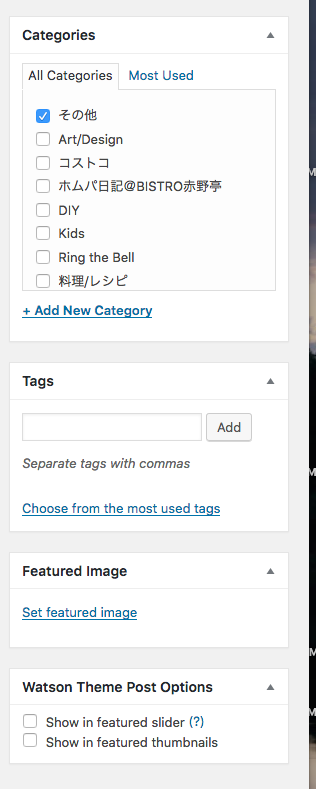
Hi, in Watson, if your front page is set to display you blog posts, you can add posts to the slider by checking “Show in featured slider” from within the post editor. The module is titled, Watson Theme Posts Option, and will typically be located in the right sidebar on the post edit page under the Featured Image module.
If you wish thumbnails to appear on your main page with each post, set a featured image for each post, and it will show up on the main page.
For the menu label, add this to your custom CSS.
.dk_toggle .dk_label { visibility: hidden; } .dk_toggle .dk_label:after { content: "Menu"; visibility: visible; margin-left: -25px; } -
Hi there,
Thank you so much again for your prompt reply.
About the menu label, I added that and it worked! Thank you.However, I can’t find “Show in featured slider” nor Watoson Thema Posts Option in my post editor. I’m using wordpress.com desktop app. ver.3.2.0.
Should I use a different editor??Thank you,
Yuki -
Yuki, I opened one of your posts in the dashboard post editor, and the module is there. Screenshot: https://cldup.com/wXML6j8U8V.png.
Try accessing your posts from the WP Admin dashboard at: https://ringthebellshop.wordpress.com/wp-admin/edit.php and it appears there.
-
Hello,
Thank you!
Now I could find the module!I set some posts to see in the featured slider, however it’s not a good idea for mobile view in terms of finding recents posts. Bit confusing.
So, scrolling is better, but I want there’s a thumbnail next to summary of every post as same as PC view.
Is it possible?Sorry to trouble you again and again..
But I need your help!Best,
Yuki -
No worries, Yuki, add this to your custom CSS and see what you think.
@media screen and (max-width: 980px) { .post-roll article.post figure { display: inline-block; } .post-content { max-width: 50%; padding-left: 20px; } } @media screen and (max-width: 720px) { .post-roll article.post figure { width: 100%; } .post-roll article.post figure img { width: 100%; } .post-content { max-width: 100%; padding-left: 0; padding-top: 20px; } } -
Hi there!
I did it!!
I really appreciate your help!Btw, as a final question, I am glad if you advise me how to change sizes of thumbnails for Top posts and pages on sidebar.
Thank you,
Yuki -
It will depend on how much larger you want the images. We can gain 25px in width pretty easily with the following.
.widgets-list-layout .widgets-list-layout-blavatar {
    max-width: 65px;
}
Wider than that and it gets a bit more complex.
Try the above and see if that will do it for you.
-
Hi there,
Thank you so much for your quick response every time!
I tried it and I think the size is OK!Finally, it’s done thanks for your strong support!
Now, I can focus on new post;)Thank you again and have a nice weekend!
yuki -
You are very welcome, and just let us know if you have any additional questions or problems.


- The topic ‘Help for error and some CSS configurations.’ is closed to new replies.
 WordPress.com Forums