Help – I'm so lost….
-
Have always been an SBI user so brand new to WordPress, really struggling on so many fronts but here are my 3 most immediate issues;
1) Changed theme from Libretto to Edin….how do I get my header text to be in my header image (like it was in Libretto and like it’s shown in the Edin example)? I don’t understand why it’s jumped down to below the header image. And why isn’t my tagline showing anymore?
2) Why can’t I always find the black dashboard screen? Where does it go? Sometimes it’ll pop up and I don’t know what I did to find it.The blog I need help with is: (visible only to logged in users)
-
Hello there,
All wordpress.COM themes are uniquely designed. Please see here https://wordpress.com/themes/edin/ and your will find the answer to your 1) question as well as set up instructions.The Admin link is here http://caricorbetowen.com/wp-admin/
Bookmark it. :) -
-
-
caricorbetowen – let us know if you need any help after looking at the Edin setup guide.
To start getting it looking like the Edin demo, you’d need to assign the front page to the Front Page template (currently it’s assigned to the Full Width Page template) and add a large featured image.
Let us know how it goes.
-
Hi Kathryn, thanks for this. Gosh what – a learning curve. So I changed the home page to the front page template but that seems to have taken away my revolving top header- which as I wasn’t able to figure out how to add text over the images, I changed the images to already include the text. So can I only have one or other other? In other words whatever image I choose for my front page or a top header image? I’m sorry this is probably such a silly question that most people would know the answer to.
Also, one of the reasons why I chose the Edin template was because of the call to action button. I have a video I’d like to link to a ‘view video’ button….in my naivety, I thought those buttons would appear there as on the template and that there would be some easy way…but I’m obviously wrong about that. How do I get those buttons?
Oh, another thing…. while I’m asking… my contact form seems to have my email etc… address in it (and not even from this site) – how do I get rid of that?
thanks so much again Cari -
So I changed the home page to the front page template but that seems to have taken away my revolving top header- which as I wasn’t able to figure out how to add text over the images, I changed the images to already include the text. So can I only have one or other other?
I’m not sure what you mean by “revolving top header” – could you explain a bit more what you’re referring to?
Also, one of the reasons why I chose the Edin template was because of the call to action button. I have a video I’d like to link to a ‘view video’ button….in my naivety, I thought those buttons would appear there as on the template and that there would be some easy way…but I’m obviously wrong about that. How do I get those buttons?
Scroll down to the Extras section to see how to add a call-to-action button:
https://wordpress.com/themes/edin/
You’ll need to flip to Text/HTML view to paste in that sample code, which you can change to your own link and text, of course.
Oh, another thing…. while I’m asking… my contact form seems to have my email etc… address in it (and not even from this site) – how do I get rid of that?
thanks so much again CariOnly you see that – no one else sees it, so no need to worry. :) WordPress pre-fills the information of users who are already logged in to save them a step. For example I see my my own name and email address pre-filled on your contact form.
-
Hi Kathryn…gosh I feel so grateful for your help…and hope I’m not going to abuse it with too many questions.
1: Thanks for the info about my contact form – I had a suspicion that might be the case. Now i have one less thing to worry about.:)
2. I found the html to add in the button – thank you, but if I go to the text html it goes into the page and not in the header image where I’d like them to appear. Also, I must be doing something wrong…because it doesn’t show up as an image of a button, just as a text link BUTTON?
3. By revolving top header – I was referring to the header images which I have loaded under the customize area and selected ‘randomize uploaded images’…. Once i’d added in a ‘featured image’ for the front page, those header images seemed to disappear. I hope i’ve been able to explain that well enough for you to understand what I mean. But thank you, I feel as if I’m at least making progress.
PS… one more thing – if there a place I can upload a pdf document for people to download? -
2. I found the html to add in the button – thank you, but if I go to the text html it goes into the page and not in the header image where I’d like them to appear.
The button is designed to be overlaid on the page’s featured image, as shown in the Edin demo — not on the header image.
Looks like you haven’t set a featured image yet – might want to try that instead of the header.
Also, I must be doing something wrong…because it doesn’t show up as an image of a button, just as a text link BUTTON?
The button looks formatted like a button to me – did you get it sorted out?
3. By revolving top header – I was referring to the header images which I have loaded under the customize area and selected ‘randomize uploaded images’…. Once i’d added in a ‘featured image’ for the front page, those header images seemed to disappear.
Ah, you mean the randomizing headers. Adding a featured image shouldn’t prevent randomized header images. If you have this issue again, please let us know.
-
Yikes, what have i done now? I removed the header image, added a featured imaged and pasted the minimal button code with a link to my video into the html text editor. This is the result:
1) The featured image is now my entire background
2) The view video button is still part of my text I I don’t see anything in the code that instructed it to be in the featured image – do I need to add something?)ps… my preview beep beep boep doesn’t work, it just keeping saying beep beep boeping
-
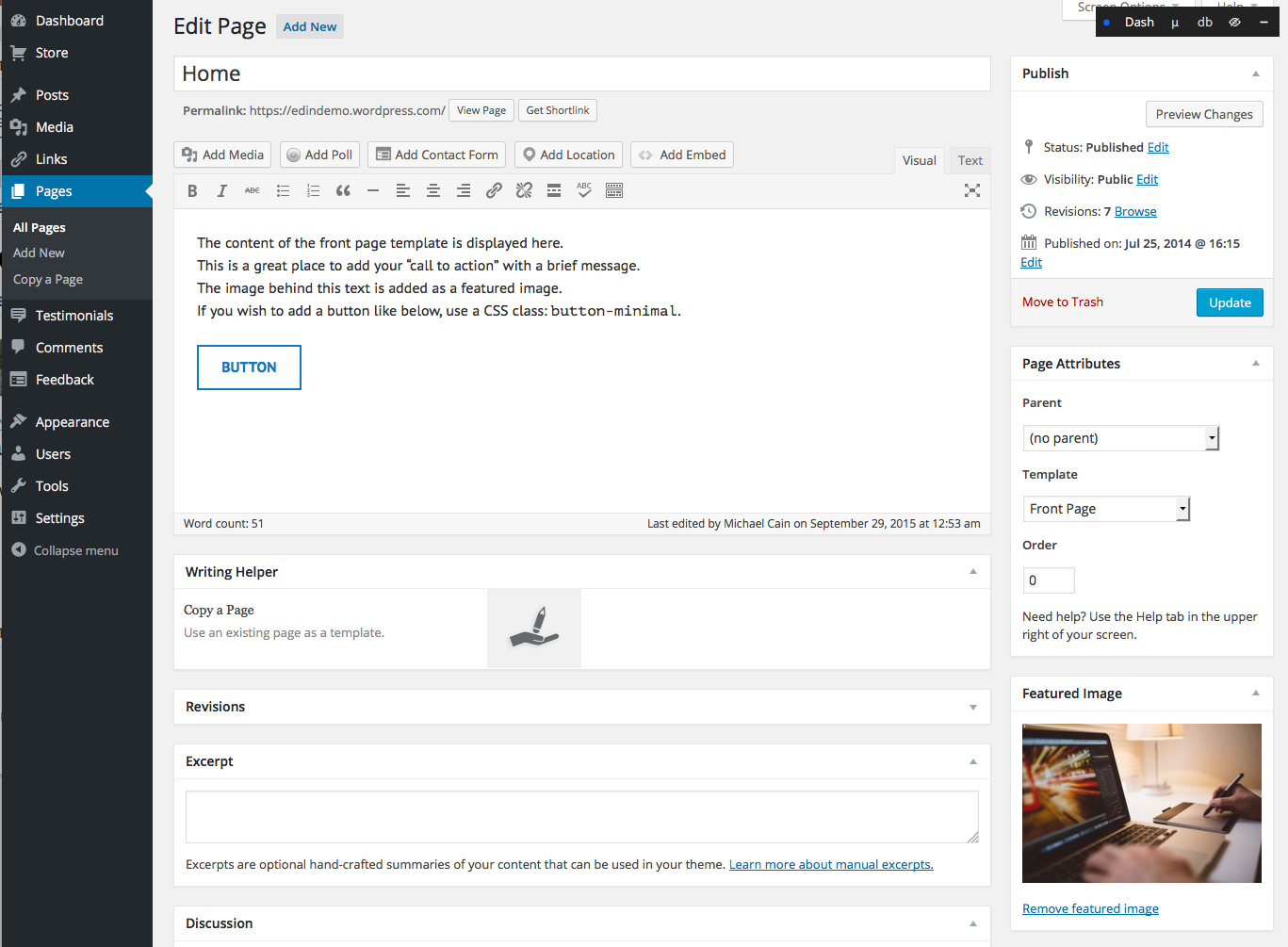
Hi @caricorbetowen, the Front Page template in Edin is designed to have a short bit of content that will show overlaid on the featured image for that page, along with the call to action button. Here is what the content of the Front page of Edin looks like in the wp-admin editor: https://cldup.com/whIxqPPwij.png , which you can compare to the Edin Demo front page here: https://edindemo.wordpress.com/ .
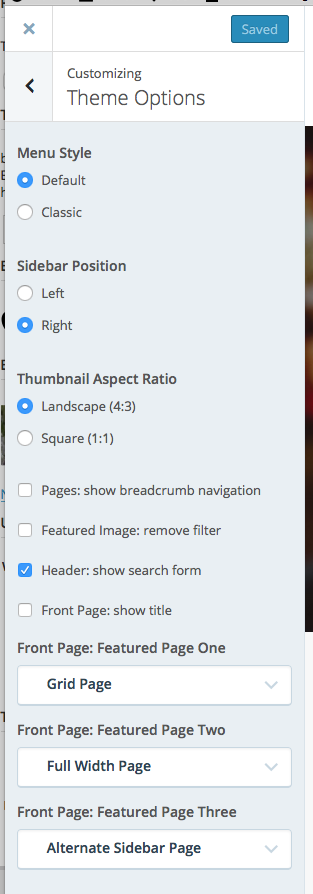
The Edin Front Page Template is not really designed to have a lot of content right on the front page. If you look below the featured image on the main page on the demo, you will notice a row of three featured images with page titles and excerpts. That area is used to call attention to three more pages. You set those pages by going into the Customizer and then to Theme Options and you can select the three pages you wish to show at the bottom of the Theme Options section in the Customizer. Screenshot: https://cldup.com/Fh_LjPD0Gq.png
If you are going to use Edin’s Front Page Template, I see a couple of options for you. One would be to place the bulk of the content for your main page into a separate page, leaving just a short excerpt in the Front page. You can then include two buttons, one for the video and one that would lead people to the page where you have the additional content you currently have on the Front Page.
If you are wanting all of the content you have on your Front Page to be on the Front Page, you may wish to consider using a static full-width page template for that page instead of the Front Page Template, or perhaps consider a different theme.
On your editor issues, I would suggest trying the dashboard editor and see if that works better for what you are trying to do. You can click here to get to your main admin dashboard page.
Let me know your thoughts and I’ll be more than happy to help you get things to a point where you are happy.
-
Thanks so much – I think where I went wrong was that I read verbiage about the front page as referring to: “a few paragraphs”. This is most helpful. Thank you so much.
-


- The topic ‘Help – I'm so lost….’ is closed to new replies.
 WordPress.com Forums