Help! on figuring out how to code “pages” widget into horizontal nav!?!
-
No problem. Just pay it forward whenever you can.
Yes, it’s easy, but like I said, I will need to widen the header image so the nav bar fits well. Do I have your permission to modify the header image?
-
-
Madison,
Try this code:
body {
background:#fff;
font: normal 1em Arial, Helvetica, sans-serif;
color:#404040;
}

h1 {
display:none;
}

a {
color:#666;
text-decoration:none;
}

a:hover {
color:#333333;
text-decoration:underline;
}

img {
border:0;
}

#wrapper {
width:980px;
background:#fff;
margin:0 auto;
padding:0;
overflow: hidden;
clear: both;
font-size: 75%;
position: relative;
}

#header, #menu, #footer {
clear: both;
overflow: hidden;
}

#header {
width:980px;
height:200px;
background: transparent url(http://80ero.fileave.com/sandbox/headerbg.gif) top left no-repeat;
}

#blog-description {display: none;}

#menu{
display: block;
width: 550px;
height: 100%;
position: absolute;
top: 108px;
right: 5px;
}

#menu ul{
list-style: none;
padding: 0;
margin: 0;
overflow: hidden;
clear: both;

}

#menu li {
display: inline;
margin: 0;
padding: 0;
}

#menu li a{
padding: 0 0 4px;
margin: 0 5px;
display: block;
width: auto;
height: auto;
float: left;
text-decoration: none;
font-weight: bold;
}

#menu li a:hover{
border-bottom: solid 4px #F68933;
}

#container {
float:left;
width:760px;
margin: 0 0 20px;
overflow: hidden;
}

#content {
margin:0;
padding: 10px;
overflow: hidden;
}

#primary {
width:220px;
float:right;
overflow:hidden;
}

#primary ul,#secondary ul {
     margin:0;
     padding:0;
}

#primary ul li,#secondary ul li {
     list-style:none;
}

#primary .textwidget h3,#primary h3 {
     color:#000;
     margin:25px 0 5px;
     text-transform: capitalize;
     padding: 5px 0 5px 20px;
     font-size: 150%;
     background: transparent url(http://80ero.fileave.com/sandbox/widgettitle-bg.gif) 0 8px no-repeat;
}

#secondary {
display: none;
}

#footer{
border-top: solid 2px #F68933;
padding: 20px;
text-align: center;
margin:0;
}

.skip-link{display:none;}

.xoxo {
width: 200px;
padding:0;
margin: auto;
}
You need to store the images on your own account. You can get them here:
http://80ero.fileave.com/sandbox/headerbg.gif
http://80ero.fileave.com/sandbox/widgettitle-bg.gifOf course, you’ll also need to change their path in the CSS code. I wrote the code based on the information I had. I’m also assuming that you won’t be adding more items to your menu.
Try the code above and let me know if that’s what you wanted.
-
Oh, it seems you’re using the Secondary sidebar, don’t use it. I’m hiding it in the CSS. Use your Primary sidebar for your widgets. The sidebar is position to the right.
Let me know when you’ve downloaded the images so that I can delete them from the server.
Thanks.
-
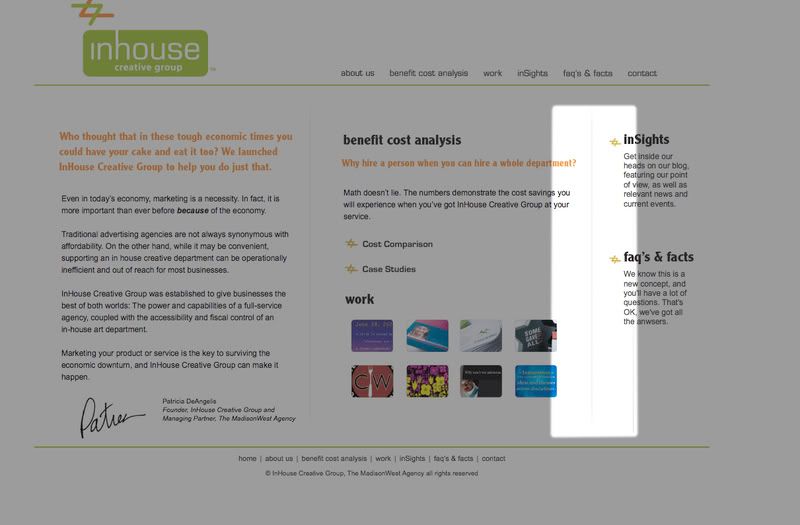
Wow Thanks a Ton! I don’t want to be a pain but, is there anyway that there can be a background image on the main content section that separates the content from the side bar?, kind like on this site: http://www.inhousecreativegroup.com/
here is a highlighted pic of what i mean..
http://i12.photobucket.com/albums/a243/bandjunkie04/Picture2.jpgLet me know if it is possible or if i have to provided you with anything.
Also are you on westcoast?
-
Let me see what I can do with the sidebar.
for some reason, the menu is not looking as when I tested it. In the menu definition, change the “top” property value from 108px to 109px so it reads like this:
#menu {
display:block;
width:550px;
height:100%;
position:absolute;
top:109px;
right:5px;
}
Yes, I am on the west coast.
-
it looks great! thanks.
i hate to be a pain but i think i can figure it out.
is it possible to replace the navigation with images
so that it would look exactly like the web page i gave out before? -
Also that side line code did not work.
i will look into it but if you have any suggestions let me know.
Thanks! -
is it possible to replace the navigation with images so that it would look exactly like the web page i gave out before?
No because we don’t have access to the .php files to edit them. We could use attribute selectors, but Internet Explorer doesn’t recognize them, and the menu wouldn’t look good in that browser.
Also that side line code did not work.
i will look into it but if you have any suggestions let me know.Weird, ’cause it did work for me. Probably you’re missing something.
-
Thanks that worked!
“No because we don’t have access to the .php files to edit them. We could use attribute selectors, but Internet Explorer doesn’t recognize them, and the menu wouldn’t look good in that browser.”
I am thinking then it would work if i hosted the blog on my server? maybe ill do that later down the line then.
also if i changes the header around and made it a bit taller i change the header height and the menu top?
and one thing what do i change if i want the side bars header and sub header to align to the left?
Thanks Agian, i know i am being a pain….
-
yeah, if you host your blog, you can pretty much do whatever you want.
If you make the header image taller, you need to modify the “top” property in the “#menu” selector definition so that it aligns with the orange line.
Currently, the sidebar headers are align to the left. well… kinda. they have a left padding so the image background can be displayed. To modify the way they look, you’ll need to modify this:
#primary .textwidget h3,#primary h3 {
     color:#000;
     margin:25px 0 5px;
     text-transform: capitalize;
     padding: 5px 0 5px 20px;
     font-size: 150%;
     background: transparent url(http://80ero.fileave.com/sandbox/widgettitle-bg.gif) 0 8px no-repeat;
}
I’m closing the shop for tonight, so if you have more questions, I’ll answer them tomorrow.
-
Before u do anything, i think i got it on my own.
Thanks Again for all your help.
I think that you should make a guide on the css tags and list what each controls, it would help us self taught codes what up with taking up your time!
Thanks ALOT! -
That worked thanks, ill be working on it tonite ill let you know, if there is any more questions. Thanks!


- The topic ‘Help! on figuring out how to code “pages” widget into horizontal nav!?!’ is closed to new replies.
 WordPress.com Forums