

Help with Globetrotter theme
-
I’m trying to change the color palette for the Globetrotter theme. Some elements allow this, but some buttons and icons, such as social media icons, remain orange. Is there a way to change the color for these?
WP.com: Yes
Jetpack: Yes
Correct account: YesThe blog I need help with is: (visible only to logged in users)
-
Hello!
Thank you for getting in touch! It seems that your website is still in the “coming soon” phase, preventing us from viewing the buttons you’re referring to. If you haven’t launched your site yet, I recommend reaching out to live chat or email support via your help page at https://wordpress.com/help.
The support team can access the backend of your site and provide detailed guidance on changing the colors. Alternatively, you can inspect the element for each social media icon or button. By doing so, you can use CSS to target and modify the colors.
I hope this information helps you get started! If you have further questions, feel free to ask!
-
I’ve been trying to correspond with the maker of the Globetrotter theme, but the last response I got in their support forum was that they’d be in touch shortly. That was several days ago. I thought I’d paste in the message I intended to share with them. I’ve as of yet been unable to post there for some technical reason I’m not sure about. I think their forum is having issues.
Below is the message meant for them. It involves WordPress-specific topics, and considering I’ve mostly overcome the actual issue regarding color customization, these current issues are at the forefront of my current progress developing the site. I have not yet launched the site, seeing as it is far from ready.
(Message begins)
First, regarding latest posts, or featured posts as I believe the block/pattern is for this theme, it is currently not pulling in posts to display there. It just has the generic placeholder content. I’ve been meaning to ask about this. How do you set this up to pull in content dynamically as posts are made, so it is showing the latest ones? It does this in the footer area made for this purpose, but not the “featured posts.”
Second, should I be using the Front Page template for the Front Page? This is the default.
I know there’s something with WordPress where you’re supposed to use a different scheme to handle things if you want the reading or blog page to be a separate page from the front page. If you set the front page that is default(and homepage) with this theme to be a static page, it changes the formatting and is much different. Should this then be configured to be the blog page, as necessary? While at the same time setting up a page to actually serve as the front page with that predefined theme? Or is there a way to set a “home” page as the actual blog page that is separate (as the “reading” page) while retaining the front page theme for the main page, and thus having it be static, pulling in dynamic content in fields such as “latest posts”?
In other words, should the Front Page be set to static, or should it be the home page at all? In order to have a page with the default “frontpage” template/layout, and yet have it not be the reading page. Then have the “reading” page be a page that’s set up to be the blog page. Then customize that page with the blog template. Does that make sense? I’m thinking it would default to the blog template as it would be the “reading” page.
I admit I’ve become confused with how WordPress handles these things. Instead of simply naming a front or home page, then blog page, etc., it crosses the two where it is as default set to have the home page be the blog page(in this case the frontpage as well), and I’ve seen no consistent or clear method to correct this.
I also had WP admin attempt to help with an issue I was having with the site editor, and somehow my About page ended up losing the theme elements it started with at default. I was given no “revisions” as an option to roll back to, so I have tried to create a new About page but don’t know if it’s correct. I was attempting to recreate the original or default design.
This brings me to creating new pages, or setting up pages that already exist, and having the default theme elements such as the header and footer format correctly. They don’t seem to retain all the edits made to them on the Front Page, which should override as defaults for all pages and maintain consistency throughout the site. Do I have this correct?
The header image I set for the Front Page doesn’t set correctly to the template header that all other pages are supposed to use, as per design with this theme. It shows as incorrect code and Site Editor has me “resolve” this, which returns to the default tiger image used out of the box. There also seems to be extreme spacing or padding beneath this as content doesn’t show up underneath where it would or intuitively should when the page is previewed. While I understand the FrontPage header is different than all other pages’ header, the customized image used for that header attempts to set for all other pages. Which would make sense. The issue is that it doesn’t work, causes the code to be flagged by Site Editor, then must be discarded to resolve it. Even when I customize the page header, per page, to fix this, the issue doesn’t make much sense. I’m also at a loss regarding the spacing beneath the header on all pages. If you edit the page directly, not accessing the “template” for that page, it doesn’t let you access settings for the header or footer, or even showing them. I get that they are default and invisible to the pages. I guess there are levels or layers of editing that are a bit confusing, but I’m trying my best to understand them.
The footer includes basic contact info and social media links, etc. But those I set on the Front Page don’t all carry over. It’s incomplete. Yet color customizations do carry over.
Are these things I should set on the templates themselves, per page? What about new pages not included in the templates, but as with any generic “page” should automatically include the theme’s header and footer?
With so many similar or overlapping terms and sometimes inconsistent application of elements, I’m trying to create a seamless, consistent site experience. I’d really appreciate some assistance in correcting for the issues I’ve outlined. It would be of great help if you could give me some instructions or guidance.
(Message ends)
I’m pasting this into this thread since it might have specifics to do with the theme I’m using. I’ve been busy with work such that I haven’t had the time necessary to try to troubleshoot everything on my own. I’m hoping someone can at least point me in the right direction on these issues.
Thank you to anyone who can provide assistance. I appreciate it!
-
As the Globetrotter theme is a 3rd party theme, we, unfortunately, don’t have direct access to its coding and specific functionalities. Therefore, it would be most effective to continue working directly with the Globetrotter theme support team as they will have the best understanding of the theme and its capabilities.
I hope they are able to provide the assistance and guidance you need to address the issues you’ve outlined and help you achieve the seamless and consistent site experience you’re aiming for. If you have any further questions or need additional support, feel free to reach out. Thank you for your understanding, and I wish you the best in resolving these issues!
-
In the forum thread for Catch Themes, who makes the Globetrotter theme, I was told to check my messages. Their messaging interface for users on their website is not loading to show messages. I haven’t heard back since notifying them of this in the thread I originally created. I did, however, check my email and find I’d missed the corresponding notification from them there. They’re asking me to give my WP login credentials so they can log into my account and check things from here. I’m not sure that’s a normal procedure for troubleshooting, or if it’s even wise. I thought I’d post about it here first.
Also, since I’m still working on solutions to my current list of problems, prior to getting my website live, I thought I’d inquire as to whether there are any themes within WP itself that are first-party that look or are similar to the Globetrotter theme. I feel conflicted and disappointed as this theme played a significant part in my decision to go with WP for my website. It seemed perfect for my purpose. With that said, I’ve had an account for weeks now without resolution to these issues, and I’m unable to finish setting up my website or launch it. That’s delaying my plans with my business. As I also work full time, there is limited time available to work on my own initiatives. It feels like I’ve lost quite a lot at this point in waiting for responses and solutions.
Please let me know what options I have from here, and whether it is common procedure or even advisable to allow a third party to access your WP account for troubleshooting purposes.
I appreciate any assistance anyone can offer. Here’s hoping everyone is doing well so far in the new year.
-
First off, never give out your own username and password to anyone, including to a developer. However, if you prefer your developer to make the desired changes to your site directly, you can invite them to become a user on your site. If they don’t already have a WordPress.com account, they can create one here.
Keep in mind that the developer will need to be given the Administrator role to have complete access to make changes. As a result, once your developer is finished working on your site, we suggest removing them as a user on your site until the next time you need their assistance.
When adding the developer to your site, you can mark them as a contractor, freelancer, consultant, or agency to help keep track of who you’re adding to your site and why:
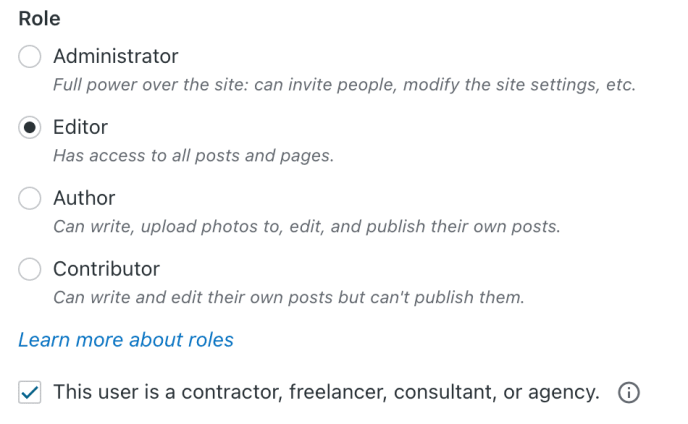
User Roles – Contractor Checkbox The Contractor checkbox does not change the user’s permissions. It’s purely a way to keep track of users not part of your organization.
With their own separate access, they can log in and help sort out your theme issue without sacrificing your account security.
Let us know if you have any other questions! We’re always here to help.
-
I thought that was the case, and allowing someone to temporarily have editor or administrator status to see the site and correct issues or give advice would be the best idea. I did not, however, believe it wise to give them my login info. I suggested this as diplomatically as possible in response to their email, but I haven’t heard back. This seems unusual. It’s unusual for anyone in the support field for a company to ask such a thing.
I do rather like the theme and hope to be able to use it. I’ve just not been able to sort some of the issues I’ve been having. Some might be theme-specific, but others seem to be related to how WordPress works in general.
As I wait to hear back from the theme creator, or at least someone from their support team, I’d like to ask if there are any similar themes that might have first-party support? I haven’t been able to find one yet, but that’s not saying they don’t exist. I appreciate anything anyone can share.
Thanks for the continued assistance, everyone.
-
As I wait to hear back from the theme creator, or at least someone from their support team, I’d like to ask if there are any similar themes that might have first-party support? I haven’t been able to find one yet, but that’s not saying they don’t exist. I appreciate anything anyone can share.
Although I can’t provide an exact comparison to the Globetrotter theme, we have a wide range of themes available in our Theme Directory (https://wordpress.com/themes/all). Additionally, any themes labeled as “by Automattic” are fully supported by us (Automattic is our parent company). This means we’re here to assist you with any challenges or questions you may have regarding those themes.
I encourage you to explore our collection to see if you find a theme that closely matches what you’re looking for. If there’s anything specific you need help with or if you have further questions about our themes, feel free to let us know – we’re here to assist you!


- The topic ‘Help with Globetrotter theme’ is closed to new replies.
 WordPress.com Forums