HELP WITH SELA – 4TH TIME ASKING
-
Hello – I’ve asked this question 4 times now and really need a reply. I will pay someone to answer. Please contact me. Here goes:
I know I’ve seen this somewhere – but how can we keep our same page layout on the homepage and add a section for ” recent posts” that would appear as thumbnails + summaries of the top 4-5 most recent posts?
The blog I need help with is: (visible only to logged in users)
-
Hello – I’ve asked this question 4 times now and really need a reply. I will pay someone to answer. Please contact me. Here goes:
Please continue in the other thread:
https://en.forums.wordpress.com/topic/question-on-sela-theme?replies=7#post-2299866 -
https://en.forums.wordpress.com/profile/laura960
You can look at some of the answers people have already given you. Alternately, you can do a search of the SELA tag in the forum and read answers others have gotten to the same questions.
-
-
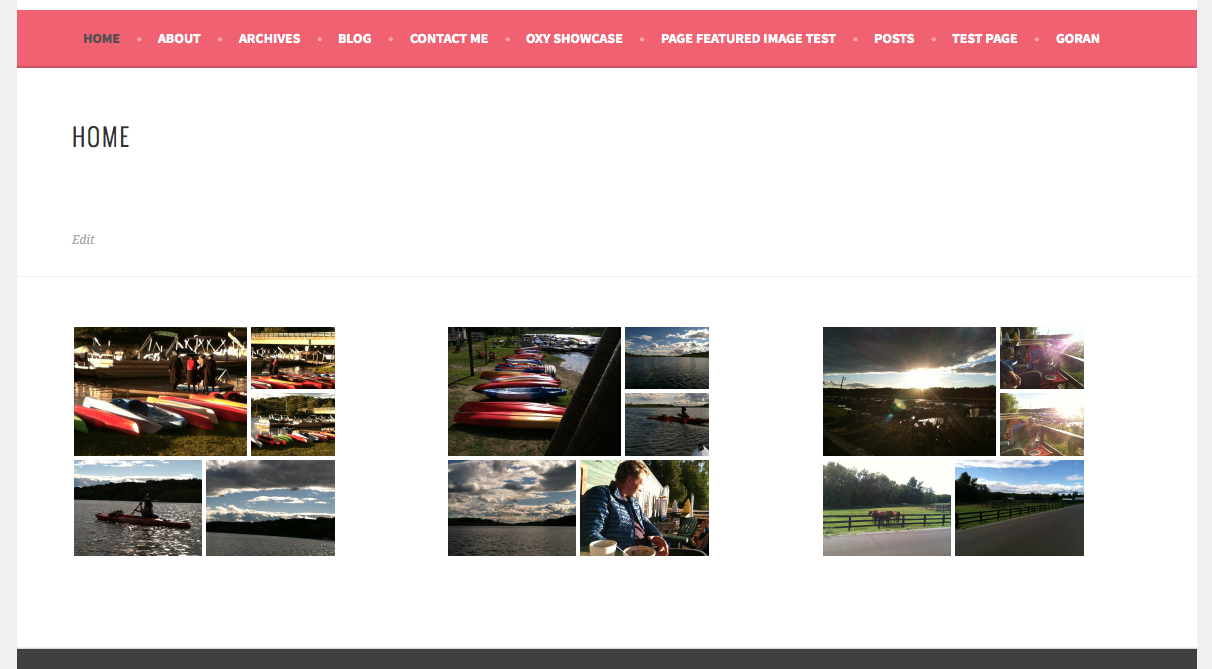
@laura960, sorry for your question getting lost. I’m working on this for you. My initial feeling is that it has to do with differences in width to height ratios on the images you are using. As an example, the first image in the left gallery is 1.5 to 1 (width to height), the first image in the second gallery is 1.33 to 1, and the first image in the right gallery is 1 to 1. The gallery software creates each gallery separately and sizes the images in the gallery to minimize cropping, so image sizes and proportions end up affecting the overall size of the gallery display.
I’ll need a bit of time to create some images and test. but hope to be able to post a definitive answer for you shortly.
-
/waving at Rich
Seems the OP is also working with Kathryn on this same question? Or perhaps you intended to post that here: https://en.forums.wordpress.com/topic/gallery-question-on-sela-theme?replies=7
Maybe it would be an idea to close the other threads in order to direct the OP to one thread?
-
-
@justjennifer, nice to (virually) see you. Yes, I’m going to close the other thread and we will continue it here.
-
@, I’ve done some testing, and if all the images are the same proportions (width to height) and all the same orientation (portrait or landscape) the galleries all come out the same size. Take a look here at a screenshot from my test site.
On your site, the left gallery has 4 images at 1.5 to 1 (width to height) ratio and are all landscape in orientation and then one, the lower right, that is 1.34 to 1.
The middle gallery is 1.33 to 1 with all landscape except for 1 portrait at left bottom.
The right has all 1 to 1 ratio images.
The differences in width to height ratios and mixed orientation is what is causing the galleries to be different sizes.
In the widgets, there is a maximum width, and the software works to fit the images into the mosaic tiled grid based as best it can.
My suggestion would be to edit your images in the middle gallery and make them all a width to height ratio of 1.5 to 1 by cropping, and the one portrait orientation image (bottom left) will need to be cropped into a landscape orientation at 1.5 to 1.
On the right gallery, all the images are basically square. To get that gallery to be the same height as the others, again you are going to have to crop them to 1.5 to 1 (width to height) and landscape orientation. Given the content of the images, I think you can probably do that and still have some nice looking photos for the Antigua gallery.
On the left gallery, the bottom right image will need to be cropped for a 1.5 to 1 ratio.
Let me know if you have further questions on this. There isn’t a CSS solution I can offer on this unfortunately.
-
I forgot to also say that you can edit the images from within the WordPress.com Media section and enter an aspect ratio for cropping. You can see more on using that feature here.
-
Somehow this question keeps getting answered as an old question. I am no longer asking about the gallery – I do have answers on that – thank you. I am asking about adding recent posts to home page. Scroll up to see my initial question when opening this thread. Yes, another WP engineer suggested that I look at the shortcode options for this – but that didn’t help me hence any duplicate of this question: “I know I’ve seen this somewhere – but how can we keep our same page layout on the homepage and add a section for ” recent posts” that would appear as thumbnails + summaries of the top 4-5 most recent posts?”
-
Sorry, for the confusion on my part. The Sela Front Page template has four sections:
1. Feature image area with overlay containing the front page content (if any).
2. The three front page widget areas, where you have Cayman, Puerto and Antigua
3. The Testimonials area
4. The three footer widget area, each of which will hold multiple widgets.We have the Top Posts & Pages Widget that you can place into one of your footer widget areas. You can set it to display up to a total of 10 posts + pages and can choose text only, image with title, or image only, which display in a grid. There isn’t an option to limit it to posts only though.
As far as adding a top or latest posts section within the body of a page set to the front page, that is not something that can be done with CSS as that functionality is not built into Sela. It would require editing of the theme php script files, and we cannot edit those here at WordPress.com.


- The topic ‘HELP WITH SELA – 4TH TIME ASKING’ is closed to new replies.
 WordPress.com Forums