

Hemingway Rewritten No Double Spacing After Video Links/Embeds?
-
Hello,
I noticed that the Hemingway Rewritten theme (which is a nice theme ;) ) seems to be ignoring double spacing after video links/embeds, I have never had a theme ignore my double spacing after video links/embeds before, and so I was wondering if this is a glitch/bug or is this how this particular theme handles double spacing after video links/embeds?
Here are several examples from my blog showing no double spacing after the videos even though I used double spacing and the double spacing works in other themes, but not on the Hemingway Rewritten theme:
http://johnjronline.wordpress.com/about-page/
Thank you,
-John JrThe blog I need help with is: (visible only to logged in users)
-
The WordPress editor does tends to strip out empty tags like empty paragraphs and line breaks that might be created by “double spacing.” I’m not sure why this would have worked in other themes, but I would suggest more foolproof method of adding spacing, using some inline CSS instead.
Something like this would add 15 pixels of space above a paragraph, for example:
<p style="margin-top: 15px;">My paragraph</p>On your About page, instead of adding bold formatting to the text after your video, try using a real heading tag, like h3, h4, or another size. Smaller numbers create larger headings, larger numbers give you smaller headings, up to h6.
Here is what an h3 tag would look like on your About page, for example:
http://cl.ly/image/1a2L3w2T2V3D
In the Visual Editor, you’d select your text first, click the Kitchen Sink icon at the end of the first row to display the second row of buttons, then select Heading 3 to apply it to your heading.
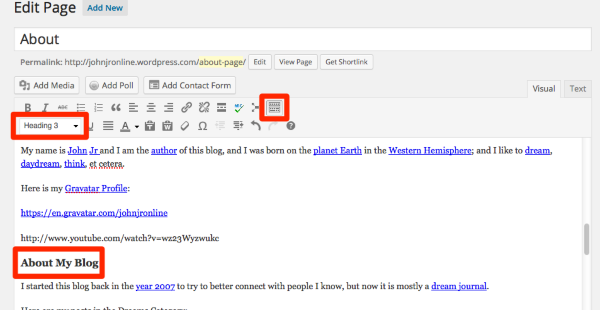
Just let me know if you need further help.
-
Hello Kathrynwp,
Thank you for sharing those recommendations, I never use anything advanced like CSS but thanks for sharing that because it is good to know, and thank you for telling me about the Heading Tag because I did not know about that; but I would like to explain what I am talking about better because normally I do not this problem.
Every other theme that I can think of that I use sometimes (Twenty Elven,Twenty Twelve, Twenty Thirteen, Twenty Fourteen, Able, Ryu, et cetera) does not have this problem where the sentence after the video is touching it like in the Hemingway Rewritten theme.
For example look at the sentence under the video in the Hemingway Rewritten theme, the sentence is touching it even though this does not happen in any other themes that I have used (my spacing does not get stripped by the WordPress Editor in those other themes that I have used):
This is how this looks in the Twenty Fourteen theme and all the other themes that I mentioned (the spacing is there like it is supposed to be, and the sentence is not touching the video):
https://mediacru.sh/y3ewvRidDh5J
Here is another example (this is probably happening in all posts/pages on my blog that have text after the video, but this only happens in the Hemingway Rewritten theme):
I only made this topic because this normally does not happen in any other theme, and so I would like it to work normally if possible without having to use CSS and/or the Heading Tag and/or things like that.
Hopefully I was more clear this time because my writing skills are not the best? Hehehe ;)
Thank you for taking the time to try to help me with this Kathrynwp. ;)
-John Jr
-
Yup – I understand the issue. :-)
The difference in display is because certain themes embed video differently on the back end, so that accounts for the difference in padding below them.
I suggest you use the CSS workaround I provided earlier to get the extra space you want.
I’ll also see if it’s possible technically to have Hemingway Reloaded use the Twenty Fourteen video-embed method, and we’ll keep you posted.
-
Good, thank you for explaining that, I thought so; and thank you Kathrynwp, and hopefully they can adjust this so that it handles it like most themes do. :)
-John Jr
-
Howdy John Jr,
Thanks for bringing this bug to our attention! We’ve fixed Hemingway Rewritten such that videos include a bottom margin.
Cheers,
Caroline -
Hello Sixhours,
You are welcome, that is great to hear, and thank you for fixing this bug/issue and for updating me because I actually started to think that this would be put on the Low Priority/X-Files List indefinitely :D ; and so you surprised me (especially because this is the weekend), and you proved me wrong. :)
If the font size and the incorrect font problem/bug/glitch in the Visual Editor for the Hemingway Rewritten theme (https://en.forums.wordpress.com/topic/hemingway-rewritten-theme-visual-editor-font-is-small-and-does-not-match?replies=4#post-1710339) is fixed I might/may go back to this theme again because that small/tiny font and the incorrect font in the Visual Editor when using the Hemingway Rewritten theme was making it too hard for me to make posts because trying to read/see that incorrect font in that small/tiny font size is difficult and so I switched themes last night until this gets fixed.
Keep up the good work,
-John Jr


- The topic ‘Hemingway Rewritten No Double Spacing After Video Links/Embeds?’ is closed to new replies.
 WordPress.com Forums