

Hidden text appears in my post (Reader)
-
I just posted my new post and when I checked if it appears correctly in my Reader I saw this https://pellymade.files.wordpress.com/2016/05/hidden-text-in-reader-post.jpg
I tried to correct it by re-editing my post, updating the gallery, refreshing the reader but it wasn’t fixedThe blog I need help with is: (visible only to logged in users)
-
Thanks for the report. Can you help me understand a bit more about how you wrote this post? Was it through your web browser? Our mobile app? Our desktop app? Any details you can offer on how you wrote the post will help me narrow this down and get it fixed up. Thanks!
-
I wrote it the old fashioned way: Dashboard > Posts > Add new, I inserted an image, wrote one sentence (that’s the only text) and then created a gallery with two photos and hit “Publish”. Same routine as always…
Thanks
-
Hi there,
Sorry that we took so long to get back to you on this. This appears to be a bug in the Reader, as I’ve been able to reproduce it on a test site as well. I’m reporting it now and we’ll update you once we’re able to fix it.
This only seems to happen with the thumbnail grid gallery style, so if you set your gallery to a different style for now this should not happen.
-
Thanks! I tried a different style and it looks ok. Please inform me when you fix it, so I can change the gallery style back to the thumbnail grid
-
-
Please wp, do something!
I just uploaded my new post and it looks like this: https://pellymade.files.wordpress.com/2016/06/reader_problem1-6-2016.jpg
A total mess. You said there is a bug in the thumbnail grid gallery style, but I tried all other types of gallery and it’s the same mess whatever style I choose!
It’s so frustrating… -
You guys never cease to disappoint me. I always have to wait for ages for a reply, although sometimes I don’t get a reply at all…
You have to take notice that we bloggers put our valuable time and effort in creating a post. The Reader is our window to the blog sphere and if the first hour (max 2 hours) passes, then our precious little post is lost in oblivion; maybe only some of our devoted followers will actually take the time to view the post.
In addition, for the majority of fellow bloggers, the Reader is the place were they see a post, they don’t actually visit the blog. So if the post is messed up in the Reader, they don’t give a second chance, they just scroll down for the next blogger!It feels awful that I have to say all that to you, you ought to already know that and show the commensurate respect to us and at least reply to our messages, but I feel helpless and very very annoyed for the 100th time…
-
I just realized that this “bug” is affecting every post of mine in the Reader!!!! It’s a complete chaos and nobody cares…
-
@pellymade you’re actively editing the post right now so it’s hard to troubleshoot, but what I saw while looked much like it did in the reader. Now I don’t see any images in the post though. Which style of gallery were you using?
Also, @kokkieh will still follow up here when the CSS issue you originally mentioned is resolved.
-
@pellymade I have just viewed your site in the reader. I mainly see a featured image followed by galleries like so.
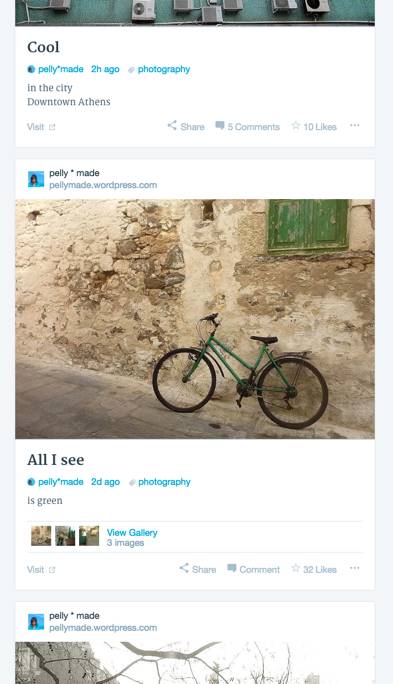
-
I just deleted the other two images, because the main photo of the post you now see didn’t appear at all!
I will now make the post like I first edited it so you could see for yourself. Also as I mentioned before all my posts are now affected in the Reader, please right click on pellymade icon (in Reader) and see…
Kokkieh will notify me for the specific gallery issue, but now the bug won’t let me use any gallery -
I just made the post as originally posted. It looks messed up and different in every tag I used: If I search for it under the “curiosities” tag I see all 3 photos, but messed up, if I check the “street” tag, it shows only 2 photos, the ones in the gallery and so on…
That’s why I deleted the images -
This is what I see in my Reader when I click on my blog “pellymade” : https://pellymade.files.wordpress.com/2016/06/messed_up2016-06-01.jpg
As for the cloud pic, this is not what I see at all. I don’t know even the existence of the cloudup.
Please take notice that I checked and double-checked both my desktop and laptop and it looks bad on both.
-
@pellymade perhaps I’ve misunderstood what’s wrong with the way the posts are displaying.
Will you try selecting a featured image for your latest post and see if that helps? I’m not sure whether this is available via wp-admin with your theme, but you can do it by clicking Edit on the post, then selecting a featured image with the option on the left.
Also, do not re-add “modlook” to the thread unless you need new staff attention on an old thread (in which case it’s probably better to make a new thread referencing the old thread anyway.) Thanks. :)
-
Will you try selecting a featured image for your latest post and see if that helps? I’m not sure whether this is available via wp-admin with your theme, but you can do it by clicking Edit on the post, then selecting a featured image with the option on the left.
You completely lost me here… If I understand correctly, that’s the way I make a new post…
Did you see the capture in my previous message? The way my posts are shown in the Reader is constantly changing every time I click the refresh button.Also, do not re-add “modlook” to the thread unless you need new staff attention on an old thread (in which case it’s probably better to make a new thread referencing the old thread anyway.)
Of course I need staff attention to this old thread! It’s the same problem, unresolved, that became much worse and ruined the appearance of my blog; it’s a bug that is spreading and I want something to be done asap as I can’t post anymore!
I can’t wait any longer, nor open a new thread! it’s been 12 days and I am loosing my patience…
Thanks -
Hi Pellymade,
I had a look at your site in the Reader and it displays correctly for me. I’m not sure whether you managed to fix it or if this is a browser issue. Here’s what I can see for the “All I see” post:
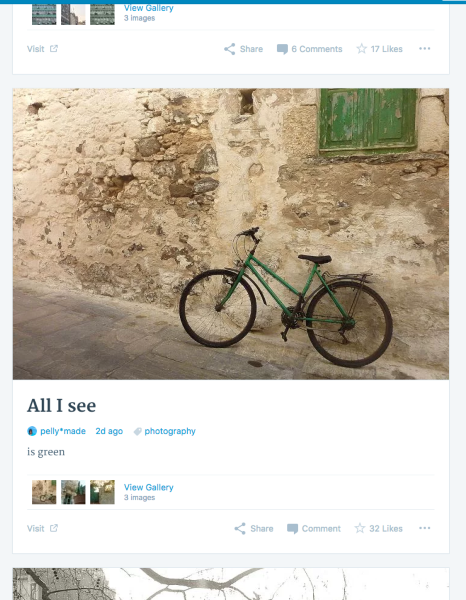
Did you manage to resolve this? If it still looks odd for you can you try clearing your browser cache or temporarily trying a different web browser to see whether the problem persists?
If you’d like to follow along with the bug you reported it’s publicly available in Github:
https://github.com/Automattic/wp-calypso/issues/5576
Feel free to follow along there. We’ll also notify you here once it has been fixed.
-
@rachelsquirrel
Thanks for the reply.
Please take a look at what I see in my Reader when I click on my blog “pellymade”: https://pellymade.files.wordpress.com/2016/06/messed_up2016-06-01.jpg
It’s a mess, it’s the same bug in my opinion and it won’t let me post new posts until it’s fixed.
Cloudup, is not the way I (and others) see posts. The Reader is.
I didn’t manage to resolve this, it’s getting worse, I tried a different browser, a different computer, clearing cache and cookies, everything with no result… -
Hi there,
Please don’t post in Github if you’ve already posted the information in the forums. Github is there for our developers to discuss the bugs and how to fix it and there are certain guidelines for posting there.
I am not a developer and have neither the ability nor the necessary access to fix this, but if you explain the problem I, and the other support staff can make sure that the correct information needed to fix the problem reach our developers. But it is up to them when and how this gets fixed.
I realise this is frustrating, but we need you to trust us to do our jobs.
-
Hi,
I posted in Github because “rachelsquirrel” wrote it’s publicly available and to get your attention, since nobody seems to understand or read my new unresolved problem. It won’t happen again and I could delete it if it bothers you.I need to explain the new and serious problem (I have already done that by the way) to someone who can fix it, that’s why I wrote all these messages. Time passes (days pass in fact) and nobody here seems to have read or ask the correct information, that’s what bothers me. I can’t post anymore, I need you to understand that and read my previous messages and links
Thanks


- The topic ‘Hidden text appears in my post (Reader)’ is closed to new replies.
 WordPress.com Forums


