

Hidden text appears in my post (Reader)
-
I have checked your site in the Reader again, and it does not look at all like the screen shot you provided. I’ve checked on several browsers, and other people have also checked and none of us see it as in your screen shot. Here is a screen shot of what I see in the Reader when I look at your site:
https://cloudup.com/cEMyC_rh–sCloudup is a service used to share images. The image is a screen shot of your site in the Reader, exactly like the screen shot you uploaded to your media gallery.
With the gallery issue I was able to reproduce the problem. In this case, I don’t even see the problem, and I don’t believe it has anything to do with the original problem you reported, or otherwise I’d have been able to see the same thing on my side.
In the screen shot you provided I see a box to the left that keeps repeating itself. That box should only be appearing once. The fact that it’s repeating itself tells me there is a problem with the way the Reader is loading for you. As no one else has reported such a problem with the Reader, the only conclusion is that the problem is restricted to your computer and browser, or to your account. I have confirmed the problem is not with your account. That only leaves your computer/browser.
I’m happy to help you troubleshoot this further, but for that I need answers to the following questions:
1) You said you’ve already tried different browsers. Which browsers? I’ll need their names and version numbers. For the record, I’ve tested this in Firefox and Chrome, on both Windows an Mac and I see no problems.
2) Do you have any browser add-ons installed in your browsers? Have you tried disabling them?
3) Did you try starting the browsers in safe mode/incognito mode and checking that way?
4) Have you tried loading the Reader over a different internet connection to see if that makes any difference?
Please keep your answers short and to the point, and then we can work from there.
-
I have a different opinion, I believe it’s the same bug and I’ll prove it.
What seems normal to you isn’t normal to me: I checked the screen shot you provided and found many errors, look : https://pellymade.files.wordpress.com/2016/06/ksdtyralta.jpg
Attention: whenever I refresh the browser, I see different errors, the screen shot I gave, was what I saw yesterday, I don’t see that screen today and I won’t see the same page after I refresh.the only conclusion is that the problem is restricted to your computer and browser, or to your account. I have confirmed the problem is not with your account. That only leaves your computer/browser
It’s definitely not my browser’s/computer problem, since I checked and doublechecked my desktop, laptop, tablet and another desktop, in firefox/ chrome/ i.e and the page showed errors everywhere…
Since you want specifications:
1) desktop: windows 7/ firefox 46.0.1/ chrome 51.0.2704.79m/ I.E 11 version 11.0.9600.18314
2) no I don’t have any add-ons and I cleared cache and cookies
3) no, I don’t know how to do that
4) yes, I tried a different desktop, with different internet connection -
In the screen shot you provided I see a box to the left that keeps repeating itself. That box should only be appearing once. The fact that it’s repeating itself tells me there is a problem with the way the Reader is loading for you.
The box to left is an error of the program I used to take the screen shot. “Snagit” has a problem with custom scroll, I did not have a loading problem.
-
First, the original problem with the gallery displaying as code was fixed about an hour ago. It might not take effect on your site immediately, but it will once it is fully deployed.
Second, what you indicate as errors in that screen shot are not errors, but due to a difference between how your theme works and how the Reader works.
Your theme uses the first image in a post as a custom header, but that does not guarantee that the same image will be used in the Reader preview. The only way to control what image appears in the Reader is to set a featured image, and your theme does not have that option.
In the absence of a featured image the Reader will select any image in the post to display in the preview, and refreshing the Reader can even cause a different image to appear every time. This is how the Reader works and is not a bug.
whenever I refresh the browser, I see different errors, the screen shot I gave, was what I saw yesterday, I don’t see that screen today and I won’t see the same page after I refresh.
So those display problems no longer exist. I’m glad to hear it. For what it’s worth, I was eventually able to reproduce that by interrupting my internet connection while the Reader was still loading, which confirms that it’s a connection issue causing that. That is also why the Caldera post shows the way it does in my screenshot – I took the screen shot before that particular post had finished loading. If I wait for the Reader to load completely that post displays the same as the rest.
The box to left is an error of the program I used to take the screen shot. “Snagit” has a problem with custom scroll, I did not have a loading problem.
Thank you for explaining that. As you did not provide that explanation before I hope you can see why I thought it was relevant. I can only work with the information you provide.
-
I am glad you are working on my issue but I am not happy or agree to what you said
Your theme uses the first image in a post as a custom header, but that does not guarantee that the same image will be used in the Reader preview. The only way to control what image appears in the Reader is to set a featured image, and your theme does not have that option
1) I use the same theme from 2013 and it’s the first time that happens. I always saw the image I selected as main in my Reader correctly.
2) Duotone is a one picture theme that lets you use a gallery, but displays a single photo
3) I found that option here : https://pellymade.files.wordpress.com/2016/06/featured-image2016-06-02.jpg and tried to edit my post there but it worsened the problem.and refreshing the Reader can even cause a different image to appear every time. This is how the Reader works
When I refresh the Reader I see different errors and that includes me not seeing some images that I inserted to the post! So those display problems still exist as I wait for the Reader to load completely.
For what it’s worth I’ll give you a second screen shot of what I see now:
https://pellymade.files.wordpress.com/2016/06/errors_scroll_2016-06-02.jpg
It’s full of errors… I can’t live with that. Please ignore the left side of the 2 scrolls, it’s “snagit” again.
Maybe you should try the Cloudup again and see if it’s different or same as mine, or as the previous one.I was eventually able to reproduce that by interrupting my internet connection while the Reader was still loading, which confirms that it’s a connection issue causing that.
I cannot accept that it’s a connection problem on both desktops I tested the Reader! They have different internet connections, different IPs and are in different areas.
-
1) I use the same theme from 2013 and it’s the first time that happens. I always saw the image I selected as main in my Reader correctly.
It could be that there was a change in how the Reader uses images, but I have tested this with several post across different themes and different sites and this is how the Reader now works.
3) I found that option here : https://pellymade.files.wordpress.com/2016/06/featured-image2016-06-02.jpg and tried to edit my post there but it worsened the problem.
As I said, your theme does not support featured images, so adding a featured images isn’t going to fix anything. Additionally, your theme was retired some time ago which means it’s not being actively maintained any more. This means that over time your theme will start giving more problems that we won’t be able to fix, so it might be a good idea to start looking at new themes as well.
When I refresh the Reader I see different errors and that includes me not seeing some images that I inserted to the post! So those display problems still exist as I wait for the Reader to load completely.
The key here is “as I wait for the Reader to load completely”, and it’s exactly what I said before. It displays that way when it is not fully loaded yet. I can ask our developers to look at that if there isn’t a way to improve how sites load in the Reader, but I can’t make any promises that it will be possible.
-
Where to begin…
The malfunction I reported took over my Reader: since last night every post of the blogs I follow, tags included, changed completely:
– there are no thumbnails nor view gallery button
– photos, or videos included in posts don’t show in Reader
– in some cases, there is no such thing as featured image, as the Reader decides which photo to show first
– all photos are shown in large size and one has to scroll down for ages to see the next post.
Please take a look: https://pellymade.files.wordpress.com/2016/06/reader_blogs_follow_2016-06-03.jpg
Are these the changes part of the “change in how the Reader uses images” and this “is how the Reader now works”??? Does this look normal to you?your theme was retired some time ago which means it’s not being actively maintained any more. This means that over time your theme will start giving more problems that we won’t be able to fix, so it might be a good idea to start looking at new themes as well.
So you are saying that my problem in the Reader is because I use an outdated theme? But I don’t have a problem with my blog and consequently my theme. the problem is how posts appear in the Reader and that, is common for every blogger.
By the way, I tried starting the browsers in safe mode with same results.
Also I disabled my antivirus program, but nothing changed. I still have the same issues., missing pictures, distorted images, large format photos etc…The key here is “as I wait for the Reader to load completely”, and it’s exactly what I said before. It displays that way when it is not fully loaded yet
Excuse my english, it’s not my mother language: the Reader IS fully loaded in all cases, that’s a fact; how could I take a screen shot otherwise?
I hope you find what’s causing all this mess, it’s so frustrating and it completely ruins my blogging experience. -
Hi Pelly*made,
Thanks for the screenshot. Let’s go through each one of these issues in turn.
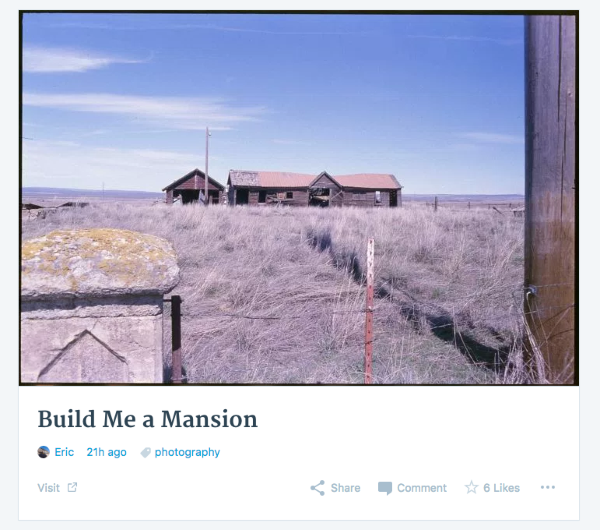
1. I had a look at the Load Film in Subdued Light site and this user has elected to add a featured image *and* insert the image into their post “Build Me a Mansion”. However both images should not appear there and so I’ve checked in my own Reader and I can only see the one which is very strange. Here’s a screenshot of what I can see uploaded to Cloudup:
2. I followed the Alan Frost Photography site and viewed it in my own Reader and it displays correctly for me. I also took a screenshot of this and uploaded it to Cloudup so you can see:
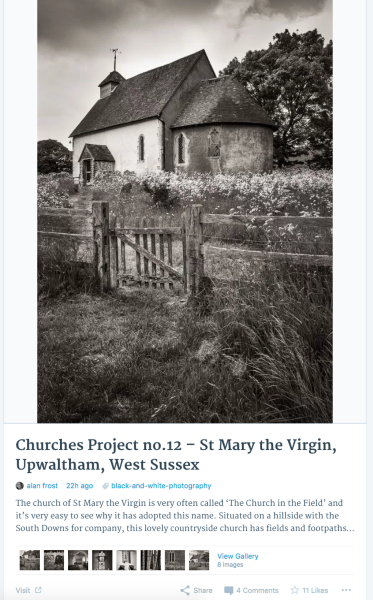
I’m not sure why the thumbnails are not displaying for you. I can see you’ve tried several browsers and they’re all the latest versions. Also check that Javascript is enabled and third party cookies if you haven’t already:
If you wait for 30 seconds or so do the thumbnails load?
3. For the Pedrol site this user has elected to just display a post summary of their site. If readers want to view the full post and the You Tube video they’ll need to click through to the site. This is expected behaviour.
4. I followed the Incandescent Art site and checked it in my Reader and the thumbnails are there for me also so something strange is going on with your setup.
Here are some suggestions as a first step:
1. Make sure third-party cookies and Javascript are both enabled in your web browser.
2. Delete and/or deactivate any browser extensions you may be using, especially ad-blockers.
3. If you’re happy to do this it would also be great to see whether there are any Javascript errors in your browser console. We’ve got some instructions here on how to check:Let me know how you go with this and we’ll take it from there.
-
Hi rachesquirrel,
Excuse the late response. I was testing if changes were permanent:
– I really cannot explain how, or why, but right after my last comment here and when I began to lose all hope, things suddenly went back to normal (!!!) and for the last two days everything is fine! Like a giant storm that came, destroyed and left, leaving everything miraculously intact… Here is a screen of my now, healthy Reader, the one that previously just went bananas: https://pellymade.files.wordpress.com/2016/06/normal_2016-06-05.jpg
Inexplicable!Thank you for your time and patience. I hope my Reader will remain healthy for all eternity :)
-
Hi there,
I’ve been trying to reproduce the error as we’re not able to fix a bug if we can’t find it first, but I’m glad to hear it’s working now. Hopefully it was only a temporary glitch that was causing it, but let us know if it starts to happen again.
The original gallery issue you reported is also now fixed, so you shouldn’t see the CSS code in the reader any more if you use the thumbnail grid gallery.
-
Thanks kokkieh, I will and I hope it won’t!
I know the bug was fixed; I don’t know if it had something to do with the glitch, but it was right after I re-edited that post back to it’s previous form with the “thumbnail grid gallery”, that things went back to normal…
Beats me :)


- The topic ‘Hidden text appears in my post (Reader)’ is closed to new replies.
 WordPress.com Forums


