

Hide side panels
-
Hi, when I am logged in to wordpress.com, then two large side panels are displayed that cover almost the entire blog. The left one is titled ‘Streams’, the right one shows my avatar and profile settings. how can I remove these panels? Please excuse this very basic question, I just don’t know what keyword to google. Robert
-
-
Hi,
I have uploaded a screenshot, you can see both the URL and what I mean with ‘side panels’:http://www.hinesley.de/sidepanels.jpg
BR,
Robert -
For some reason the link does not work although the URL is correct, so perhaps copy & paste it manually:
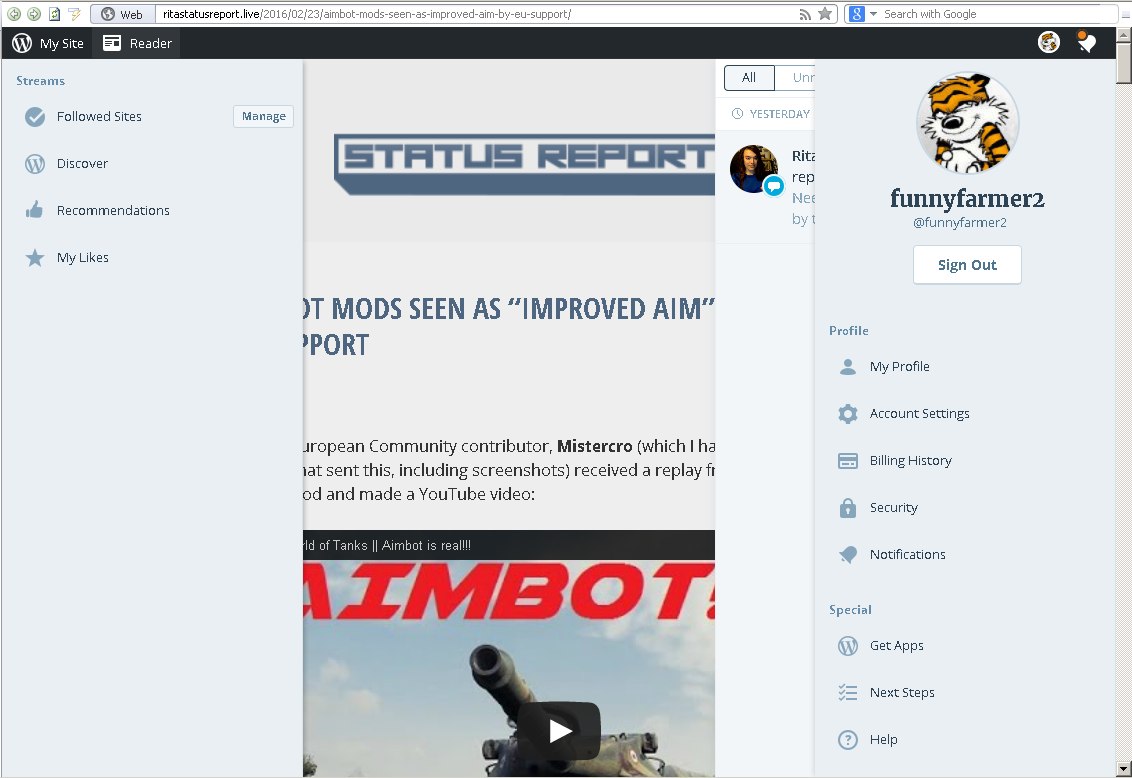
-
Hm.
That is weird those sidebars are covering the page. What browser are you using and how are you accessing the site (laptop, tablet, phone..)
You might try the following possible solutions
1. Switch to a different browser such as chrome or firefox to see if it goes away.
2. If you have any third-party browser plugins try turning those off.Let me know what happens.
-
@TT Got it!
Quick Q:
When you say it is not a WP blog are you referring to the site the image is hosted at? -
I cannot find any domain mapping by using the domain helper.
Note what I see here http://www.whois.com/whois/hinesley.de
Hostmaster STRATO AG WebhostingThen go to http://www.hinesley.de and note there is no wordpress.COM Admin bar at the top and no footer credit links.
Maybe this is a site connected through Jetpack. -
Please tell if I misunderstood..
I am using Opera 12.17, no plugins
The blog is not my own, it is ritastatusreport.live/
I access via PC
Actually I just logged into WP because this seemed the only way to comment on that blog and get my own avatar. It was really annoying. All I want to do is comment on that WP blog with my avatar. -
@TT
Gotcha! That makes sense.@FunnyFarmer2
I’d like you to make a new posting over in the WordPress.org forum site, underneath their JetPack section. That will be the quickest way for you to resolve your issue.This is the forum for WordPress.com and it appears your issue is not related to WordPress.com but rather something with WordPress.org. For the differences between WordPress.org and WordPress.com see:
When you make a new posting please describe the issue, add that image, and link back to this forum post here, for reference. Note, you may need to create a WordPress.org account.
WordPress.org Forum Area for JetPack Issues:
https://wordpress.org/support/plugin/jetpack
Hopefully, they will be able to help get it resolved!
-
-
This seems to be an issue with the WordPress.com interface: the site you’re looking at is hosted on WordPress.com, and as shown on the screenshots, you’re experiencing the issue when logged in to your WordPress.com account.
Unfortunately, I couldn’t reproduce the issue on my end; the panels appear properly when I click on the different items in the WordPress.com admin bar, but I can never display more than one panel at once; as soon as I click to display another panel, the first one disappears.
Do you experience similar issues when logging in to your account in another browser, like Chrome or Firefox?
If the problem only appears in Safari, could you please try clearing out your cache and cookies?
http://en.support.wordpress.com/browser-issues/#clear-your-cache-and-cookiesLet me know how it goes!
-
I installed Chrome and the problem does not appear there- so it really is a browser incompatibility. I’m sorry that I did not try that myself, it did not look like a browser issue to me.
BTW, when I log into wordpress.com while on that site then the side panels do not appear immediately. They only show up when I click back to the main page (but from then on they are visible on all pages).
Thanks for the help, I’ll stick to Chrome then for visiting blogs.
Robert
-
I’m glad to hear you could figure it out!
Would you mind trying to clear your cache and cookies in Opera? It might end up solving the issue there as well, and you can get back to using that browser to browse your favorite blogs.
I hope this helps.


- The topic ‘Hide side panels’ is closed to new replies.
 WordPress.com Forums
