

Home page : box "oldest posts"
-
Hello all!
I just migrated my wordpress.com website to a self-hosted wordpress. I’ve migrated all the content and it all worked out perfectly, except one thing about the revelar theme :
On the homepage, I used to have the 10 newest posts, and then a box “see other posts”. When I clicked on the box, the page downloaded more articles (you can see it on “http://lesvoyagesdemaxylou.wordpress.com”). But on my new website, when I click on the box, a new page is charging with the next 10 posts. The URL changes, so, it trully is a new page, and not the same with more content. I don’t know if I’m making myself clear… If someone has a clue as how could I change this box’s behavior, it would be great! Thanks!The blog I need help with is: (visible only to logged in users)
-
Hi, These forums are tailored for providing support to WordPress.COM hosted site users, your query will get better tailored support over on the WordPress.ORG’s support forum where there will be people who can help with your WordPress.ORG site. Unless there has been some issue with the site move on the WordPress.COM site, the best place to get help is over at the .ORG forum, hope this helps.
-
It sounds like you need to activate Infinite Scroll on your new site, which is a Jetpack feature. Go into your Jetpack Settings, and on the first panel, under Infinite Scroll, make sure “Load more posts as the reader scrolls down” is checked:
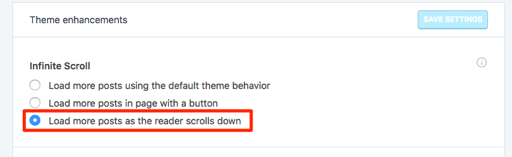
If you need further help with the self-hosted version of Revelar, feel free to post in its forum at WordPress.org:
https://wordpress.org/support/theme/revelar
You’ll need a free WordPress.org account to post – if you don’t already have one, you can register here:
https://wordpress.org/support/register.php
Be sure to provide a link to your site when you post so people can help you more easily.


- The topic ‘Home page : box "oldest posts"’ is closed to new replies.
 WordPress.com Forums