

homepage slider move automatically
-
Hello,
I am working to set up the homepage slider using the organization theme. I followed the directions from this previous support: https://en.forums.wordpress.com/topic/how-do-i-work-the-homepage-image-slider-for-organization-theme?replies=11 and it worked very well! However, the photos in the slider do not change automatically. Is there a way to make this happen or do they only change manually when you click on the arrow?And if I am using the slider function, does this mean that my original homepage image is no longer visible as part of the slider slideshow? Can I simply add the tag that I used on the blog photos to my homepage image and that will add it to the slideshow?
Also, I created the “blog” in order to have the homepage slider images, but I would like to remove the blog tab from the green banner at the top of my page (it is inline with the other tabs: home, about, mission, etc). Is this possible?
Sorry for all of the questions and thank you!
The blog I need help with is: (visible only to logged in users)
-
Hi!
Please see below:
Is there a way to make this happen or do they only change manually when you click on the arrow?
The slideshow should change automatically. It’s currently changing for me after five seconds or so on your home page. Can you confirm it’s doing the same thing for you as well?
And if I am using the slider function, does this mean that my original homepage image is no longer visible as part of the slider slideshow?
Are you referring to the Featured Image you have setup for the home page? If so, you’re correct. That image will not show with the home page template of the Organization theme.
Can I simply add the tag that I used on the blog photos to my homepage image and that will add it to the slideshow?
You will need to create a new post on your blog with the featured image you want. Then, assign the tag to that post. You will not be able to set just the image in the slider without it linking to a post.
Also, I created the “blog” in order to have the homepage slider images, but I would like to remove the blog tab from the green banner at the top of my page (it is inline with the other tabs: home, about, mission, etc). Is this possible?
You’ll want to remove it from your Custom Menu here:
https://sanjuandelsurdayschool.wordpress.com/wp-admin/nav-menus.php
Additional instructions can be found here:
Then, it should be removed from the menu on your site!
Please let me know if you need anything else!
-
Thank you! Yes, the slider is now working – thank you!
I went to the Custom Menu and clicked “remove” on the blog tab and then “save menu.” It no longer shows up in the list of menu items in my dashboard, but it still shows up in the menu on my wordpress site. Am I forgetting to do something?
I was able to add my original homepage image back to the slider by creating a post, but now that post (I currently have it labeled as “test”) is showing up in my block of posts at the bottom righthand side of the page. I don’t want to remove all of the posts – just the one that says “test” – is this possible while still maintaining the slider image?
Thanks again!
-
See below!
Thank you! Yes, the slider is now working – thank you!
Excellent!
It no longer shows up in the list of menu items in my dashboard, but it still shows up in the menu on my wordpress site. Am I forgetting to do something?
Ah – my apologies. You’ll need to enable that menu here:
https://sanjuandelsurdayschool.wordpress.com/wp-admin/nav-menus.php?action=locations
From that drop-down menu, just select “Menu 1”.
I don’t want to remove all of the posts – just the one that says “test” – is this possible while still maintaining the slider image?
The best way to do that would actually be to setup different categories for the posts that you do want to include. Then, you can specify the correct categories under Appearance -> Customize -> Theme. The specific sections are “Category for news” and “Category for tabs”. So, if you setup a category for the posts that you do want to include, you can set it there. Then, any other posts (like “test”) will be excluded.
Can you give that a try?
-
Okay- got some of this working – thank you! I categorized all of the posts that I want to see show up on the main page with the label “main page” and I left the “test” page as uncategorized. Then I set the “Category for news” as “main page,” but this didn’t work. “Test,” “Casa Llanta,” and “The Super Space School Trip” appear, but not the “Surf
post. It should show “surf” and not “test.” What else am I missing?Thanks again!
-
And…I figured it out! I should have selected “category for tabs,” not for “news.” Thanks!!
-
And…I figured it out! I should have selected “category for tabs,” not for “news.” Thanks!!
Excellent! Please let me know if you need anything else.
-
Okay, one last question – I am now trying to create the box on bottom left (latest articles). I followed the same process – created a category called “left hand side,” and assigned it to the post, but when I went to customize, that option didn’t appear under “category for news.” I logged out and back in again, but that didn’t work. Any ideas?
-
Hi!
I’m seeing the new category there now:
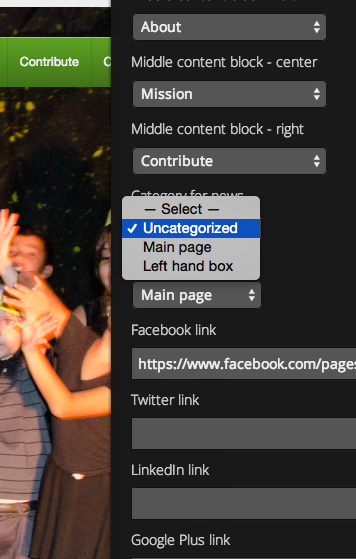
Can you take another look and let me know if you see it as well?


- The topic ‘homepage slider move automatically’ is closed to new replies.
 WordPress.com Forums