

Homepage – theme stay
-
Hello
I would like my homepage on theme stay to be full width. Now, I always have a search archive and meta widgets in the right sidebar > how /where can I amend/delete these (or move them to another place) ?
I do not want to make my page static, but to displays last posts.
Thanks!
CarolineThe blog I need help with is: (visible only to logged in users)
-
Please consult the detailed themed description page at this link http://theme.wordpress.com/themes/stay/ so you are clear on how the theme is designed.
-
Thanks for your quick reply! I read it but I’m not sure to understand : am I obliged to create a static page to be able to amend the home page? and then use an article widget? Isn’t there a ‘place’ where the specifications of the current /default home page are defined (notably these ennoying widgets which I would like to remove ?) ?
:-) thanks for your help
Caroline -
re: widgets
Most but not all themes here will display a default display that appears to contain a sample set of widgets in the sidebar and/or footer when you have not yet added any of your own. Go to Appearance > Widgets and add the widgets you desire and configure them and the default display may disappear. http://en.support.wordpress.com/widgets/
If you do not want any widgets to display in any sidebar(s) at all (or footer widget areas) you can try placing an empty text widget at the top of each sidebar or footer area. Then click to open, add no title, add no body text, click “save” and click “close”.
For more widget tips see here > http://onecoolsitebloggingtips.com/2013/08/02/8-hot-wordpress-com-widget-tips/ -
I tried the above but it seems not to work. So I’ll go for the static home page including a last article widget :-)
thanks for your help!
Caroline -
I do not want to make my page static, but to displays last posts.
The only way to create a full-width homepage in Stay that displays your latest posts would be via some custom CSS. If you decide to upgrade your site feel free to post in the CSS Customization forum for help with the specific code.
I did notice an issue in your site setup. You currently have your homepage set to a static page – which you said you didn’t want to do – and no page at all has been assigned to display your latest posts:
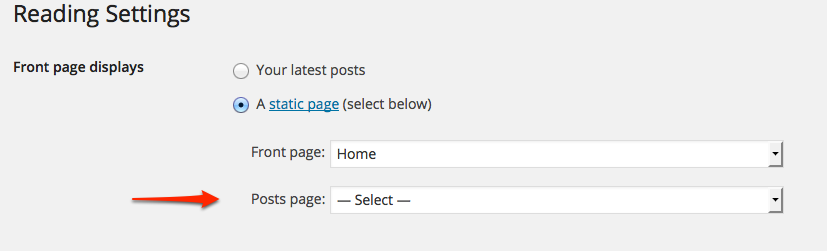
Your entire homepage right now is a static page, and it only has widgets displaying: is that what you want?
Usually a homepage is set up to either:
1) display your latest posts, OR
2) display some static page content, such as information about your company or organization, with a separate page for your blog or news (posts)Right now you’re doing neither, which means that for example, if you wanted to send someone a link to your blog or news area, there would be no way to do that, as it doesn’t have a URL like http://hglv.wordpress.com/blog/ or http://hglv.wordpress.com/news/ for example.
If you want to finish setting up your site, you can just create another page called Blog or News, and then assign it to your posts under Settings > Reading, as in the screenshot above.


- The topic ‘Homepage – theme stay’ is closed to new replies.
 WordPress.com Forums