

How can I access my blog admin after signing in?
-
Hi
My blog is blogoath.wordpress.com. I cannot access either of my blogs in the usual fashion, I can get into the opening screen after I sign in, but, this page will not show either of my blogs (the other being mixenglish.wordpress,com). Even clicking to “My Sites” will not show the names of my blogs.
However, if I go to the yahoo page and type in “blogoath. wordpress.com”, I cannot get my blog site but I can get into the wordpress forums page. From there I go to “My Sites” and choose “switch sites”. From there I can get into my blog admin.
I have cleared cache and cookies. I have even shut down the computer and re-started, In addition, I am on Internet Explorer 11 and using Windows 8.1.
Is there anything else I can do?
Looking forward to your reply.The blog I need help with is: (visible only to logged in users)
-
You can administer your site here:
http://blogoath.wordpress.com/wp-admin/
If you are still having a problem, let me know, and we can take the next troubleshooting step, once I get more feedback.
-
Thanks for that..the link got me straight into my admin. However, when I go through the usual method (going through the wordpress front page) I still find the same result…that is, when I click on “My Sites” my blogs do not appear. I am left with a blank screen.
But I do want to thank you for your response. In the short term, I will use either the link you sent or I’ll go through the “back door” via the forums page – because when I click on the “My Sites”, it will show my blogs and I just click on “Switch Sites”. -
When I view your My Sites section, this is what I see:
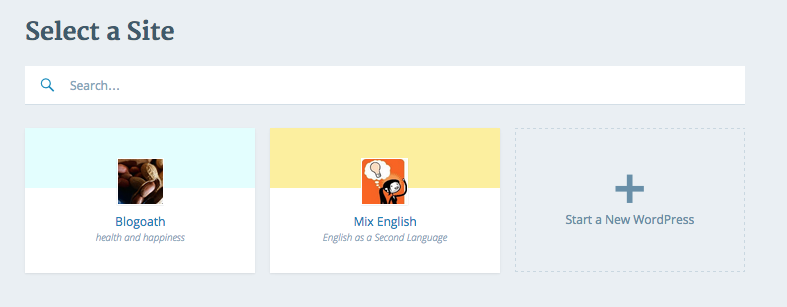
Also, you can reach your site’s Dashboard from here:
If I’ve misunderstood the issue, or if you have any other questions, please let me know.
-
Sorry for taking so long to answer.
My sites should be Blogoath and Mixenglish. The “cloudup” name – I have no idea what that is or where it came from. The “wordpress.com” name seem general…bit I didn’t put that in as my site.
When I go through the back door method (via forums) I can get both my sites.
However, I still cannot get them after signing in…(the front door method?)
I certainly do appreciate your help and I hope we can resolve this… so you can spend time doing other stuff.
thanks -
Cloudup is a service that can be used for sharing screenshots. I used it to share a screenshot with you to illustrate what I see when I view your My Sites page.
It lists both of the sites that are associated with your WordPress.com account, Blogoath and Mixenglish.
You can administer these sites here, respectively:
https://blogoath.wordpress.com/wp-admin/
https://mixenglish.wordpress.com/wp-admin/
Let us know if you have any more questions :-)
-
Thanks for the information…and thanks for the links. Thanks for telling me about Cloudup…although I don’t understand why it is ‘My Sites’…which I cannot see that at all, but I think you can.
As I said before, I can see both my blog sites in the “My Sites” (and not Cloudup…which is okay) when I use the backdoor method – via forums. However, it does not explain why I cannot see them after I sign in with the usual method of going through the WordPress page…I only get a blank page when I press on “My Sites”. Could this mean I have done something wrong…I must admit this something I do worry about. Also, does this mean I should use the links you sent me all the time in the future?
Whatever happens I am still grateful that I can still use my blog…(quite infrequently at the moment, I admit).
cheers for now -
Can you please try clearing out your browser’s cache?
Afterwards, try again and see if you’re still getting a blank screen.
If you are still having a problem, let me know, and we can take the next troubleshooting step, once I get more feedback.
-
Yes I have done that. I did it again…same result as above.
Sorry for being a nuisance.
Thanks -
Okay! I went through google chrome and it is great. I went through Internet Explorer one more time and could not get through.
So it looks like I will go through chrome from now on…I do not understand the reason…but what the heck!
Thanks for all your help and the time you went in to assist…I really appreciate it. -
If you love using Internet Explorer, you can try resetting it to see if that solves the issue:
http://windows.microsoft.com/en-us/windows7/Reset-Internet-Explorer-settings
Also, make sure that both Windows and IE are up-to-date.
Best of luck, and if you have additional questions regarding WordPress.com, please let us know :-)


- The topic ‘How can I access my blog admin after signing in?’ is closed to new replies.
 WordPress.com Forums