

How can I add panels using Lodestar theme?
-
Hello,
I’m using Lodestar Theme. The info page saids that’s possible to add 4 or more panels first creating a page, publishing it, and then click on “Navigate to Customize → Theme Options. From the drop-down, select the page you’d like to appear in the panel”. But when i click on theme options, there’s only “header top text” and “Footer image”.
If i click on static front page, i can add new page, but not add more panels.
How can I add panels? Need help… thanks!
The blog I need help with is: (visible only to logged in users)
-
Hi,
If you switch to the front page at Customize > Theme Options, by (for example) clicking on the site title, you should see Panel options 1-4. Let us know if that works, or doesn’t.
Once you see the Panel sections at Customize > Themes Options, you may follow the instructions at Adding Panels in the Lodestar theme guide.
-
There’s a small problem with your setup that you’ll need to fix before you can add panels.
Go into your Customizer‘s Static Front Page panel.
You need to select a page for your static front page – right now, you haven’t selected a page, and that’s what’s causing the other problem.
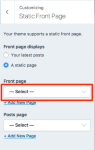
If you also plan to have a blog or news section, you’ll need to create a placeholder page (called Blog or News or whatever you like) and select it as your Posts page. If you don’t plan to have a blog or use posts at all, you can leave the second dropdown menu empty, like it is now.
Let me know how it goes!
-
You need to select a page for your static front page
I presumed that the Adding Panels section of the theme guide would include the information on switching to a static front page, but it actually comes just before that section.
and that’s what’s causing the other problem.
Not really. On two new test sites created today, with the Lodestar theme applied immediately after creation, I found that regardless of the front page setting (posts or static page), the Panels sections automatically appear at Customize > Theme Options. If I switch the displayed content item at Customize to a static page or a single post, the Panel sections are hidden.
So the Panel sections will display at Customize > Theme Options if the front page is displayed there, regardless of what is set to display on the front page, but they’ll be hidden at Customize > Theme Options if a static page or a single post (and perhaps anything other than the front page) is displayed there.
-
-
musicdoc – not sure we’re talking about quite the same thing, but I could be wrong – it’s been a long day. ;-) If you look at the settings here – https://cloudup.com/cqZFkqm5SSR – yogabcn has selected the Static Front Page option but has not selected a specific page to display on the front. Testing with these settings in Lodestar, I can replicate the issue on my test site – no panel options appear in the Customizer.
yogabcn – I don’t want to confuse you too much with our back-and-forth, but please let us know how you get along!
-
yogabcn has selected the Static Front Page option but has not selected a specific page to display on the front.
Sorry about that, got it now. Saving an unselected static front page is impossible at Reading Settings — I just tried it to make sure — where I ordinarily still go, out of habit, to set the front page, so it never occurred to me that the OP had done that.
-
-
Hey, tagging along to this –
Do you know if its possible to add panels to a page that is not your front page? I have a static front page selected under Static Front Page>Front Page and can add panels to that page. However, if I go to a separate page and try to add panels, the “panel 1-4” option is hidden. Is it just a feature of the theme that you can only have panels on your front page or am I missing something?
Thanks!
-
Do you know if its possible to add panels to a page that is not your front page?
Not on the Lodestar theme.
Is it just a feature of the theme that you can only have panels on your front page or am I missing something?
The panels feature on Lodestar is only available for, and only displays on, the page assigned as the front page. The Shoreditch theme has a Panel Page Template that may be assigned to multiple static pages on a site. A page assigned to the Panel Page Template will display the page you’ve assigned to the template, followed by a panel for each of its child pages.
-
Hello, after select a page for the static front page, the panel options appear in the Themes Options. Thank u guys very much!
kathrynwp and musicdoc1 :)
-
yogabcn – great, glad that did the trick!
Sorry about that, got it now. Saving an unselected static front page is impossible at Reading Settings — I just tried it to make sure — where I ordinarily still go, out of habit, to set the front page, so it never occurred to me that the OP had done that.
musicdoc1 – no worries, I’m just glad we figured it out! :)
-
I thought for this sort of page the menu should link down the front page, but it seems to pull up the panels as separate pages. Is there any way to change this?
-
prototypestrong – you can add links to each panel by adding custom links to a custom menu:
Your custom panel links would follow this format:
Testimonials – https://prototypestrong.com/#post-306
Prototype Strong Effects – https://prototypestrong.com/#post-277
About – https://prototypestrong.com/#post-2
Contact – https://prototypestrong.com/#post-3
For post panels, the links go to the top of the featured images, though. If that’s not ideal, we could manually create heading tags with an ID that you can link to in the custom menu. To go that route, you’d need to:
– Leave the page title blank
– Manually add a Heading 2 tag with a unique ID for each panel. Example:
<h2 class="entry-title id="about">About</h2>You’d then be able to link directly to that panel in the custom menu, like this:
https://prototypestrong.com/#about
Just let me know if you need further help with anything.


- The topic ‘How can I add panels using Lodestar theme?’ is closed to new replies.
 WordPress.com Forums