

How can I center the contents of an HTML table cell?
-
I’m trying to center the contents of an HTML table. It shows up as centered in the ‘Visual’ tab of the edit screen. The ‘Text’ tab also shows the center codes where they need to be, but when I update the page, the text is not centered in the cell of the table. The table that I’m having problems with is here: http://muscoda.com/festivals/muscoda-morel-mushroom-festival/#soa
Note: the table I’m having problems with is the 2nd table on the page, the one with the events of the Mushroom Festival listed.
This appears to be a bug in the WordPress system.
The blog I need help with is: (visible only to logged in users)
-
Hi there!
Could you copy and paste some of the text they you’re trying to centre? I’m not too sure which specific section of your page you’re referring to. It’s likely that the following CSS will need to be applied to the specific text you’re trying to change:
text-align: center;If you can point out the specific text you’d like to centre than I can be more specific and help out. :)
-
Here is a part of the table I’m trying to center.
`
<table border=”0″ cellspacing=”0″><colgroup width=”120″></colgroup>
<tbody>
<tr><span style=”color: #ff0000; font-family: Andalus; font-size: x-large; text-align: center;”>33rd Annual Morel Mushroom Festival </tr>`
Note the
text-aligh: centertag is there. It just doesn’t work on the page. It seems to work fine in the ‘Visual’ tab of the edit screen. -
Hi there.
Thanks for the extra information!
text-align: center should be applied to the td tag, rather than the span tag in order to work correctly.
It’s worth noting that we generally don’t recommend tables as a way for formatting content on your site. This is for a few reasons, including the fact that it can be tricky getting them to work with mobile devices. Did you try formatting that content with the tools in the visual editor? I’d love your feedback on why this did/didn’t work out for you if so.
-
If you look at the
<td>tag I copied above, you’ll notice it also hasalign="center"as one of the attributes of the tag. I removed thetext-align: centerfrom the<span>tag and it’s still centered in the ‘Visual’ view, but still left justified in the published page.I didn’t use the visual editor on the page. The content came from an Excel spreadsheet. I saved it as HTML, edited it to remove miscellaneous junk (
<head>, etc.) and pasted it into the text editor. -
Your table’s ‘align’ property is being overridden by the theme’s css stylesheet:
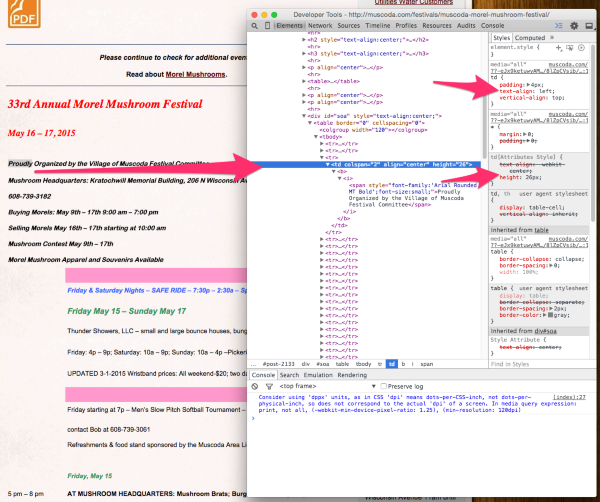
The Visual Editor doesn’t always account for the theme’s CSS properly.
You’ll need add this style property to each td element of the table
style="text-align:center;"For example, this is your current top line of that table:
<td colspan="2" align="center" valign="middle" height="55"><b><i><span style="color: #ff0000; font-family: Andalus; font-size: x-large;">33rd Annual Morel Mushroom Festival</span></i></b></td>Looks like this:

Add the style property…
<td colspan="2" style="text-align:center;" align="center" valign="middle" height="55"><b><i><span style="color: #ff0000; font-family: Andalus; font-size: x-large;">33rd Annual Morel Mushroom Festival</span></i></b></td>And it looks like this:

-
Alex,
THAT’S IT! I just added that code scrap you suggested and it works! Thank you so much!
Best regards,
Steve


- The topic ‘How can I center the contents of an HTML table cell?’ is closed to new replies.
 WordPress.com Forums

