

How can I change the colour of the navigation titles?
-
Hi, I need a hand with the css for this one? Anyone help? Using Capoverso theme. I’d also like to know how to make them upper and lowercase, rather than all uppercase (although would like to keep the Home page title upper and lowercase!)
The blog I need help with is: (visible only to logged in users)
-
Hi Laura,
I see in your other threads you were trying to change your navigation menu using ‘h1’, but these are actually generated as ‘a’ tags within a list with the class ‘menu’:
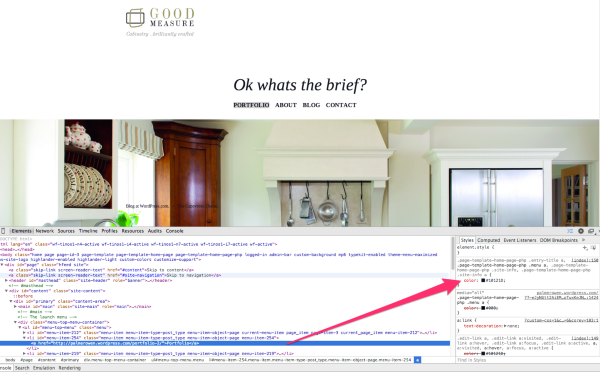
This CSS will change the menu text color to gray and change the text transformation from all uppercase to only first letter capitalize. Replace the hex value with your preferred color:
#menu-top-menu a{
	color: #cccccc;
	text-transform: capitalize;
}
You can see other options for the text-transform property here:
http://www.w3schools.com/cssref/pr_text_text-transform.asp
In the future, most of our CSS support is done in our community forums by both staff and volunteers:
https://en.forums.wordpress.com/forum/css-customization
You’re likely better faster response and more ideas on how to tackle tough problems there.
Best,
-Alex G.


- The topic ‘How can I change the colour of the navigation titles?’ is closed to new replies.
 WordPress.com Forums