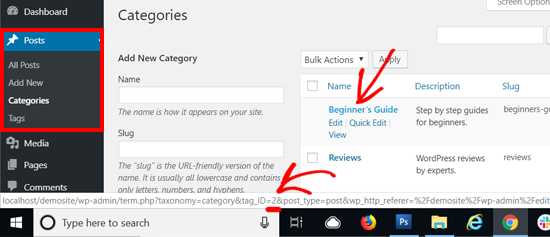
How can I find the category ID now?
-
It used to be visible from the Dashboard under the Posts option but it seems everything was redesigned and what worked before, no longer works. Please help.
The blog I need help with is: (visible only to logged in users)
-
Hi there!
I’m not sure I understand what you mean. To find your categories, you’ll want to go to My Site>Settings>Writing, or directly from this link:
https://wordpress.com/settings/taxonomies/category/watercolorsheart.wordpress.com
Is this what you were looking for?
-
No, that isn’t it. The numbers of the categoryID aren’t visible.
If you check this link, you will see what I mean:
Your category ID is right there in the URL. It is the number that comes after ‘category&tag_ID=’ and before ‘&post_type’. In the screenshot above, your WordPress category ID is 2.
These numbers don’t seem to appear in my URL anywhere or anymore.
-
You’ll find them following that guide under your site’s Dashboard: https://en.support.wordpress.com/dashboard/


- The topic ‘How can I find the category ID now?’ is closed to new replies.


 WordPress.com Forums