

How can I get a different page title than the menu link?
-
Hi, I’m using the Forever theme and I’d like to have the link to my “Contact & Disclaimer” page say “Contac and Disclaimer” but the title of the page (once you’re on it) to either not appear at all, or changed to something other than “Contact & Disclaimer” because I think it’s a bit repetitive.
Thanks!The blog I need help with is: (visible only to logged in users)
-
Hi Kristina!
What you’ll do to accomplish this is adjust the menu label. To do this, you’ll need to create a custom menu.
Here are instructions on creating custom menus:
http://en.support.wordpress.com/menus/After you add a new page to your menu, you click on the item in your Menu Structure. You will see something that looks like this:
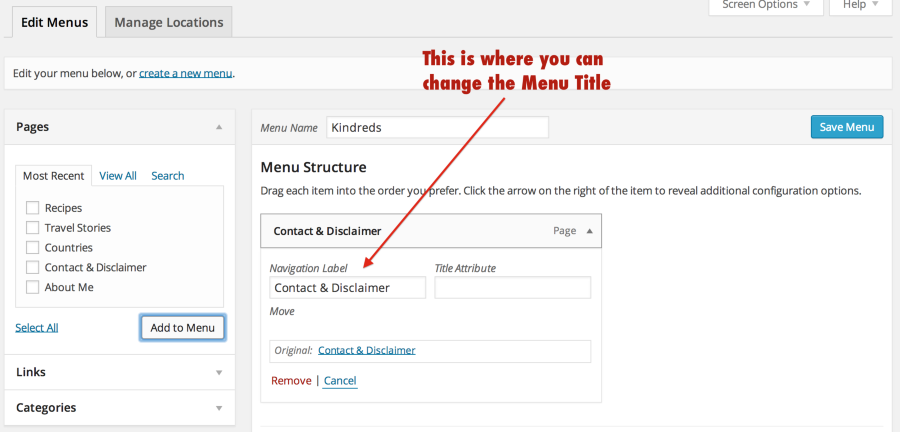
Adjust the Navigation Label. Whatever you enter will appear in your menu bar. Then click “Primary Menu” where you see “Theme locations.” Save your menu.
You will add all your pages to the menu and change the titles as you’d like.
I hope this helps! Please let us know if you have any other questions. Thanks much!
-
-


- The topic ‘How can I get a different page title than the menu link?’ is closed to new replies.
 WordPress.com Forums