

How can I get all of my comments to show up?
-
I want to be able to see all of my comments, not just blurbs. In my blog, you just see a small blurb, not the whole comment. How can I change this?
Also, when people follow me and receive weekly emails, they are not seeing the photo that is posted along with the post. Why is this? They see the photos that are within the post, but not my main, header photo.
The blog I need help with is: (visible only to logged in users)
-
Hi there,
When I look at your posts I am seeing the entire comment as seen in the screenshot below:
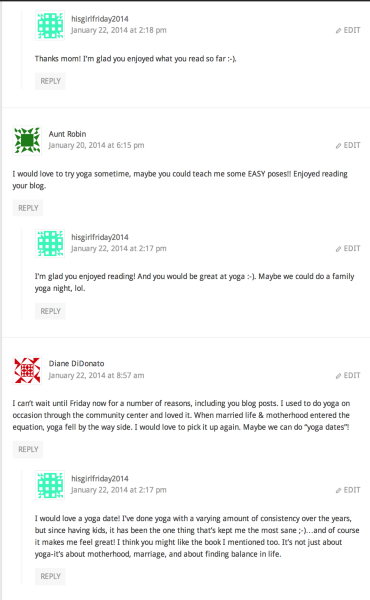
If you are talking about the Recent Comments Widget here:
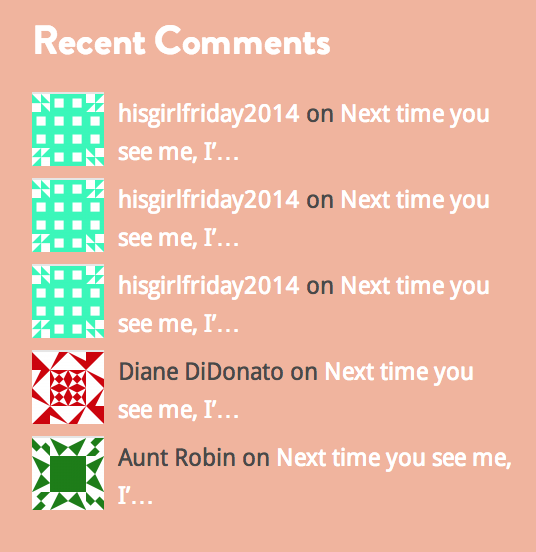
Please note that the widget is not meant to show the entire comment, and that can’t be changed. If you no longer want it, you can always delete it by going to Appearance > Widgets in your Dashboard. Click on the box titled Recent Comments and you will see the link to Delete at the lower left hand corner.
Also, when people follow me and receive weekly emails, they are not seeing the photo that is posted along with the post. Why is this? They see the photos that are within the post, but not my main, header photo.
Please note that the emails sent to your followers are about the posts you have published, so it will not show your header image. If your followers click on the post and go to your actual site, they will see your header image; but, the header will not show up in the email.
Feel free to reach out if you have any questions!


- The topic ‘How can I get all of my comments to show up?’ is closed to new replies.


 WordPress.com Forums