

How can I get my custom menu to appear on all browsers?
-
I am using the Hemingway Rewritten Theme and am having problems viewing my custom menu. I went to appearances>menu and arranged my pages using the menu structure tool provided. It seems to be in order–sub items slightly to the right. However, when I go to view my site, there are no drop down items. The parent menu items (custom links, not pages) are there with nothing underneath.
Having read the trouble shooting guide and watched the video tutorial again and again, I cannot find anything ‘wrong.’ I went to my MacBook (I had been using my desktop Mac) to view the page just in case, and the menu is there! Tried on my iPad also, and the menu appears…but not on my husband’s iPad.
So, might it be something with the various browsers? Using Google Chrome on the Mac and MacBook and using Safari on the iPads. I already cleared my cache, cookies and browsing history. No dice. Thank you in advance for your help.
The blog I need help with is: (visible only to logged in users)
-
Hi there,
Currently, I’m seeing the menu on both Chrome and Safari on my Mac as well as Safari on my iPad. However, on the iPad, the menu drop-down is not working on the “About Dan” and “About Jillian” menu tabs. Is that what you’re experiencing? Here’s a screenshot of what I’m seeing in Safari on my iPad:
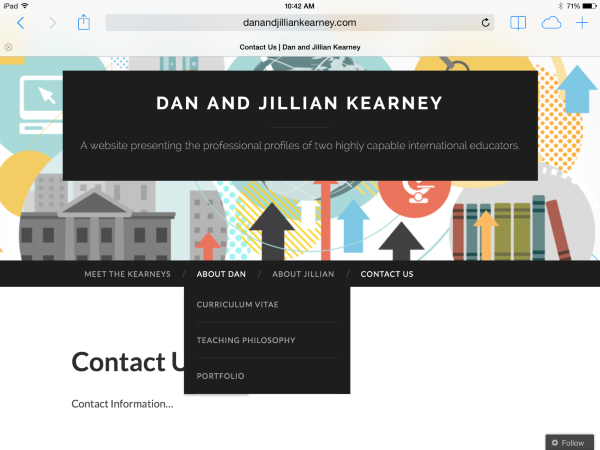
The issue on the iPad with the drop-downs appears to be related to the blank link attribute in the custom menu. When I placed a test URL under the “About Dan” menu item, the drop-down worked correctly. Can you try inserting a URL to a new page (like a generic “About Dan” page) within the custom menu and see if the drop-down begins working correctly on your side?
-
Thank you for taking on our query.
Well, I am glad you are seeing the menus on both your devices–that’s promising.
I am still able to see the menu on MacBook and iPad #1. However, it still does not appear on my iMac and iPad #2, which makes absolutely no sense. It should be the same no matter what device is being used, right?
So, I suppose we’re actually talking about two problems here:
1. The iPad functionality with the drop down feature. When I insert a URL to a new page rather than a blank custom link it works fine. Is there another option so I don’t have to have a generic “About Dan” page? I have no real content for that, but I suppose I could make something up.
2. Still not seeing the menus on 2/4 devices, which makes me think browser issue…or not, I don’t know. Both computers, iMac and Macbook, are running exactly the same system (Mavericks and up-to-date Chrome). Both iPads are running iOs 7. It doesn’t make sense! Some internal setting I’m not aware of?
-
Howdy!
The iPad functionality with the drop down feature. When I insert a URL to a new page rather than a blank custom link it works fine. Is there another option so I don’t have to have a generic “About Dan” page? I have no real content for that, but I suppose I could make something up.
Yes – I believe the submenu page should still appear when the link item is blank. After testing a few themes, I think this is a bug as it seems to work on certain themes but not on others. I’m investigating this a bit further.
Still not seeing the menus on 2/4 devices, which makes me think browser issue…or not, I don’t know. Both computers, iMac and Macbook, are running exactly the same system (Mavericks and up-to-date Chrome). Both iPads are running iOs 7. It doesn’t make sense! Some internal setting I’m not aware of?
That’s extremely odd! Can you upload a few screenshots (one of the iMac and another of the iPad) to your Media Library so I can take a look?
-
Yes – I believe the submenu page should still appear when the link item is blank. After testing a few themes, I think this is a bug as it seems to work on certain themes but not on others. I’m investigating this a bit further.
Thanks!
That’s extremely odd! Can you upload a few screenshots (one of the iMac and another of the iPad) to your Media Library so I can take a look?
Screenshots uploaded. One pic has the cursor hovering over “About Dan” with no drop down coming up. The other pic has the cursor just below “About Dan” showing a hairline invisible link to the first drop down menu item. Seriously, so weird.
-
Oh, I forgot to mention, on the second pic you can see the URL appear in the bottom left corner as you scroll over just below “About Dan.” It is exactly the same for About Jillian.
-
On that second computer (where the drop-down isn’t working), does this appear consistent across all browsers (if you try Safari or Firefox for instance)? Or, does it only not work in Chrome?
-
Hi!
I wanted to follow-up regarding the submenu without the custom link. I’ve confirmed that this isn’t actually a bug within the theme. Custom menu links don’t work properly without an actual link. They aren’t designed to be used as labels in custom menus. You’ll notice that you can’t create a custom link without entering a URL. It’s only possible to go back and remove the link after the menu item has already been created. I would recommend creating a generic “About Dan” page rather than using a blank custom link!
-
On that second computer (where the drop-down isn’t working), does this appear consistent across all browsers (if you try Safari or Firefox for instance)? Or, does it only not work in Chrome?
Consistently does not work. I tried using Safari, but don’t have Firefox installed.
Custom menu links don’t work properly without an actual link.
OK, I’ll make a generic page then. FYI, below is the text from the custom menu support page. If this option doesn’t actually work, maybe it could be rewritten? Or again, maybe I’m misunderstanding the directions.
Sometimes when you nest items, you don’t have any content on the parent (top-level) tab, in which case you do not want it to be clickable. To make it static, use a Custom Link (see Adding Custom Links above) for the parent tab.
You will have to add an actual URL to the URL field in order to create the menu item — just use any link, such as the URL of your blog. Once you’ve added it, edit the menu item and delete the URL.
Thanks for your help so far!
-
Howdy!
OK, I’ll make a generic page then. FYI, below is the text from the custom menu support page. If this option doesn’t actually work, maybe it could be rewritten? Or again, maybe I’m misunderstanding the directions.
Ah! Thanks for pointing this out. We’re going to re-examine how to modify the Hemingway Rewritten theme to incorporate this function and take a look at whether or not this is the best suggestion for creating a blank parent element going forward. I’ll keep you updated regarding the theme!
Update: All is well on MacBook, iPad #1, and #2. I still am not seeing the drop down menu on my iMac, though. I even did the last resort “unplug it and plug it back in” equivalent (restart the computer) to no avail. I am stumped.
Well, we’re moving in the right direction! :) Let me just confirm a few things:
- The drop-down doesn’t work in Safari or Chrome. Correct?
- Has the drop-down begun working now that you have placed the custom link in the menu item?
- Can you see the drop-down beneath “Facebook” on my test blog at groovydomains.net?
We’ll get this sorted out!
-
Ah! Thanks for pointing this out. We’re going to re-examine how to modify the Hemingway Rewritten theme to incorporate this function and take a look at whether or not this is the best suggestion for creating a blank parent element going forward. I’ll keep you updated regarding the theme!
Great! Thanks!
The drop-down doesn’t work in Safari or Chrome. Correct?
Correct. Does not work in either browser.
Has the drop-down begun working now that you have placed the custom link in the menu item?
No.
Can you see the drop-down beneath “Facebook” on my test blog at groovydomains.net?
Yes!
-
Good news! It looks like the blank parent menu item is possible after all. In the place of a link however, you’ll want to just place a # symbol. So, the menu item should look like this:
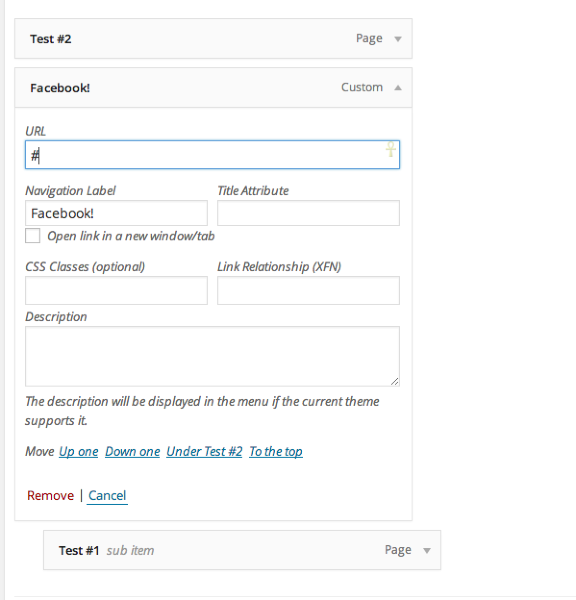
Can you give that a try and see if that corrects the menu on your iPad?
Regarding the iMac, it’s very odd that you’re able to see the menu on some sites, but not your own. Do you have any browser plugins installed?
-
Can you give that a try and see if that corrects the menu on your iPad?
It works! Great, no pointless parent page. You’re a star!
Do you have any browser plugins installed?
I uploaded two screenshots to our media library that show our installed plugins and extensions. Any look suspicious?
-
Hmm – I don’t think those browser plugins should prevent you from seeing the drop-down, especially because you can see the drop-down on my test site. However, can you try disabling them all just to see if it makes a difference? I’m investigating other solutions at the moment as well.
-
-
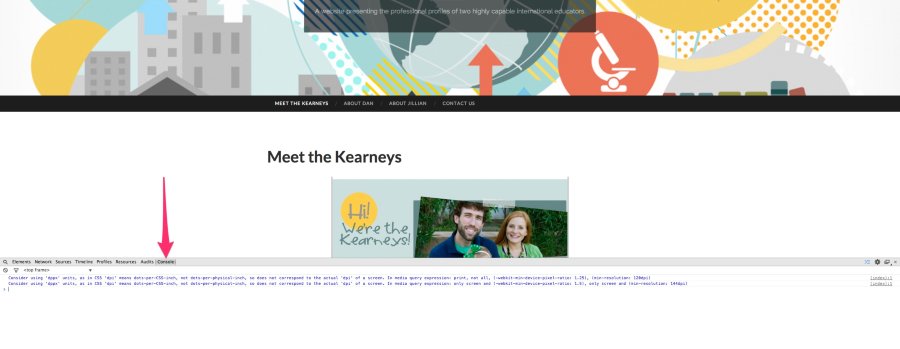
One last piece of information. Can you try the following?
- Open your site in Google Chrome
- Right-click anywhere on the site and click “Inspect Element”
- On the tab that opens up, click ‘Console’
- Keeping that Console tab open, refresh your browser, which will reload your site
- Take a screenshot of the errors and lines in that window and upload it to your Media Library
It should look like this:
-
-
Howdy!
I apologize for the delay. I’m not entirely sure why the submenu isn’t displaying on your side. I was even able to test the site on an iMac, and the submenu worked correctly. It’s not the result of a console error as that would have popped up on the screenshot you sent. It doesn’t seem to be browser-related as you can see the submenu on my test blog.
I don’t have a solution at the moment, but I’m still investigating. In the meantime, can you try creating a new, test blog following the instructions here:
http://en.support.wordpress.com/register-a-blog/#adding-new-blog-to-an-existing-account
Just try setting up a menu on a new blog. I just want to see if the new menu is visible from your iMac at all.
-


- The topic ‘How can I get my custom menu to appear on all browsers?’ is closed to new replies.
 WordPress.com Forums