

how can I get my feature image to \"stick\"
-
I can not get my new feature image to \”stick\”
The blog I need help with is: (visible only to logged in users)
-
Hi!
Can you let me know the URL or the title of the post you’re having trouble with? Also, when you say you’re having trouble with the featured image “sticking,” could you clarify? When you set a featured image, does it refuse to save?
-
I do not like the image that introduces the blog “across America on a wooden tandem”. When you select a feature image, isn’t it suppose to be the one that shows up on the main page? If not, how can you change it?
-
Are you by chance referring to this post titled “Cross-country on a wooden tandem”?
http://sojournercyclery.com/2014/01/17/cross-country-on-a-wooden-tandem/
That’s the closest post I could find to the title you mentioned. Currently, that post is listed as a “Gallery” format. You can see that on the right-hand side of the Edit Post screen under “Format”.
https://sojournercyclery.wordpress.com/wp-admin/post.php?post=402&action=edit
Gallery posts are displayed a bit differently on the home page. It looks like the showcased image on the home page is automatically chosen from the gallery. If you would like to specify the image, you could change the post format to Standard and then set a featured image. Could you give that a try?
-
That worked. Thanks! How do I turn a gallery into a slideshow? The post ” Ride for life…The University of Dayton to Notre Dame….I want those pictures to be in a slideshow format.
Thanks
-
Hi!
To do that, first, click on the gallery to edit it as explained here:
http://en.support.wordpress.com/images/gallery/#editing-a-gallery-or-slideshow
Then, under “Gallery type”, choose Slideshow:
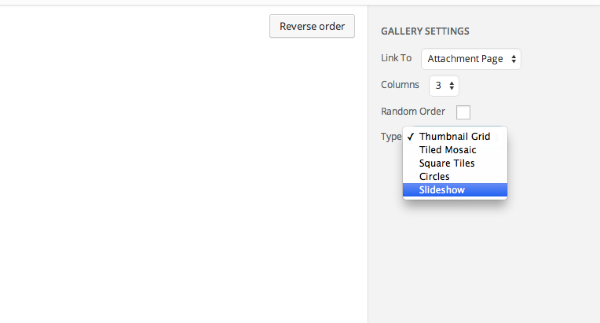
-
-
It won’t be under the format for the individual post. It will be in the format for the actual gallery of images. You can find this on the Edit Post screen here:
https://sojournercyclery.wordpress.com/wp-admin/post.php?post=525&action=edit
From that page, click on any image within the post and then click on the small pencil icon shown here:
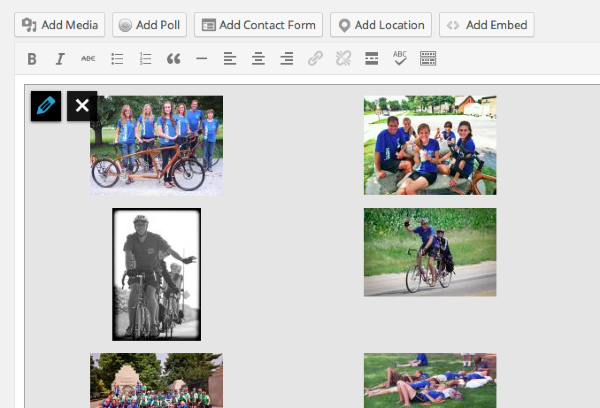
From that next page, you can change the gallery type as shown here:
-
-
Now one of my blogs will not collapse on the home page. The blog is “cross-country on a wooden tandem”. Did I mess up a setting?
Thanks!
-
By “collapse”, I believe you’re referring to how the full post displays on your front page versus just a short preview. To get the short preview version, you’ll want to use the “More tag”, which is explained further here:
http://en.support.wordpress.com/splitting-content/more-tag/#using-the-more-tag
You’ll want to go into the post here:
https://sojournercyclery.wordpress.com/wp-admin/post.php?post=402&action=edit
From that page, you can place your More tag within the post. Anything above the More tag will display on your home page. Anything beneath it will be hidden by a “Read more” link.
Can you give that a try?


- The topic ‘how can I get my feature image to \"stick\"’ is closed to new replies.
 WordPress.com Forums